Puppet End to End. Well, more like Beginning to Beginning.

I’ve been experimenting a little more with setting up Puppet. So far, I’ve successfully been able to get Puppet up and going – and now, I’m left with the feeling OK, that was neat I guess. Now what? There’s an ocean of possibilities when it comes to Puppet and its integration points with Azure – infrastructure as code to configuration management. I’m just scratching the surface, and I’m not pretending that any of the below is anything but the fumblings of a complete newbie. Still, I wanted to share with you my list of steps in preparing Puppet on Azure – as the first in what hopefully will be a series as I use Puppet as an engine to drive my DevOps learnings. Hope this helps!


Setting Up Your First Puppet Master in Azure

  • We need to set up Azure CLI first.
    • Install (using the steps in this article) node.js from the official install site. You could do this on a VM, or right on your laptop.
    • Command prompt – Admin privilege – run npm install azure-cli –global
    • Then run command azure account download
    • Take the file and save it somewhere convenient – I saved it to c:\junk\azure.publishsettings
    • Then run azure account import {filename}
    • I ran azure config mode arm at this point too in a command prompt.
  • Then fill in azure account show to confirm you have the right account selected.

  • Now we go to VisualStudio Online – login at https://app.vssps.visualstudio.com/profile/view?mkt=en-us and go to your VSO portal.
  • On a new tab, go to the azure portal – https://manage.windowsazure.com/

  • Click New, then Compute -> Virtual Machine -> From Gallery.
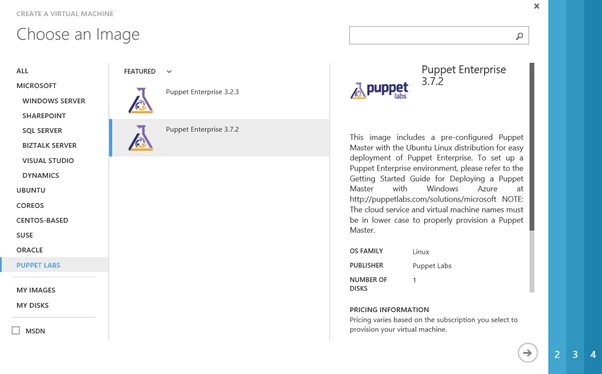
  • Then, select the Puppet Labs node, and select the latest build of Puppet Enterprise. On my build, this is 3.7.2.

  • Choose a lower-case unique name of 3-15 characters. Standard Tier, Size at least A2, a username, and – choose a password over uploading an SSH key. This is obviously just for a demo.


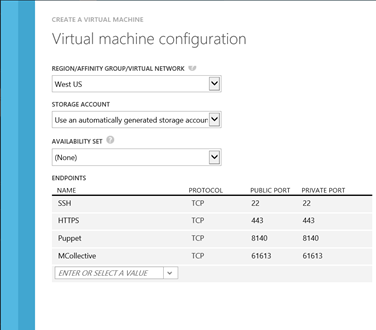
  • then fill in your other values. Always select “create a new cloud service”, and open up three ports – 1) HTTPS (port 443), Puppet (8140), and MCollective (61613)

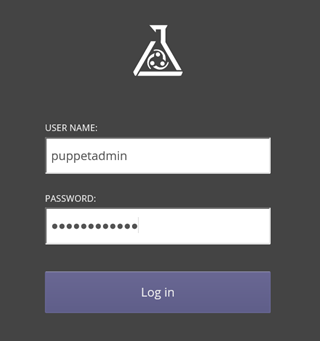
  • Go to a new browser window – it may take 10 minutes for this to appear and be fully provisioned/available – and access your URL. In my case, this is https://dhpuppetmaster.cloudapp.net . I don’t know yet what the password is, but I’m going to find out – in the next step.

  • Then, open up bitvise. (I’m really pleased with this SSH client in particular, but feel free to substitute whatever you like.)


  • In the prompts that follow – go ahead and save the remote hosts public key when it prompts. Use the username and password you used in originally creating the VM.
  • In the bitvise cmd prompt window that appears – don’t you just love linux? – run sudo grep ‘auth_user_email’ /etc/puppetlabs/installer/answers.install. Write down the user information it gives you. In this case it’s admin@dhpuppetmaster.cloudapp.net
  • Now run sudo grep ‘auth_password’ /etc/puppetlabs/installer/database_info.install


  • Then go back and check out that URL for your Puppet master box – in my case https://dhpuppetmaster.cloudapp.net/ OMG what am I looking at here? ISn’t this great?
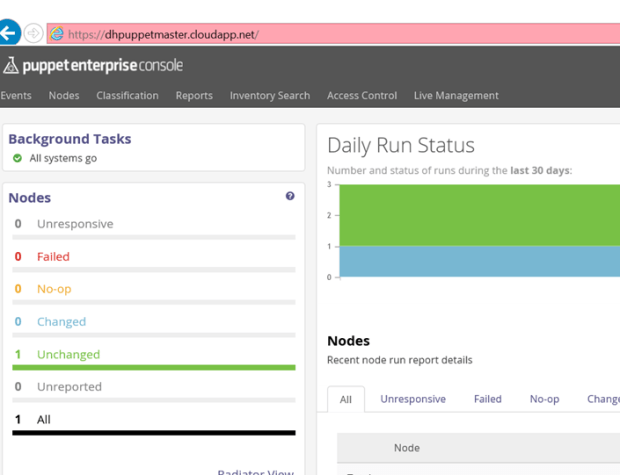


Setting Up a Node


  • Now we’ve set up a Puppet Master – let’s set up a node. Create a VM – same as above, but this time let’s create a Windows Server 2012 from the Gallery. Remember to make the name lowercase – everything else can be default values.


  • The tricky part is the last page – here you want to select the Puppet Agent checkbox. Fill in the name of your Puppet server.
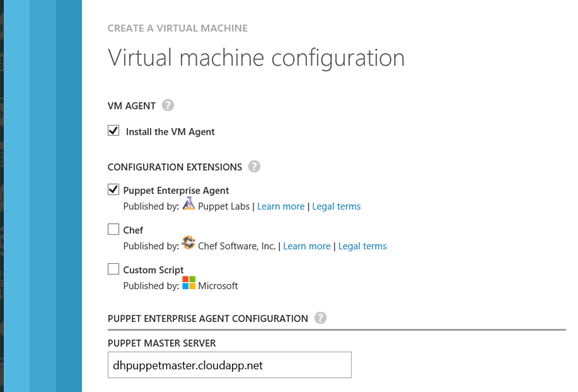

  • Then – once its done spinning up – go back to your Puppet admin window, and select Node Requests on the top right. You should see your new node’s request in the list. Approve it – and congrats! You now are all set up with a Puppet master and a node.


  • OK, now I have a working Puppet node and puppetmaster set of VM’s. Now what? Well, following the steps in this blog post – he had as many problems with the obtuse and overly generic Puppet documentation as I did! – I created a text file called helloworld.pp in a junk directory, copied it over to my root folder (/home/puppetadmin) using FTP, and then ran puppet apply hello_world.pp. (The contents of the .pp file are in the article link.) I’m sure I’m violating all kinds of best practices here but in the absence of better documentation – here it is.
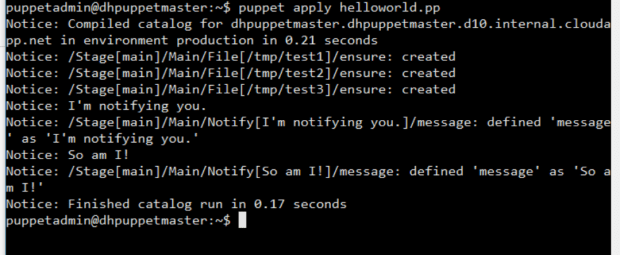


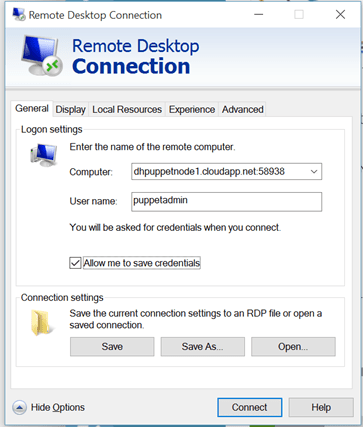
  • Did it work though? I RDP onto the box – look at the Endpoints tab to view the dynamically changing public endpoint for RDP –

  • Anddddddd I see – nothing. Wow. So, clearly I’m missing something. It’s at this point – after a few hours of fumbling around – that I am admitting I’m like a six year old with scissors here. Time to go back to the drawing board and figure out more about how Puppet likes to work – before “learning by doing”.


Links Goodness

I will continue this with some more posts later. But in the meantime, here’s some helpful URL’s that may be of use to you in your DevOps quest:


DevOps and the game of Life.

Remember the old game of Life?

Pretty discouraging by the way. You work, you work, go to college / don’t go to college, pick up fellow travelers/family members – and at the end they add up your score. You either end up in a nice big house or a smaller one, and – what? Is that “winning”? Valuing things just by the money you’ve earned along the way, or the house you get with creaky knees and an enlarged prostate – well, that seems pretty empty to me.

The last time I gave a presentation on DevOps, I remember thinking how short I came up. I was talking about how certain cultures are very resistant to change. Most of the audience were died-in-the-wool developers, and had no problems jumping on the DevOps bandwagon. But they were frustrated at the lack of power they had to change the culture they were in. I remember making some noises about “keeping on trying” and the like.

I can say that I have seen even very resistant cultures change over time. And there’s been some great articles on building up a community of practice on DevOps from the ground up. So, free thinking a little, I went thru that blog post on guerilla-type subversive DevOps efforts – and combined it with the excellent writeup on some anti-patterns, and tried to make a game of it.

I was only mildly successful. See below – that’s as far as I’m getting for now. It’s a pretty lame game. Needs some work. But, there it is…

Between this and the articles I’m looking through on our new Release Management capabilities – it’s busy times here! Hope you are doing well as well.


Just a few thoughts before I go…

… back to bed that is. 103 degree fever and I’m finding it VERY hard to get any kind of work done.


On the plus side, I’m rediscovering my love of junk 80’s science fiction. Interstellar Pig and The Man Who Never Missed didn’t age too well – I remember loving those books as a teen. But Harry Harrison, you are STILL a genius. Love the Deathworld trilogy, it’s everything I could ever want. And that West of Eden series is a masterpiece. Genuinely got choked up at the end, it’s wistful and tragic with the lost potential. How he could build such a dynamic alien culture is beyond me. I miss those days and it seems like creativity like that – real craftsmanship – doesn’t exist anymore. Where are books like that anymore?

I am going through my goals for the year and what it will take to have My Best Year Ever. I’ll keep y’all posted.

And, did you know it’s incredibly easy to set up RM in the cloud with VSO? Here’s your link candy.

It’s not how hard you work – 3 essential tips for productivity.

A few months ago I was sitting in my garage, frustrated. It seems like every time I had to get ready for a fishing trip, I would have to go through dozens of boxes looking for gear. And I was always forgetting something important. Why is this so painful?, I thought, rummaging through another unlabeled box of mismatched junk, hoping not to end up with a rusty #4 hook embedded in the ball of my thumb.

It all came to a head on a river rafting trip last August. It’s OK, I told my friends at the launch, a raft is never full. But after we loaded everything on, I felt much less smug about things. The gear and boxes were piled up so that it teetered over my head at the back of the raft, nearly tipping it over, and the sides of the boat were barely above water. This was on a stretch of river that was known for having some truly frightening rapids, and as we gingerly eased ourselves into the raft, a small crowd gathered to watch the show. No one said anything as we paddled the wallowing boat out to midriver, and I remember one older gentleman taking off his hat. It was one of those trips where the best you can say at the end is, “Well, we survived.” The tipping point for me was when a family of four, with a dog, came by with one quarter the gear we had – floating high and dry while we barely stayed afloat. The father looks us over a little and kind of cocks his hat, and asked us when the garage sale was.

Getting home I refused to put any of the boxes back until I had gone through everything and separated out the essentials, and moved everything else out to Goodwill. Suddenly what was six boxes of miscellaneous and jumbled junk became one box. Hmmm, I thought. That’s interesting. Then I took my fly boxes – a mishmash of fur, hackles and hooks – and laid them out in order, as you see below, and took out anything that I’d bought on a whim that would never see a fish. Suddenly, my boat was a lot lighter –and I was spending a lot less time rummaging through gear and fly boxes every trip.


My flies all tied up and ready for a fun day on the river.

By not taking the time out to do a little tidying up and reorganizing, I was costing myself valuable time. I’ve found the same thing to be true at work. Time is a diminishing resource for most of us. For me to keep my head above water at work, I would need to learn how to focus on the important things and let the rest of the clutter slide. Below are three tips that I’ve used over the past six months that has dramatically increased my happiness and reduced stress. I hope you find it of value!

Tip #1 – Taming The Savage Inbox

How many times have you gotten into work excited – today is going to be a great day, I’ve got all these cool things to do – and decide, while your coffee is brewing, well, I guess I’d better check my email – and the next thing you know, it’s 10 a.m. and your daily slog of meetings is beginning, and you haven’t really gotten anything done? The biggest tyrant of our time by far – besides runaway meetings – is email, by a mile. If you’re not careful, you’ll be sucked into a reactive cycle of compulsively checking your email almost constantly. Your company is paying you to be productive – and responding to emails within minutes is NOT adding business value. With very few exceptions, emails can and should wait on the back burner so you can address them in a batch. Our goal should never be too have a “clean” inbox at the end of each day – but to as efficiently as possible pick out the emails that are truly important from the pack and knock them out quickly without allowing it to dominate your workday.

So do yourself a favor. Only check email the afternoon, never the morning – and turn off your email alerts. Set expectations with your customers and close partners that your SLA for emails is within one business day, and that for urgent issues they should call you. And take the time to identify that one special thing that you want to get done each day in advance – and don’t check your email until it’s done, finished, kaput. This one tip alone will quadruple your productivity and your work satisfaction level – and make you feel like the master, not the slave, of your own time.

Tip #2 – You Come First

As a team lead I was always running around every day, harried, stressed. I would look at some of my developers at the company gym, working out or hitting the treadmill, and think bitterly – I wish I had time for that. Over time though I noticed something – the developers who took the time out every day, usually in the morning, to exercise, go on a walk, have a healthy breakfast – they were consistently the top performers. Somehow, by putting themselves first and ignoring all the urgent deadlines and project pressures we had as a team, they were able to get more done than others like myself, slaving away at a hot keyboard for 10-12 hour days. So, I started to walk in the mornings, and took a few minutes to make a good healthy breakfast instead of that Egg McMuffin and a coffee to go. Guess what? I was happier – and midway through the walk I would often get clarity on how to solve a problem that was nagging me at work. Difficult things suddenly became easy. I lost weight and felt happy and healthier – and I got more done.

In the end you have to remember that, even for those lucky few of us that work for great companies – we may love our jobs, but they don’t love us. In the end work is a large but ultimately rather meaningless part of our life. It has to be kept in perspective. Put yourself first with a great morning ritual – a walk through a wooded area, a nice healthy breakfast and a shower, a few minutes to meditate or read. You’ll be amazed at how much more you get done when you treat yourself with compassion.

Tip #3 – Reflection

One of the best things I liked about Scrum and Agile techniques as a team lead is the opportunity to reflect a little. “What did we get done? What will we shoot for next? What could be improved?” We would write these up and email it to the team and partners – and I can’t even tell you how many mistakes this prevented me from repeating, and how much more on-target our development activities became.

To stay on course, first thing in the morning write down the three most important things that you want to do today. If it helps, put them on sticky notes on a whiteboard. (It always gives me a nifty little feeling of satisfaction when I rip one of them off the board and crumple it up.) In the evening, cover in a journal the three reflection points I mentioned above – “What did I get done today? What will I do tomorrow? What could have gone better?” I usually put this as a reminder in Outlook for me, as – if I don’t block out time for this meditation – it often gets crowded out. Spending a few minutes reflecting really helps me keep my focus on the important things that can slip away with the chaos of each workday.

Finishing Up

Shakespeare said:

“Life’s but a walking shadow, a poor player

That struts and frets his hour upon the stage

And then is heard no more. It is a tale

Told by an idiot, full of sound and fury,

Signifying nothing.”


For too many of us, sometimes our life becomes a little like that. There is a ticket out of that very frustrating and unproductive cycle though. You don’t have to do all of the suggestions above at once. Try one or two for a week or two – and if it works, keep it up. For all of us though, learning how to control interruptions like email, building a healthy morning routine, and spending a few minutes reflecting will help you feel more in control of your life – and perform better when it counts.