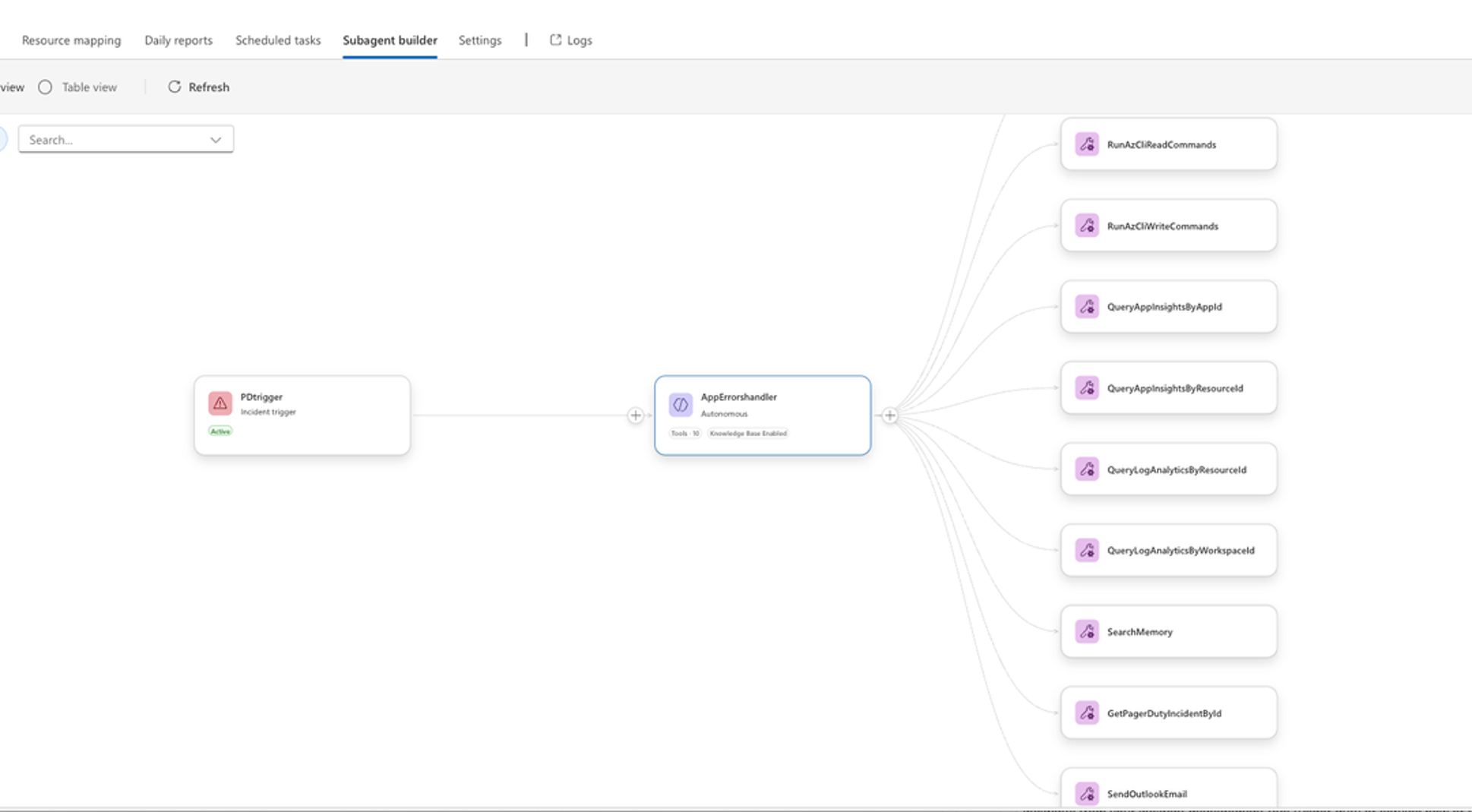
I’ve been doing some demos / walkthroughs of the Azure SRE Agent – thought I would post here the resources I’ve found most helpful. The specific use case here is, “How can I get better / more intelligent alerts for yellow case conditions – like with an endpoint that’s degraded in response times but not yet failed / in a red state?”
for example this one (4 min video) filters out Azure Monitor alerts so they are better triaged. Demonstrates a cooldown window for things like high CPU state. There’s also a weekly hygiene report that’s auto-created.
also on HTTP triggers – firing on a GH issue type identified by a subagent
Proactive .NET reliability with Azure SRE agent – 25 min overview. This is based on deploying a .NET app where something goes catastrophically wrong. Its triggered based on a SwapOperation. But similar workflow in some ways:
My friend Jorge Balderas does a very nice 16 min demo. 11 minutes in he shows the alert setup for a backend high response time. Repo links in the comments.
Anyway this is a fun agent to work with and very extensible. Try it yourself!
If you spend a lot of time in the terminal, GitHub Copilot CLI feels surprisingly natural—almost like it’s always been missing from your workflow. In this post, I’ll walk you through the bare basics you’ll need to get started with using it. Please check out the references at the end as a good starting point for your journey!
Installation
Once its installed (using npm or winget, npm install -g @github/copilot for example) you should get a glorious 80s type CLI window by typing in the following:
copilot
Note here – the easiest path is to use GitHub Codespaces for zero setup. That preinstalls Python and pytest. Fork the repository to your GH account, and select Code > Codespaces > Create codespace on main
Try this as your first prompt:
Say hello and tell me what you can help with
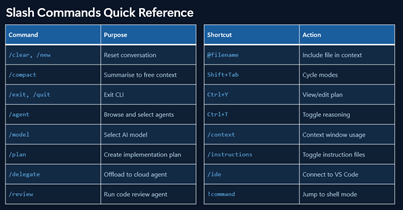
There’s some slash commands here you can play around with. We’ll be getting into the main ones a little later:
Your First Code Review
Let’s do a quick comparison of the different models available to us:
/model
Higher-multiplier models use your premium request quota faster, so save those for when you really need them. But let’s try our very first code review, so we can compare the output:
/review review the apis using gpt 5.4, opus 4..
This is a great way to see the differences between models and what they catch (and don’t catch). There is no clear leader at present between OpenAI, Anthropic, Google, etc – no single model does it all best.
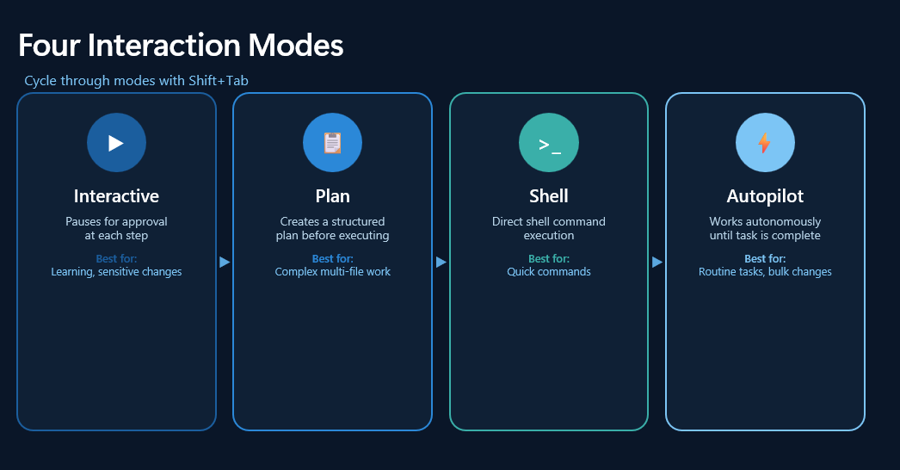
Four Interaction Modes
The key points here:
Interactive: conversation and iteration
Plan: design before coding
Programmatic: one-off commands
So to experiment a little with these : (in copilot mode of course)
/plan Add search and filter capabilities
/plan Add a "mark as read" command to the app
/plan Add OAuth2 authentication with Google and GitHub providers
copilot -p "Write a function that checks if a number is even or odd"
And if you’re truly kicking the tires experiment with /ask mode:
Explain what a dataclass is in Python in simple terms
Write a function that sorts a list of dictionaries by a specific key
What's the difference between a list and a tuple in Python?
Give me 5 best practices for writing clean Python code
Working with Code
These are some sample prompts you can try yourself in working with a new application.
Onboarding
Explain what FILENAME does
Review all files in PROJECT
How is logging configured in this project?
What's the pattern for adding a new API endpoint?
Explain the authentication flow
Where are the database migrations?
Compare @FILE1 and @FILE2 for consistency
Analyzing files together reveals bugs, data flow, and patterns that are invisible in isolation. If I would have checked books.py singly, it would have been – cool! Syntax is fine, types valid, style is clean…
With @FILE1 @FILE2 - How do these files work together? What's the data flow?
In one paragraph, what does this app do and what are its biggest quality issues?
Give me an overview of the code structure
How does the app save and load books?
Test Driven Development
Write failing tests for the user registration flow
Now implement code to make all tests pass
Commit with message "feat: add user registration"
Code Review
/review Use Opus 4.5 and Codex 5.2 to review the changes in my current branch against `main`. Focus on potential bugs and security issues.
Review FILE and suggest improvements
Add type hints to all functions
Make error handling more robust
Review all files in @PROJECTNAME for error handling
Find security vulnerabilities that span BOTH files
Refactoring
i want to improve FILENAME. what does each function in this file do?
Add validation to FUNCTION() so it handles empty input and non-numeric entries
What happens if FUNCTION() receives an empty string for the title? Add guards for that.
Add a comprehensive docstring to FX() with parameter descriptions and return values
Git Workflows
What changes went into version `2.3.0`?
Create a PR for this branch with a detailed description
Rebase this branch against `main`
Resolve the merge conflicts in `package.json`
Bug Investigation
The `/api/users` endpoint returns 500 errors intermittently. Search the codebase and logs to identify the root cause.
Putting it All Together
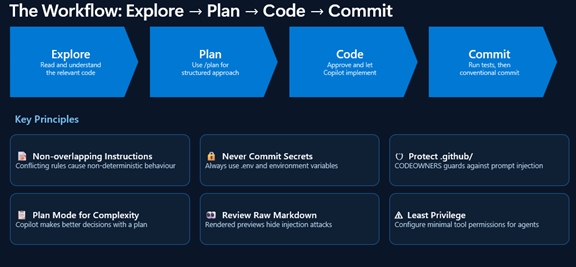
So your workflow might look something like the following:
Explore: “Read the authentication files but don’t write code yet”
Plan: “/plan Implement password reset flow”
Review: “Check the plan, suggest modifications”
Implement: “Proceed with the plan”
Verify: “Run the tests and fix any failures”
Commit: “Commit these changes with a descriptive message”
A Few Words about Agents
So we’ve already used agents! When I enter in copilot mode:
/plan Add input validation in the app on X field
That’s using an agent!
So for example – and this is a power tip with agents – try this: When you need to investigate a library, understand best practices, or explore an unfamiliar topic, use /research to run a deep research investigation before writing any code:
/research What are the best Python libraries for validating user input in CLI apps?
What Are Skills?
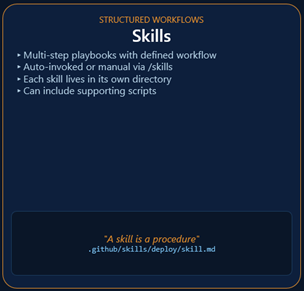
Agent Skills are folders containing instructions, scripts, and resources that Copilot automatically loads when relevant to your task. Copilot reads your prompt, checks if any skills match, and applies the relevant instructions automatically.
These can be invoked command line, for example:
/generate-tests Create tests for the user authentication module
/code-checklist Check books.py for code quality issues
/security-audit Check the API endpoints for vulnerabilities
And you can ask copilot directly what skills were used:
What skills did you use for that response?
What skills do you have available for security reviews?
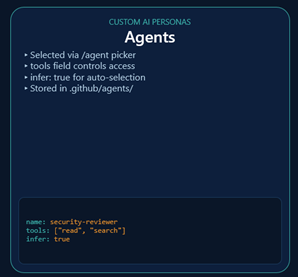
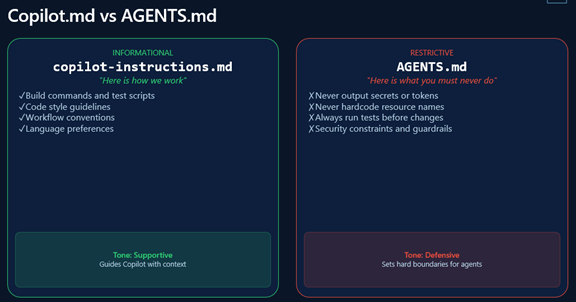
Last – why would we use an instruction file vs an agent?
Best Practices and Final Thoughts
As the official documentation reminds us – the following should become second nature the more you work with GitHub Copilot CLI:
Set Custom Instructions: Use .github/copilot-instructions.md to define project-specific coding standards and build commands.
Use /plan for Big Tasks: Always generate an implementation plan for complex refactors before writing any code. A good plan leads to dramatically better results. (this is especially true now that we’ve moved to usage based billing. More to come!)
Offload with /delegate: Use the cloud agent for long-running or tangential tasks (like documentation) to keep your local terminal free.
Save prompts that work well. When Copilot CLI makes a mistake, note what went wrong. Over time, this becomes your personal playbook.
And I’ll throw in a few observations of my own:
Code review becomes comprehensive with specific prompts
Refactoring is safer when you generate tests first
Debugging benefits from showing Copilot CLI the error AND the code
Test generation should include edge cases and error scenarios
Git integration automates commit messages and PR descriptions
I last wrote about SpecKit in December of 2025 – an eon ago it seems. Since then, there’s been some epochal changes in how we use agents to write code – including Squad and other work orchestrating fleets of agents. In all this, it’s encouraging to note that SpecKit is moving forward in maturity level as well.
Over the past few days I’ve gotten a chance to get caught up with the latest evolution of SpecKit. This very popular project has undergone a significant pivot, moving to a modular “kit” ecosystem.
For teams looking to scale AI-assisted engineering without drowning in “token burn” or architectural drift, here are the key takeaways from the latest SpecKit developments.
Extensions and Presets
SpecKit has moved away from trying to be everything to everyone in its core code. Instead, it now uses a catalog model. Two big changes here have to do with extensions and presets:
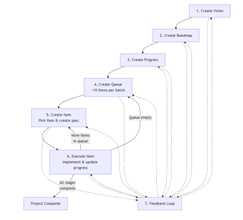
Extensions: There are now over 80 community-driven extensions. (See the full list here – it’s getting quite long!) These allow you to add new commands (like visual GUIs or deployment triggers) without bloating the core engine. One example here is AI-Driven Engineering, which has a very cool workflow very distinct from the traditional SpecKit flow:
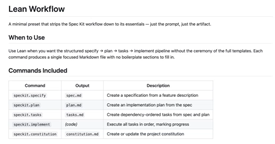
Presets: This is perhaps the most powerful update for enterprise teams. This is the way you can adopt the SpecKit workflow to your own methodology or use your own org standards. It’s actually a fairly complex stacked override system. So just as an example – there’s one preset (Lean Workflow) that’s very light on ceremony – just 3 files needed: spec, plan, and tasks.
But that’s just the beginning. There’s an interesting one on Accessibility, and another on Fiction Book Writing, or an enhancement to /clarify called VS Code Ask Questions. Anyway Presets look like a fantastic way to add your special spin to how SpecKit does its work.
Automating the SDD Cycle with Workflows
The introduction of Workflows transforms SpecKit from a manual CLI tool into an automated engine. Workflows chain the entire SDD cycle—from constitution to implementation—with built-in human-in-the-loop gates.
Gated Approvals: The workflow will pause for review/approval/rejection at key milestones.
Resumable Runs: If a process is interrupted, workflows maintain state, allowing you to resume exactly where you left off.
Deterministic Automation: Unlike “Fleet” agents that can be unpredictable, workflows provide a step-based, procedural path that reduces unnecessary LLM hallucination.
I would say this is more for advanced / experienced teams – eliminating those gated steps might be a little jarring for some who are newer to using SpecKit / SDD.
Tools and Measuring the Cost of Quality with Token Analyzer
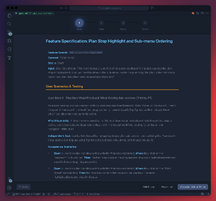
There’s a lot of cool SpecKit aligned content and tooling. For example there’s a visual GUI you can add:
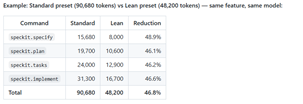
But that’s not the best one I found. I’m working with quite a few enterprises as GitHub has made the pivot to Usage Based Billing, trying to control costs. I like this extension (?) very much – the Token Consumption Analyzer. This answers what often required lots of manual analysis – whether changing your model or prompt actually save tokens, and is it costing us in terms of quality?
Pro Tips for Better Implementation
Here are three immediate tactical shifts for your workflow:
Stop Using Personas: Recent researchsuggests that telling an LLM “You are an expert architect” can actually degrade performance. It narrows the model’s focus too much. Instead, focus on the task and provide rich context.
Manage Your MCP Servers: Tools like Azure DevOps or Figma MCP servers are great, but they add overhead to every request. Turn them off once you move from the specification phase to implementation to save on token costs.
Positive & Negative Testing: Don’t just ask for “tests.” Explicitly require both positive and negative test cases. Also, avoid chasing fixed code coverage percentages (e.g., “must be 100%”), as the token cost to reach those final few percentage points often outweighs the value.
The Bottom Line
SpecKit is maturing into a professional-grade orchestrator that rewards context over complexity. Structured SDD can deliver working implementations even in complex existing codebases. I think the last two paragraphs of the excellent brownfield walkthrough sums it up quite nicely:
“The more interesting takeaway is the ceiling, not the floor. Even with a thin spec, a bare plan, and no analysis pass, the agents produced a running, end-to-end implementation that required only conversational follow-up to debug and verify. … For teams considering this workflow: the agents are only as good as the context you give them. Treat speckit.specify, speckit.plan, and speckit.analyze as investments, not formalities. The implementation will reflect the quality of the artifacts that precede it.”
In my day job, we talk a lot about “modernization,” but let’s be honest: for most architects, that usually means a massive backlog of technical debt spanning several dozen repos. Modernization projects are fraught with danger and risk – nearly 35% of these projects stall because of complexity and a lack of resources. (Have you ever seen the famous “strangler fig” pattern actually strangle anything, in reality?) Legacy projects are daunting just due to the scale and the weight of the unknown has its own inertia.
That’s why the recent release of the Modernization Agent caught my eye. We’re moving into what’s being called Agentic DevOps, and it’s a total game-changer for those of us managing large portfolios. By using these AI agents to handle the “operational drag”—the upgrades, the migrations, the brittle pipelines—we finally get to get back to the work we actually enjoy: building what’s next.
The real “aha!” moment for me is the shift from single-app fixes to modernization at scale. Most of the attractiveness to me is with what it offers in the planning and assessment stages. Here’s what has me interested:
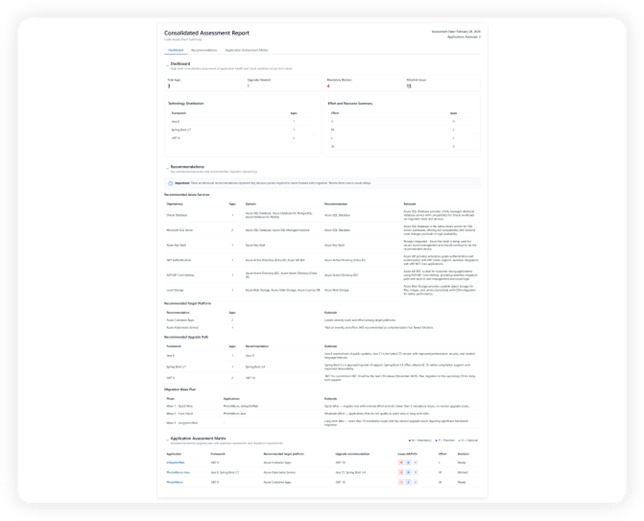
Estate-Wide Visibility: You can now run batch assessments across multiple applications at once. It’s not just a surface-level scan; it digs into deep code and dependency-level insights to show you exactly where the snags are before you even start. The assessment checklists look comprehensive and very well thought out:
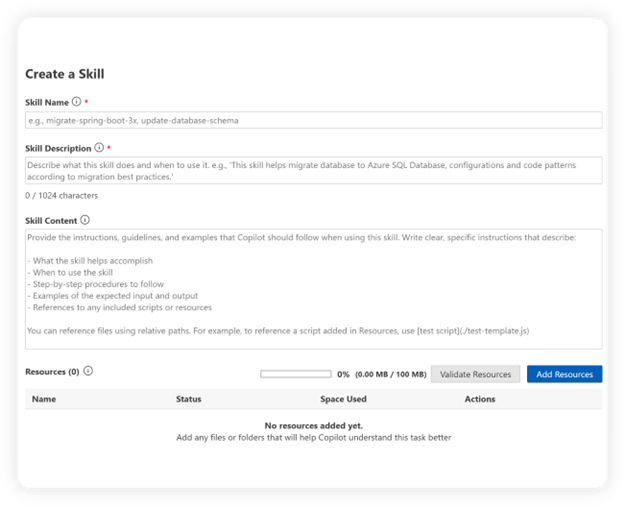
Skills: One of the most powerful capabilities is support for custom skills, allowing you to tailor the agent to your organization’s specific processes, standards, and patterns rather than relying on a generic approach. Enterprises often have unique governance requirements, and custom skills let you encode business logic, internal frameworks, and compliance rules directly into the agent’s planning and execution. This enables consistent modernization by reusing proven migration patterns, enforcing coding standards, and aligning with organization-specific SDKs and practices. I could see this being a great place to capture and reuse successful migration patterns including org-specific SDKs or frameworks – i.e. no more having to hurdle the same obstacles each time you migrate a project.
The Heavy Lifting is Asynchronous: Through the CLI, the agent coordinates with GitHub Copilot to handle tasks like upgrading Java and .NET versions asynchronously. It creates the issues, handles the PRs, and even scans for CVEs while you focus on the higher-level strategy. I especially love the support around unit testing.
If you’re ready to stop the manual toil and start scaling, I highly recommend checking out the Quickstart guide. It walks you through the interactive mode (the modernize command is surprisingly intuitive) for both Java and .NET.
I’ve been working with the program team developing this and I’m really excited about its new direction and capabilities over the past few months. I’d love to hear if any of you are playing with agentic workflows in your own dev cycles. Drop a comment or reach out!
Note: for the actual implementation details on my experiments around SDD, check my demo walkthrough doc.
If you’ve spent any time with AI coding agents, you know the thrill. You ask for an expense tracker, it generates one. You ask for a menu feature, it adds it. You point out a bug, it proposes a fix. It feels like magic—until it doesn’t.
Inevitably, the model starts hallucinating features, forgetting earlier decisions, or creating code paths you never asked for. You try to rein it in with a custom instructions file , but those quickly fall out of date. Before long, you’re wrestling with the very agent that was supposed to save you time.
Spec-Driven Development (SDD) is the antidote to this chaos.
Rather than letting code (and an over-eager LLM) dictate direction, SDD gives us structure, guardrails, and a development rhythm that creates clarity instead of drift.
What Is Spec-Driven Development? (SDD)
Specifications can make or break any project. For example, a few years ago I was in charge of a development team tasked with producing a product catalog Web API. Right on schedule, two weeks before we were due to roll out the resident silverback software architect dropped a bomb on us – a late breaking requirement that would instantly have spiraled the project’s complexity by a factor of ten, and made us months late in delivery. Having a strict written functional requirement I could point to (in this case a response time under 0.2 seconds), and a delivery date in the near term, acted as a magic shield to keep us on track.
Specs can be both a shield and a trap. As I wrote in my book, it’s the nonfunctional requirements- which often aren’t understood well by the project team or are implicit – that can delay or sink a software project. Database standards, authorization requirements and security standards, lengthy and late-breaking deployment policies – the fog of the unknown has us in its grip.
Spec-Driven Development (SDD) is meant to address this gap. Instead of code leading the way and the understood project goals and context falling hopelessly behind – the spec drives everything. Implementation, checklists, and task breakdowns are no longer vague.
The promise is that this uses AI capabilities and agentic development the right way. It amplifies a developers’ effectiveness by automating or handing off repetitive work that an agent can often do much more quickly and effectively – leaving us to do the actual creative work humans do best; refactoring, directing and steering code development, critical thinking around feature best paths.
I like the writeup from the GH blog by one of the speckit coauthors, Den: Instead of coding first and writing docs later, in spec-driven development, you start with a (you guessed it) spec. This is a contract for how your code should behave and becomes the source of truth your tools and AI agents use to generate, test, and validate code. The result is less guesswork, fewer surprises, and higher-quality code.
Unlike the vibe coding videos I’ve seen, which are mostly greenfield and very POC / MVP level in complexity – I think SDD has the potential to be ubiquitous. It could fit almost anywhere, even with very complex and monolithic app structures. It could help with large existing legacy applications. And it enforces development standards that can prevent a lot of wasted time and effort.
Let’s start with a quick overview of the process.
Specify, Plan, Tasks, Implement: A Four Step Dance
Software development with SDD follows this lifecycle:
Instead of jumping into coding (or vibe-coding your way into a corner), you follow a four-step loop:
1. /specify — Describe what you want: High-level aims, user value, definitions of success. No tech stack. No architecture.
2. /plan — Decide how to build it. Architecture, constraints, dependencies, standards, security rules, and any nonfunctional requirements.
3. /tasks — Break it down. Small, testable, atomic units of work that the agent can execute safely.
4. /implement — Generate and validate the code. Here TDD is mandated. Tests first, then implementation, then refinement.
Starting with a constitution is a game changer because – as the orig specs state – they’re immutable. Our implementation path might change, and we can even change the LLM of choice – but these core principles remain constant.. Adding new features shouldn’t render our older system design work invalid.
Step 1: / specify
You start with a constitution: the unchanging principles and standards for your project. It’s the backbone of everything that comes after.
GitHub’s Spec Kit can generate a detailed spec file from even a one-line input like “I need a photo album site that allows me to drop and share photos with friends.” It even marks uncertainties with [NEEDS CLARIFICATION], essentially flagging the traps LLMs usually fall into. And though this is optional – I would highly recommend running /clarify to address each ambiguity, refining your spec until it reflects exactly what you want the system to do.
By the end, you’ve got:
A shared understanding of what success looks like
A great first draft of what user stories, acceptance criteria, and feature requirements you have for the project.
Clear user stories
Acceptance criteria
Detailed requirements
Edge cases you probably wouldn’t have thought of
Step 2: /plan
We just finished our first stab at “why” – this is where the “how” comes in. /plan is where we feed the LLM our tech choices, constraints, standards, and organizational rules.
Backend in Node? React front end? Performance budgets? Security controls? Deployment quirks? Legacy interactions? All of it goes here. As Den notes in the GitHub blog:
Specs and plans become the home for security requirements, design system rules, compliance constraints, and integration details that are usually scattered across wikis, Slack threads, or someone’s brain.
Spec Kit turns all of this into:
Architecture breakdowns
Data models
Test scenarios
Quickstart documentation
A clean folder structure
Research notes
Multiple plan options if you request them
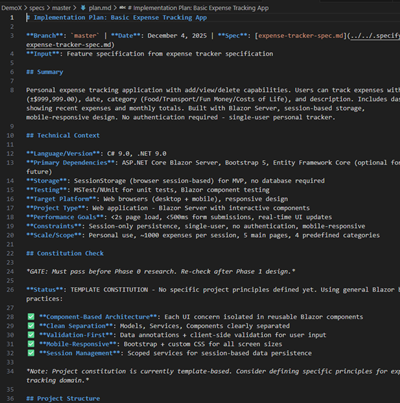
Look at that beautiful list of functionality… Including a very nifty app structure tree. OMG!
Step 3: /tasks
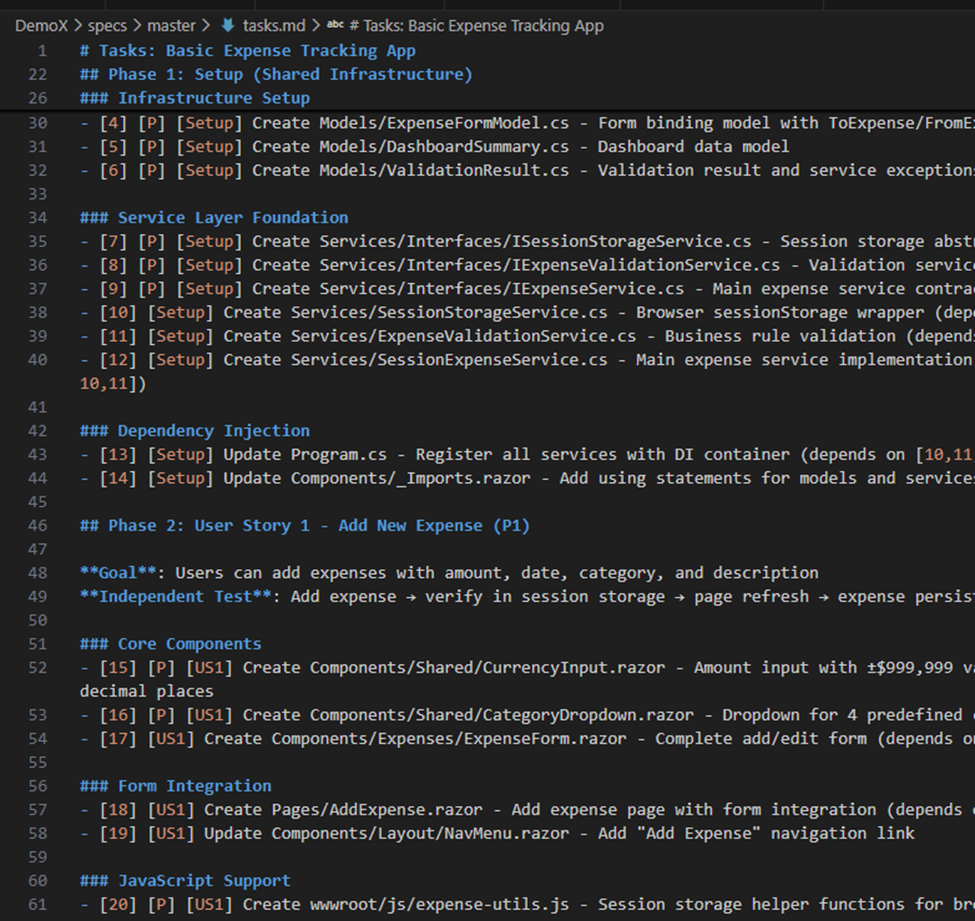
The third phase is where you ask the LLM to slice the plan we just created into bite-sized tasks—small enough to be safe, testable, and implementable without hallucination. It also flags “priority” tasks and provides a checklist view for the entire project.
This creates something rare: truly atomic, reviewable, deterministic units of work.
The /analyze command is especially powerful—it has the agent audit its own plan to surface hidden risks or missing pieces.
At first glance – this is a nearly overwhelming amount of work:
This is a lot to go through!! Where to start? Thankfully it tells me which ones are important:
Step 4: /implement
Now the LLM finally writes code. But instead of working from guesswork and half-remembered context, the agent is now writing code from:
A clarified spec
A vetted plan
A task list
Test requirements
An architectural contract
Immutable principles
You can implement by phase or by task range. Smaller ranges work better for large projects (context windows get spicy otherwise).
The best part? Updating a feature is now simple: change the spec, regenerate the plan, regenerate tasks, re-implement. All of the heavy lifting that used to discourage change is gone.
Summing Things Up
The real magic of SDD isn’t the commands—it’s the mindset:
Specs are living, executable artifacts
Requirements and architecture stay fresh
Tests are generated before code
LLMs stop improvising
Creativity shifts from plumbing to design
Consistency is enforced, not hoped for
Documentation emerges automatically
Adding features becomes a natural loop
Legacy modernization becomes sane again
As AWS and GitHub both point out, vibe coding is intoxicating but fragile. It struggles with large codebases, complex tasks, missing context, and unspoken decisions. SDD fixes the brittleness without killing the creativity.
It keeps the fun of vibe coding, but adds discipline, traceability, and clarity—like pairing with a brilliant junior dev who follows instructions with perfect literalness.
I do think Spec Driven Development will be changing very rapidly over the next few years. But it definitely is here to stay! Its in line with how AI coding agents are meant to work, and it allows us to focus on the creative / business implications of what we’re writing – a force multiplier for the innovative developer.
For Future Research
I already mentioned more work to come on having the coding agent generate different approaches for comparison; also what the implementation might look like with different models besides Claude Sonnet.
Some interesting statements by Den in that GH blog article: “Feature work on existing systems, where he calls out that advanced context engineering practices might be needed.” What are these exactly?
A second point follows right after:
“Legacy modernization: When you need to rebuild a legacy system, the original intent is often lost to time. With the spec-driven development process offered in Spec Kit, you can capture the essential business logic in a modern spec, design a fresh architecture in the plan, and then let the AI rebuild the system from the ground up, without carrying forward inherited technical debt.”
I’d like to see this! We need more videos demonstrating splicing on new features to a large existing codebase.
Background founding principles, a must read… even if lengthy. It all comes from this. For example, the Development Philosophy section at the end clarifies why testing and SDD are PB&J, and how these guiding principles help move us away from monolithic big balls of mud.
I liked this video very much… because it walked through the lifecycle below very clearly. Good sample prompts as well.
The Uncommon Engineer spends a half day experimenting with SDD. He found it a frustrating experiment. Some of his conclusions: specifications can actually lead to procrastination (user feedback is the only thing that matters), and start embarrassingly simple with your specs. Testing specification compliance is NOT the same thing as testing user value…
Den Delimarsky talks vibe coding and SDD on the GitHub blog. “We treat coding agents like search engines when we should be treating them more like literal-minded pair programmers. They excel at pattern recognition but still need unambiguous instructions.”
Dr Werner Vogels, AWS re:Invent 2025 keynote. About 40 minutes in we’re talking about SDD – at 46 minutes in – Kiro and function driven development: “The best way to learn is to fail and be gently corrected. You can study grammar all you like – but really learning is stumbling into a conversation and somebody helps you to get it right. Software works the same way. You can read documentation endlessly – but it is the failed builds and the broken assumptions that really teaches you how a system behaves.”
Tomas Vesely from GH explores writing a Go app using SDD. Interestingly, his compilation was slowing over time.