DevOpoly!

This is the fourth of a series on DevOps. The first focused on the three ways explored in the Phoenix Project, and I stuck in some thoughts from the Five Dysfunctions of a Team by Lencioni. The second discussed the lessons taught by GM’s failure in adopting Toyota’s Lean processes with their NUMMI plant. The third went through some great lessons I’ve learned from “Visible Ops” by Gene Kim.

“The single largest improvement an IT organization can benefit from is implementing repeatable system builds. This can’t be done without first managing change and having an accurate inventory. When you convert a person-centric and heavily manual process to a quick and repeatable mechanism, the reaction is always positive. Even a partially automated release/build process greatly improves the ability for individuals to be freed from firefighting and focus on their areas of real value. And by making it more efficient to rebuild than repair, you also get much faster systems downtime and significantly reduced downtime.” (Joe Judge, Adero)


So I am putting together a presentation for PADNUG tomorrow on DevOps. I’ve reworked this presentation like three times, and I’ve never been very happy with it. Let’s just say Steve Jobs would have rolled his eyes at something like this:

Look at that crap above. I mean, there’s information here – but way too MUCH information. There’s no way any audience is going to absorb this. I’ll lose them halfway through the second bullet point.

So, I was struggling with this a few weeks ago, trying to come up with a better idea. And I was watching my kids play Monopoly. And I started to think – since there’s no recipe for DevOps, and you can choose your own course, and some amount of it is up to chance or your individual circumstances – well, isn’t that a game? (And isn’t that a more fun way of learning than using an endless stream of bullet points?)

So, DevOpoly was born!
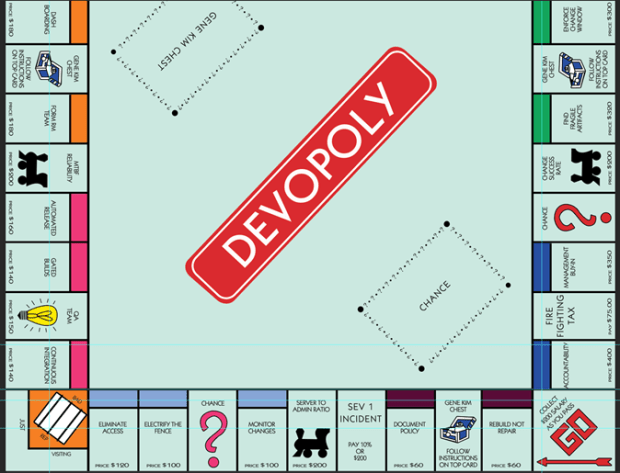
Let’s take a look at this in blocks shall we?

  • MTTR – Mean Time to Repair. This indicates how robust you are, how quickly you can respond and react to an issue.
  • Stakeholder Signoff – this is after you inventory your applications – instituting any change management policy and change window will require the business to provide signoff.
  • Inventory Apps – listing applications, servers, systems and services in tiers. This is a prereq for getting your problem children identified and frozen, see below.
  • CAB Weekly Meetings – I used to think these were a complete and total waste of time. In fact several books I have claim that they don’t measurably reduce defects and slow down development – bureaucracy at its worst. But, Gene Kim swears by it – and he thinks it’s a base level requirement for change management culture.

  • Versioned Patches – Putting any software patches into source control
  • Security Auditing – having controls that are visible, verifiable, regularly reported
  • Configuration Management – Infrastructure as Code, a key part of implementing repeatable system builds, using software like Puppet, Chef, Octopus etc.
  • Golden Build – The end goal and the building block of a release library, a set of ‘golden builds’ that are verifiable and QA’d. The length of time that these builds stay stable is another metric helpful in determining reliability of your apps.

  • Feed to Trouble Ticket – Creating a system where any changes – authorized or unauthorized – show up in trouble ticket for first responders to access. % Success rate in first response in diagnosis is a key metric for DevOps.
  • Dashboarding – creating visibility around these metrics (see stage 3 of the Phoenix Project post) is the only way you’ll know if you’re making progress – and securing management support.
  • Form RM Team – This is part of the process in moving more staff away from firefighting and early in the release process. Mature, capable orgs have more personnel assigned to protect quality early on versus catching defects late.
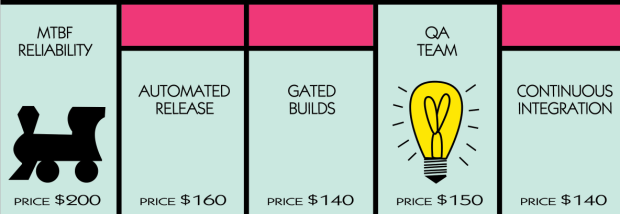
 

  • MTBF – Mean Time Between Failures. As configuration management knocks out snowflake servers and fragile artifacts are frozen, this number should go up.
  • Automated Release – creating a release management pipeline of dev bits from DEV-QA-STG-PROD, with as much automated signoff as possible using automated tests, is a great step forward.
  • Gated Builds – See above, but having functional/integration testing and unit tests run on checkin is key to prevent failures.
  • Continuous Integration – bound up with testing and the RM cycle – having any dev changes get checked in and validated and merged safely with other development changes. (And, remember, CI means the barest amount of release branching possible. It’s a tough balance.)

  • Eliminate Access – Actually I don’t know many devs (besides the true cowboys) that really WANT access to production. But, removing access to all but change managers is a key step. And when you’re done with that…
  • Electrify the Fence – Have change policy known and discipline the (inevitable) slow learners. Not fire them. Maybe have a few “disappear” in suspicious accidents, to warn the others!
  • Monitor Changes – Use some software (like Tripwire maybe?) to monitor any and all changes to the servers.
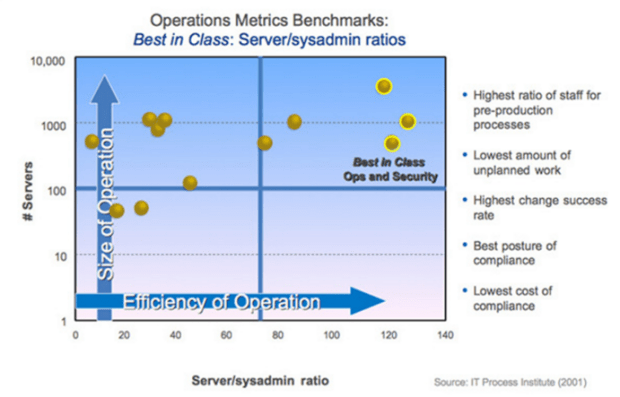
  • Server to Admin Ratio – Typically this is a 15:1 ratio – but for high performing orgs with an excellent level of change management, 100:1 or greater is the norm.

  • Document Policy – Writing out the change management policy is a key to electrifying the fence and preventing the org from slipping back into bad habits.
  • Rebuild Not Repair – With a great release library of golden builds and a minimal amount of unique configs and templates, infrastructure is commonly rebuilt – not patched and limping along.
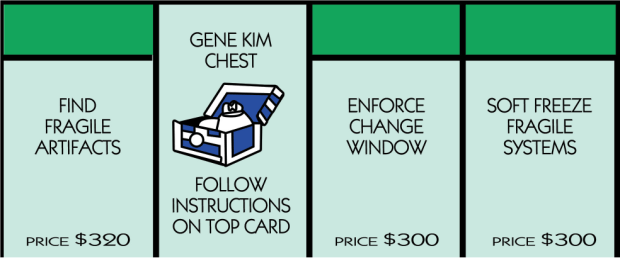
  • Find Fragile Artifacts – Once you’ve done your systems inventory, you can document the systems that have the lowest uptime, the highest impact to the business when its down, and the most expensive infrastructure.
  • Enforce Change Window – Set a change window for each set of your applications, and freeze any and all changes outside of that window. It must be documented and stakeholders must provide signoff.
  • Soft Freeze Fragile Systems – These fragile artifacts have to be frozen, one by one, until the environments can be safely replicated and maintained. This soft freeze can’t last long until the systems are part of configuration management/IAC.

  • Accountability – #1 of the two failure points in any change. True commitment and accountability from each person involved.
  • Firefighting Tax – Less than 5% of time spent in firefighting is a great metric to aim for. Most organizations are at about 40%.
  • Management Buy-In – DevOps can be started as a grassroots effort, but for it to be successful- it must have solid buy-in from the top. Past a pilot effort, you must secure management approval by publicizing your dashboards and key metrics.

Anyway, this was fun. I have some cards on the way for both the Gene Kim Chest – yes, not Jez Humble, but I’m thinking about it – and Chance. Lots of chance in the whole DevOps world.

(I tried this back in August with Life but it never worked by the way.)


“All Happy Families Are Alike” – Visible Ops by Gene Kim review

This is the third of a series of three posts I’ve done on DevOps recently. The first focused on the three ways explored in the Phoenix Project, and I stuck in some thoughts from the Five Dysfunctions of a Team by Lencioni. The second discussed the lessons taught by GM’s failure in adopting Toyota’s Lean processes with their NUMMI plant. This one will go through some great lessons I’ve learned from a terrific – and very short and readable – little book entitled “Visible Ops” by Gene Kim. Please, order this book (just $17 on Amazon!) and give it some thought.

“The single largest improvement an IT organization can benefit from is implementing repeatable system builds. This can’t be done without first managing change and having an accurate inventory. When you convert a person-centric and heavily manual process to a quick and repeatable mechanism, the reaction is always positive. Even a partially automated release/build process greatly improves the ability for individuals to be freed from firefighting and focus on their areas of real value. And by making it more efficient to rebuild than repair, you also get much faster systems downtime and significantly reduced downtime.” (Joe Judge, Adero)

I was always struck by the phrase from Tolstoy – “All happy families are alike, every unhappy family is unhappy in its own way.” Turns out that’s true of DevOps as well. Successful companies, it turns out, have some very common threads in terms of IT:

  • High service levels and availability
    • Mean Time To Repair (MTTR)
    • Mean Time Between Failures (MTBF)
  • High throughput of effective change
    • Change success rate >99% (for example, amazon with 1500+ changes a week)
  • Tight collaboration between dev, Ops/IT, QA team, and security auditors
    • Controls are visible, verifiable, regularly reported
  • Low amt of unplanned work
    • <5% of time spent firefighting – typical is 40%
  • Systems highly automated and hands-free
    • Server to System Admins ratio 100:1 or greater (typical 15:1)


So what are the common factors with the happy families” that have these highly efficient, repeatable RM culture?

  • A change management culture
    • Management by fact versus belief
    • All changes go through a formal change management process
      • “The only acceptable number of unvetted change is zero.”
      • “Change management is important to us, because we are always one change away from being a low performer.”
      • “Perceptions of nimbleness and speed are a delusion if you are tied down in firefighting.”
      • “The biggest failure in any process engineering effort is accountability and true management commitment to the process.”
  • No voodoo – causality over gut feel
    • Trouble ticket systems – inside each ticket are all scheduled changes and all detected changes with the system.
      • This leads to 90% first fix rate and 80% success rate in initial diagnosis
  • Human Factors Come First in Continual Improvement
    • Strong desire to find production variance early
    • Controls to find variance, preventative and detective.

Every unhappy family though is unhappy in their own way. You’ll hear sayings like the following in these “DevOps won’t work for us, we’re unique and special” type organizations:

  • “80% of our outages are due to changes – and 80% of the time we take in implementing a repair is trying to find that change” – Gartner
  • Data and continual improvement takes a back seat to intuition, gut feel, highly skilled IT Ops staff
  • SLA not met
  • “Most of our work is caused by self-inflicted problems and uncontrolled changes. Each sprint I start with a blank slate, and each sprint ends with 50% of my development firepower getting sucked away into firefighting.”
  • Infrastructure is repaired not rebuilt- “priceless works of art”
  • System failures happening at worst possible time, IT’s rep is damaged
  • Changes have a long fuse
  • One change can undo a series of change(s)

So how does an unhappy family move towards becoming more functional? Gene Kim has broken it down into four logical steps.

  • Phase 1 – Stabilize the Patient
    • Freeze changes outside maintenance window
    • First responders have all change related data at hand
  • Phase 2 – Find the Problem Child
    • Inventory your systems and identify systems with low change success, high repair time, high downtime business impact
  • Phase 3 – Grow your Repeatable Build Library
  • Phase 4 – Enable continuous Improvement

In a little more detail:

  • Phase 1 – Stabilize The Patient
    • Beginning of step for Goal is to allow highest possible change throughput with least amount of bureaucracy possible. No rubber stamping, change request tracking system feeds info to first responders, ensure solid backup plan.
    • Inventory applications and identify stakeholders and systems
    • Document new change management policy and change window with stakeholders
    • Institute weekly change management meetings
    • Eliminate access to all but authorized change managers
    • Electrify the fence with instrumentation, monitoring
      • you’ll be shocked at what you find!
      • this prevents org from falling back into bad old habits, like a rock climber with a ratchet and rope
    • Failure Points
      • We won’t be able to get anything done!
      • The business pays us to make changes. Not to sit in boring CM meetings.
      • We trust our own people – they’re professionals and don’t need micromanaging.
      • We already tried that – it didn’t work
      • We believe there are no unauthorized changes.
  • Phase 2 – Find The Problem Children
    • Analyze assets, find fragile artifacts (use list from Phase 1)
    • Must be fast. Can’t freeze changes forever.
    • Soft freeze, where truly urgent changes during this period go through CAB.
    • Failure Points
      • Pockets of knowledge and proficiency
      • Servers are snowflakes – irreplaceable artifacts of mission critical infrastructure
  • Phase 3 – Grow Your Repeatable Build Library
    • Create a RM team. (Shifts team to pre-prod activities)
    • Take fragile artifacts in priority – create golden builds stored in software library
    • Separation of roles – devs have no access to production
    • Amount of unplanned changes (and related work) further drops
    • # of unique configurations in deployment drops, increasing server/admin ratio
    • Mitigated the “patch and pray” dilemma, updates integrated into the RM process for patches to be tested and safely rolled out
  • Phase 4 – Enable Continuous Improvement
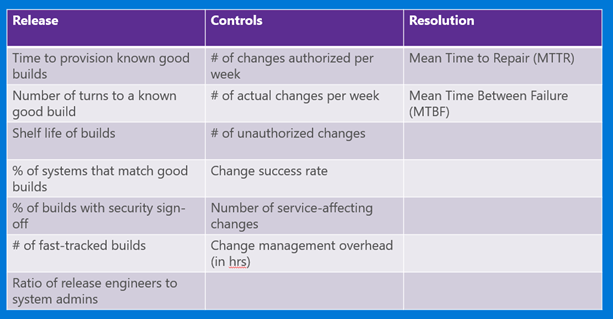
    • This has to do with gathering metrics and measuring improvement along three lines – release, controls, and resolution.

  • Release – how efficiently and effectively can we generate and provision infrastructure?
    • Time to provision known good builds
    • Number of turns to a known good build
    • Shelf life of a build
    • % of systems that match known good builds
    • % of builds with security signoff
    • # of fast-tracked builds
    • Ratio of Release Engineers to System Admins
  • Controls – how effectively do we make good change decisions that keep infrastructure available, predictable and secure?
    • # of changes authorized per week
    • # of actual changes made per week
    • # of unauthorized changes
    • Change success rate
    • Number of unauthorized changes
    • Changes submitted vs changes reviewed
    • Change success rate
    • Number of service-affecting outages
    • Number of emergency changes or “special” changes
    • Change management overhead (measure bureaucracy, lower is better!)
  • Resolution – when things go wrong, how effectively do we diagnose and resolve issue?
    • MTTR – Mean Time To Repair
    • MTBF – Mean Time Between Failure

Money, it’s a shame! We love Mint, and so should you.

“Money, so they say

Is the root of all evil today

But if you ask for a raise it’s no surprise

That they’re giving none away.” – Pink Floyd

So I did an article a few weeks back about my personal struggles with money. That posting boiled down a very practical book on personal finance into the five essential ingredients for getting on top of things:

  1. Plan for monthly bills and daily needs.
  2. Keep a running total of daily needs spending.
  3. Have a bill payment plan where bills are paid each month automatically
  4. Have a savings account for what you want and need
  5. Keep a record of all of the above.

You must do all these things to have any control over your money – no matter how much of an income you have.

The issue though came down to implementation. All of these things required time – something I have little of these days. So, were there tools out there that could help me?

First a few words about my personal relationship with finances. Money is a topic I find frightening and I tend to shy away from it – mainly because it’s just so depressing watching it pour out every month. I thought, well, some people seem to have a knack for it. I just don’t – and there’s no changing that. I just got used to being a colander or a sieve – and tried to earn as much as I could to balance things out.

There’s a strong correlation between money and food (or alcohol, or anything else you can abuse or get addicted to). In my case, I would binge spend to feel better – the same way some people drink whiskey or food when things get most hopeless. The feeling of being out of control, of being a victim of circumstances beyond my control – a car bill or the dishwasher breaking setting us back once again – would start the spiral.


This morning we had a breakthrough. I think it’s the first time in twenty years of marriage that we’ve had a discussion about money and what we’ve spent without an argument. Here’s how it worked:

  1. Go to www.mint.com and sign up. It’s FREE and amazing – and yes, they have an app for it on your phone.
  2. Add any accounts you have. We’re talking checking, savings, 401(k)’s, and your credit cards, home/rental and cars. This way you know your financial health in one nice snapshot. (turns out, you may find out you are worth more $-wise than you think!)
  3. Then it’s time to fill out a budget. Do the best you can on the categories – they’re all prefilled out. I pulled my checking account records for the previous month and had a good idea of what I spent each month. I also allowed money each month for fun money – you know, fishing and other trips – and an allowance, small, each month, for things like a vacation, home expenses, car breakdowns, etc.
    1. It’s very important to allow SOME room for fun. There’s no point in being a budget Nazi if you will break down and binge spend because you’re going overboard. For me, I need some time every few weeks to get away. If you select the option to “Start each month with the previous month’s leftover amount” – you can even save up this discretionary money for that trip to the Bahamas you’ve always wanted to take.

Guess what? You are basically done at this point. At this point all your financial transactions – everything coming in and out – will show up on one nice dashboard. You can check it daily or – as my wife and I have committed to doing – once weekly. We look at every item we spend and make sure that it’s falling into the correct line item on the budget:


See that line item below for “Royal”? That’s $40 bucks I spent on fly fishing books at Joel’s fine fly fishing shop locally in Lake Oswego. (Yes, I’m an addict.) Knowing that it would be showing up and that I would have to account for this made me spend a little less at that store this day.

Then we can go through and see if we’re over or under-spending. See below – we definitely spent a little more than we should have last month on eating out and even on groceries. I can fine-tune this then for the next month – or adjust the budget so it’s more reasonable. Like with tracking what you eat every day, a tool like Mint really makes tracking – and being accountable for – what we spend will help us turn our financial ship around.

Hopefully, over time we will become a little less of a colander – and more of a bowl. Going through what we spent and saved took us less than half an hour – well worth it. We’ll keep doing this every week. What a great feeling!

Culture and Agile – GM and its failed attempt to mimic Toyota

I had a good friend of mine – Mark Taylor – recommend some listening material recently on GM. I’ve been fascinated with Toyota since I first started learning about Agile development practices, and this podcast definitely was worth the time to listen. It’s a fascinating story. Why was Toyota so willing to be so open and revealing with one of its biggest competitors – GM – on its higher quality production processes? Turns out there’s a lot more to making cars than just an assembly line.

This isn’t just history. All successful companies hit a moment of complacency. For people who are interested in improving the quality of their working life – whatever the field – there’s some real lessons here. (And, if you’re still not convinced, think of all the billions of your taxpayer dollars that had to go into bailing American car companies after they went bankrupt!)

Some thoughts I had – in outline form – from this:

  • Culture Matters (are your teams top down or horizontal?)
    • “Back home in Fremont, GM supervisors ordered around large groups of workers. At the Takaoka plant, people were divided into teams of just four or five, switched jobs every few hours to relieve the monotony, and a team leader would step in to help whenever anything went wrong.”
  • Stopping The Line With Defects (how do you handle bugs?)
    • I can’t remember any time in my working life where anybody asked for my ideas to solve the problem. And they literally want to know. And when I tell them, they listen, and then suddenly they disappear, and somebody comes back with the tool that I just described. It’s built, and they say try this. Under the Toyota system, everyone’s expected to be looking for ways to improve the production process all the time, to make the workers’ job easier and more efficient, to shave extra steps and extra seconds off each worker’s job. To spot defects in the cars and the causes of those defects. This is the Japanese concept of kaizen, continuous improvement. When a worker makes a suggestion that saves money, he gets a bonus of a few hundred dollars or so…. And if you look around the Toyota plant, you can see the result of all those improvements. Hanging shelves that travel along with the car and the worker, carrying the parts and bolts they need within easy reach. Special cushions they throw into the car frames when they have to kneel inside. Workers’ tasks have been streamlined to the fewest possible steps, each step timed down to the second.
    • In contrast, in GM plants, workers could never stop the line – because they’re lazy, you know? “So now we tell the plant floor, don’t you worry about the production volume. You worry about quality. The last thing we want is to have a lot of defects flowing down the line that we have to repair later.”
  • It Takes Brains – You Can’t Just Mimic
    • (after a failed trainsplant) “For this workforce, there were no trips to Japan, no tearful sushi parties. And from the start, workers were skeptical…. This was one of the biggest differences between Fremont and Van Nuys. Van Nuys hadn’t been shut down. Turns out it’s a lot easier to get workers to change if they’ve lost their jobs, and then you offer them back. Without that, many union members just saw the Toyota system as a threat.”
    • “…much of the Japanese system happened off the factory floor, it answered something that had never quite made sense to {one of the managers}. Why had Toyota been so open with GM in showing its operations? We didn’t understand this bigger picture thing. All of our questions were focused on the floor, you know? The assembly plant. What’s happening on the line. That’s not the real issue. The issue is, how do you support that system with all the other functions that have to take place in the organization?”
    • “I remember one of the GM managers was ordered from a very senior level– it came from a vice president– to make a GM plant look like NUMMI. And he said, I want you to go there with cameras and take a picture of every square inch. And whatever you take a picture of, I want it to look like that in our plant. There should be no excuse for why we’re different than NUMMI, why our quality is lower, why our productivity isn’t as high, because you’re going to copy everything you see. Immediately, this guy knew that was crazy. We can’t copy employee motivation. We can’t copy good relationships between the union and management. That’s not something you can copy, and you can’t even take a photograph of it.”
  • Its Not Just The Assembly Line
    • “The team concept stressed continuous improvement. If a team got a shipment of parts that didn’t fit, they’d alert their bosses, who’d then go to the suppliers to fix the problem. Sometimes they’d realize the problem was in the part’s design, and Toyota engineers would go back to the drawing board and remake the part to address the problem workers were having on the assembly line. All the departments in the company worked together. …. But Ernie’s suppliers had never operated in a system like that. If he asked for fixes, they blew him off. And if he called Detroit and asked them to redesign a part that wasn’t working, they’d ask him, why was he so special? They didn’t have to change it for any other plant. Why should they change it for him?”
  • The High Cost of Complacency
    • “One of the ironies of GM was that in the moment it went bankrupt, it was probably a better company than it had ever been. In the factories, they had really dramatically closed the productivity gap that they had had for many, many years. And on the new products, they have much better quality. So the company that failed was actually doing better than it had ever done. But it was too late, and that’s really sort of hard to forgive– that if you take 30 years to figure it out, chances are you’re going to get run over. And they got run over.”
    • “They sold junk for a while. Just any kind of piece of crap they could roll out there, they did. And they paid a tremendous price for it. And even when they turned the corner in quality, people didn’t trust them. They’d say, well, gee, they’re building a good car now. Why aren’t they buying them?”

Walkthrough – Creating a Linux VM in Azure

I saw this great post recently by Donovan Brown. Thought I would take a waltz thru it really quick and share.

Creating a Linux Based Development Box on Azure

It might be a good idea to first create an availability group – add a Storage and a Cloud Service with a good naming convention you like. This way it won’t arbitrarily assign some wacked out names for you and you can delete them later.

  1. Open up the Azure Management Portal – the Plus sign on the lower left (Add) -> select Compute -> Virtual Machine -> From Gallery.


  2. Look at all these Ubuntu images we can pick from. Select Ubuntu, open up port 3389 for RDP.


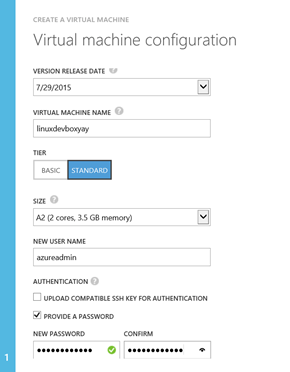
  3. Select A2 for the sizing. I unselected the SSH option and picked out a good strong admin password.


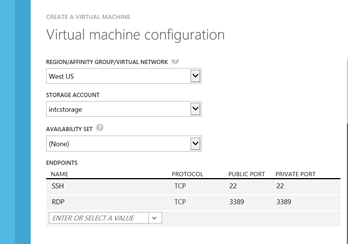
  4. Pick a good region and your (previously selected) storage accounts. Very important here – open up a port for RDP for 3389. (If you forget, you can also do this later in the Endpoints section of the Azure dashboard.)


  1. This next portion will take a while. Open up your SSH client of choice – some people like Putty, I like Bitvise. Then enter in the following into command line:
  • sudo apt-get update
  • sudo apt-get install xrdp
  • sudo apt-get install xfce4
  • sudo service xrdp start
  • sudo apt-get install eclipse
  • sudo apt-get install libwebkitgtk-1.0-0
  • sudo apt-get install firefox

OK, that’s done. It takes, well, about forever. Once that’s done though you’re about there.

  1. Use remote desktop to dial onto ____.cloudapp.azure.com.
  2. R-click on the Panel – Add New Items, select Launcher. R-click, Properties, and add Eclipse. This will drop an icon onto the bottom part of your window.
  3. Click on the Earth to open up fireFox.
  4. Start up Eclipse and select the Help menu. select Install New Software…
    1. Click Add… enter “TFS Plugin for Eclipse” for the name, and location of http://dl.microsoft.com/eclipse/tfs

  5. Select Team Explorer Everywhere. Click Next > , and then Next>
  6. Accept the Microsoft Software License Terms
    1. Click Finish
  7. Restart Eclipse when prompted
  8. Close the Welcome page
  9. Select Window / Open Perspective / Other…
  10. Select Team Foundation Server Exploring
  11. Click OK
  12. Click Connect to Team Foundation Server and follow the instructions to connect.

And that’s it. You’ve got a fully running developer VM running Ubuntu, Eclipse and plugged into TFS – all on Linux.


Some DevOps Links for Today