Author: elvisboats

Short Version: I'm married to the amazing (and amazingly forgiving) Jennifer, proud possessor of two amazing kids, crazy about all things trouty with fly fishing. I'm an Application Development Manager with Microsoft, and am based out of Portland, Oregon. Long Version: I grew up in Oregon, and moved down to California with the original goal of finishing my education in Civil Engineering, but I found application development and RDBMS systems much more exciting! I do miss the mountain biking in California and the awesome Mexican food, but Oregon is my home and I have never regretted moving back to start a family. Plus it gives me more time for fly fishing for trout and steelhead on the beautiful Deschutes river in central Oregon! ;-) Working for Microsoft has by far been the best experience of my professional life; it's great working with a group of people that are passionate about writing good code and continually improving development practices and firepower. Past assignments have included Providence Health Plans, Kroger, and managing a .NET development team at Columbia Sportswear. Working at Columbia in particular gave me a great customer-side perspective on the advantages that Azure offers a fast-moving development team, the dos and don’ts of agile development/scrum, and the cool rich Ux experiences that SPAs (Single Page Applications) can offer with Breeze, OData, WebAPI, and modern Javascript libraries. Microsoft did a fantastic job of engaging with Columbia and understanding our background and needs; I witnessed their teams win over an initially hostile and change-averse culture. The end result was a very satisfying and mutually beneficial partnership that allowed Columbia to build dynamic applications and services using best-of-breed architecture. I’m a MCDBA and a Certified Scrum Master.

DevOps – Where to Start

I had a friend come to me the other day with what seems to be a simple ask. His company, a large banking enterprise, is looking into DevOps. So where should he start in building awareness?

Some context here – my friend is a programmer, a lifelong developer with high-level black belt skills in a variety of languages. He doesn’t want this to become a full time job for him – he loves coding and application development/architecture in particular. He just wants some resources to pass along.

Here’s my response:

A few words first on what DevOps is…

If you’re just getting started, there’s a decent Microsoft site out here at this address. Including a great series of videos that introduce what DevOps is and means, with some really rich content in the footnotes for next steps..

DevOps means in practical terms making sure your release pipeline from a development workstation to production is as smooth and automated as possible. So that implies:

  1. Infrastructure as Code: You have your infrastructure written out as a recipe and it’s rebuilt each time you push out code (Infrastructure as Code). Following a template enforces consistency, it’s the only sane way to handle things. The big players in this space to date are Chef and Puppet, maybe Octopus.
  2. Testing: Your testing is as rigorous as possible. This means when you do a release no person needs to look at anything but exceptions where there’s failures – your releases are gated where if there’s major bugs you’ll catch them early on and prevent a release to production. This means integration and unit testing using things like Selenium for the UI layer.
  3. Release Management: When developers check in code its continuously integrated and released. Note – this is mostly IDE based. I believe MSFT has best in class tooling here especially built on top of VSTS releases, where essentially it becomes fire and forget, a checkbox. (Remember when Agile used to be hard?)

For my open source friends – the big players in the industry right now come from the Linux community. So start in your learning efforts with Chef (https://learn.chef.io/) and Puppet (https://puppet.com/download-learning-vm) . Ansible is also a hot name. You can download VM’s and start playing with them, or run these tools on the cloud, free with Azure, and they’re Linux based, very easy on the $.

OK, That’s Great. Now What?

Well, if you want to tackle this, and you’re book oriented, I would recommend the following:

The “Gang of Four” Books:

  1. Get “The Phoenix Project” by Gene Kim. This is great in particular for you executive/leadership types. Think about leaving this on the desk of decisonmakers you know if you need support for your DevOps initiative.
  2. Another, very practical book is “Leading the Transformation” by Gary Gruver and Tommy Mouser. This is a much more connected approach on how one leader found a way around serious organizational constraints – yes your efforts will make enemies if handled badly! – by chaining it to specific business (not technical) phased objectives. A must read.
  3. You developers out there should already have “Continuous Development” by Jez Humble on your bookshelves. It’s a modern classic and explains why developers should be 100% onboard with RM and continuous delivery movements.
  4. IT people need to pick up a copy of “Visible Ops” by Gene Kim, very prescriptive and outstanding in basing your transformation on key IT/operations based KPI’s. Nonfuzzy, clear, short and sweet at about 100 pages in a little booklet. I love it.

Yeah, I’m more into videos. Books are so 90’s, dude.

OK, well do you have 12 minutes? Check out this intro with Donovan Brown,  and an excellent three part series on Release Management – Part 1 (overview), Part 2 (RM architecture), and Part 3 (release pipelines). Outstanding, and will give you a nice overview of setting up Continuous Integration and build pipelines.

My blog has some links on “All Happy Families Are Alike“, “Devopoly“, “Cats and Dogs Living Together“, and “The Five Dysfunctions of DevOps“. These are lengthy but put together will give anyone a good overview of the Phoenix Project and Visible Ops.

Now We’re Getting Started…

Well that’s enough to at least whet the appetite.

Here’s the three things I’d like you to come away with:

  1. DevOps is a big effort, you will need help. You can’t do it grass roots. It will require strong commitment by management and the understanding that this will require both time and money. If you feel that you lack that level of commitment, manage expectations or scrub the effort until the conditions are more favorable. Likely, you will need some experienced help to form a roadmap and get buy-in, and coach/mentor so the first few months go smoothly. You will also need to commit time and effort to mastering and maintaining your code for both testing and building out your infrastructure. (Hopefully, your releases themselves will be mostly code-free).
  2. Build maturity through better testing. Your gated releases are going to need a high level of assurance that your builds are functional. So building up your QA maturity is one big investment that will pay huge dividends in avoiding production mishaps and environmental anomalies that come through manual deployment methods.
  3. Infrastructure As Code is where its at. As long as environments are manually provisioned, you have a vector for errors and time-sucking anomalies. Once you start writing out environments as recipes and going away from manual patching to destroying/rebuilding environments along with your production releases – you’ll never, ever go back. It rocks!

Thanks guys, hope this is helpful to you with those first few steps on your journey!

Azure auditing options for your custom reporting needs

Here’s the five options I’ve been able to find – so far – if you need fine-grained detail on your Azure subscription usage. (i.e. historically showing user access for security audits across multiple resource groups, etc.)


If you want a one-sentence recommendation – sorry I have to stick with “It depends”. I think you get great power with the OMS option (#2), but the PowerBI option (#3) is up and coming and very robust.


  • Option 1: Powershell Client for Azure RM. See the links below for more on this.
  • Option 2: Operational Insights
  • Option 3: Azure built in portal reporting
  • Option 4: PowerBI consuming the REST service. (See the links but this may very well be your best and most powerful option)
  • Option 5: Other tools consuming the ARM auditing APIs/SDK/CLI. There’s lots of log aggregation tool ranging from Excel to very sophisticated third party tooling that consumes the REST interface.


    In more detail:


    Option #1 – Powershell

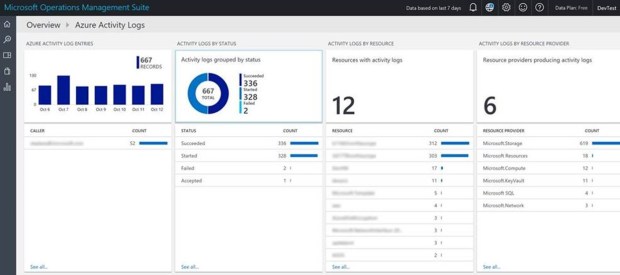
    This was what we used two years ago. Nowadays, it seems like best practice is log aggregation–using Operations Management Service. That gives you the best level of customization and fine grained detail without having to take on PS scripting or consuming REST endpoints manually.


    Auditing reports using ARM Powershell, which in turn rests on the REST API we expose as part of the Azure resource manager. A Microsoft walkthrough of setup including deployment is here.


    There’s a good walkthrough on installing Powershell Client for Azure Resource Manager here. This blog goes through this in detail, including answers like ‘who accessed by subscription in the past 60 days”, “what access does a specific user have”, etc. We could extend this to show more detail points.


    There’s a walkthu on this blog of building out auditing reports. This blog uses ARM Powershell to come up with user list on subscriptions, modules used etc. And of course there’s third party products offering services in this space as well.


    The auditing APIs are evolving fast per my friends on the product team – there are some great third party tools out there that will provide this info. For you script based junkies – PS might be a great option. You can use PowerShell to view the Azure Activity Logs, showing all operations on the subscription and who did what. From here you can consume those API’s – fairly easily – and then you can crunch them into something useful.


    Start with the PS Commandlet Get-AzureRmLog:

    https://msdn.microsoft.com/en-us/library/mt603617.aspx

    https://azure.microsoft.com/en-us/documentation/articles/resource-group-audit/


    Option 2 – Operational Insights

    On #2 above, there’s an overview here of Operational Insights. A overview page on Log Analytics is here, documentation and FAQ is here, Not too much deep dive info on Operational Management Service (OMS) within Premier, but if you think this is a worthwhile option we can engage with a PFE and even build you out a pilot on it.  It can also now be connected directly to OMS (as well as Event Hubs and storage accounts). For the type of reporting you are talking about I think OMS would be the answer.


    Also worth pointing out that this is only activities carried out though ARM. If you want to see the audit records for changes to RDFE resources i.e. Classic Cloud services etc. then you still need to use the Operation Logs in the classic portal (or API). This caught me out recently trying to help a customer audit config changes to cloud services.


    Option #3 – Built in reporting in Azure

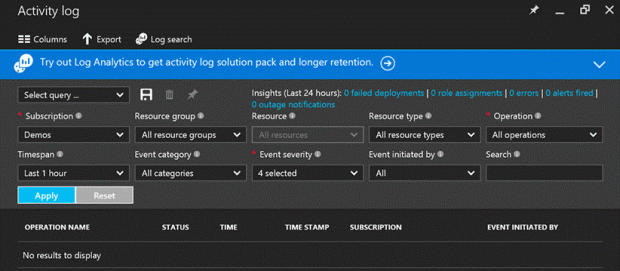
    Note that the audit data from Azure (ARM) is now available and searchable in the Azure Portal via the Activity Logs blade.


  • According to this article, there’s five different types of reporting available to subscription admins OOTB.
    • Anomaly reports – Contain sign in events that we found to be anomalous. Our goal is to make you aware of such activity and enable you to be able to make a determination about whether an event is suspicious.
    • Integrated Application reports – Provides insights into how cloud applications are being used in your organization. Azure Active Directory offers integration with thousands of cloud applications.
    • Error reports – Indicate errors that may occur when provisioning accounts to external applications.
    • User-specific reports – Display device/sign in activity data for a specific user.
    • Activity logs – Contain a record of all audited events within the last 24 hours, last 7 days, or last 30 days, as well as group activity changes, and password reset and registration activity.


    Option 4 – PowerBI

There’s a couple of slick ways to build out PowerBI reports direct from the REST endpoints. Some great references on this here.

https://azure.microsoft.com/en-us/blog/analyze-azure-audit-logs-in-powerbi-more/ – this goes through the Power BI Content Pack for Azure Audit Logs. There’s a secondary article right here with some snapshots. From this doc:

“In a nutshell, Azure Audit Logs is the go-to place to view all control plane events/logs from all Azure resources. It includes system and user generated events. You can also access this through the Azure Insights SDK, PowerShell, REST API and CLI. The logs are preserved for 90 days in Azure’s Event Logs store.”

Here’s the data you can gather:

  • Events by any particular resource over time
  • Which users perform what actions, how frequently and on what resources
  • Actions and events per subscription, resource group, region etc.
  • Azure Service Health (outages and maintenance) events that potentially impacted your resources
  • Alerts and AutoScale events by resource and time
  • Failures, success of deployments and registrations


Microsoft has further documentation explaining how you can access Azure Audit Logs in the Azure Portal.


Option 5 – Other options:

  • There’s advanced reporting available in Azure Active Directory as well. Azure Active Directory Premium. Advanced reports help you improve access security, respond to potential threats and get access to analytics on device access and application usage. There’s a walkthrough of this at this page.


I hope to add to this in the future with some great third party tooling we could recommend. Stay tuned!


Portland 2016 DevOps day – wow, thanks!

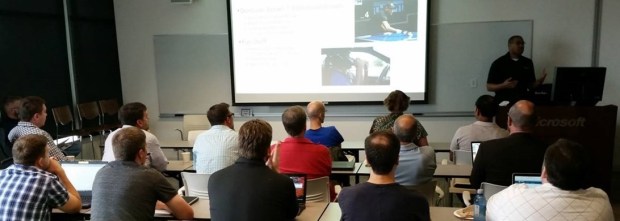
Guys, had SUCH a blast last Friday at the DevOps roadshow!

Here’s some pix. I really owe Monu Bambroo, Derrick Cawthorn and the amazing Donovan Brown for coming down and buying out their time to spread awareness of DevOps and the answers we have here at Microsoft for this sea change.

If you’re interested in more, give me a holler. We do have that workshop on “DevOps Fundamentals” that in three days goes through setting up a complete release pipeline – way cool!


Some link goodness for you:

  1. Donovan’s site: http://donovanbrown.com/ Search for DevOps. There’s something for everybody at this site. For example, here’s a post describing how he went about setting up a demo for a group in New Zealand using Docker, Ubuntu Linux, Visual Studio, Selenium, etc. Way cool! There’s another good link here for how Deployment Slots play into your DevOps pipeline, another on “how many vendors does it take to implement DevOps?”, triggering a rollback based on user feedback during a release, where Powershell DSC fits in.


  1. Dave Harrison’s site is here. www.driftboatdave.com. I’ve got some links here on “All Happy Families Are Alike“, “Devopoly“, “Cats and Dogs Living Together“, and “The Five Dysfunctions of DevOps“. These are lengthy but put together will give anyone a good overview of the Phoenix Project and Visible Ops.


  1. Last, may I recommend Channel 9? Here’s a 12 minute intro with Donovan Brown,  and an excellent three part series on Release Management – Part 1 (overview), Part 2 (RM architecture), and Part 3 (release pipelines). Outstanding, and will give you a nice overview of what we covered during DevOps Day in setting up Continuous Integration and build pipelines.


July 15th Premier Roadshow on DevOps – coming your way!


Way cool – at long last, we’re hosting a DevOps half day conference right here in Portland on July 15th!


The agenda below is set to change and we have some exciting guest speakers on their way. Get in touch with me and we will add you to the list of invitees!


Agenda:

  • Building a 3-Phase roadmap to sanity – and getting out of firefighting
  • Defining DevOps For YOUR Organization
  • Release Management Plain and Simple – Which Tool is Best?
  • Metrics Make It Happen – KPI’s You Can Use to Track Progress and Drive Success
  • Puppet, Chef, Octopus and Visual Studio – Better Together


As a movement, DevOps has now replaced Agile as the key factor in getting software builds out the door faster and safer. This workshop will help you define conditions of success for your organization and lay out a practical roadmap to change management. We’ll discuss features and advantages of leading DevOps tools and how to make sure your org culture and people can use these to best advantage to drive value and repeatability.


How to Register:

Contact:
Dave Harrison

Microsoft Premier

dharriso@microsoft.com


Note: This program is in high demand and registration is on a first-come-first-serve basis. You will be placed on a waitlist if the seminar is full.

Snacks and coffee / tea will be provided.

DevOps Roadshow coming to Portland!

Hey folks, more details coming – but we are going to have a half-day roadshow on DevOps coming to Portland on Friday, July 15th! We’re hoping for a few surprise presenters so the agenda is subject to change – but here’s a sneak peek.

Ping me to get an invite!

As a movement, DevOps has now replaced Agile as the key factor in getting software builds out the door faster and safer. This workshop will help you define conditions of success for your organization and lay out a practical roadmap to change management. We’ll discuss features and advantages of leading DevOps tools and how to make sure your org culture and people can use these to best advantage to drive value and repeatability.

Agenda:

  • Building a 3-Phase roadmap to sanity – and getting out of firefighting
  • Defining DevOps For YOUR Organization
  • Release Management Plain and Simple – Which Tool is Best?
  • Metrics Make It Happen – KPI’s You Can Use to Track Progress and Drive Success
  • Puppet, Chef, Octopus, Release Management and Visual Studio – Better Together


When/ Where:

Microsoft Pearl Office, 1414 NW Northrup St, Portland, OR 97209

Friday, July 15th, 9 am-Noon