The Five Dysfunctions of DevOps

I remember laughing at the American car companies in the 80’s that – panicked by the unmatched quality coming out of Toyota – sent spies and emissaries out to Japan to emulate what was being done in the factories. They were given complete access, took it back to America – and it fell flat on its face. The Japanese product managers implementing Lean in the manufacturing floors snickered that they were copying the image of Buddha without the spirit. How could they ever implement something they didn’t understand? In part, those American car company manufacturers missed the essence of kata, or continuous improvement through repetition. By neglecting culture, any tool or process they tried just ended up in the same dead end.

I just finished reading the Phoenix Project by Gene Kim etc – oddly enough, on a trip out to Phoenix – and found myself wanting to smack myself in the forehead. There are so MANY things about DevOps that I did not understand, even a year ago. It would have made the last five years of my life immeasurably smoother – if I had understood the principles and thoughts behind what I was trying to do. (Insert cargo cult joke here)

We don’t have a DevOps Manifesto yet – and one is badly needed. In the meantime, we have two books that sum things up. If you haven’t read the Old Testament and New Testament of DevOps – that’s the Phoenix Project and Continuous Delivery by Jez Humble – you are missing out. The Phoenix Project is ¾ management-speak – a hero leader who steps in and methodically saves a failing company, you know the old story of the guy pointing majestically at the sunset on a horse? But, here’s the thing – if you want to convince CxO type people of the importance of DevOps, you need to read this book. It speaks the language of management – so it will help you tell a story that your management and the CIO would want to hear. And buried in its pages are some real depth.

Creating Flow – the Three Ways

I used to show a picture of Hillsboro, Oregon on the 26 during rush hour. This is, no one will argue, a fully utilized freeway. But, is it efficient?

The key to the Toyota Lean principles – and Kanban and Agile and everything else – is creating that flow. That means a buffer in every day, in every week, where we have space to think about how work is done – not just the what.

What

How

The First Way: Maximizing flow with small batch sizes and intervals of work, never passing defects downstream, global goals

Continuous build, integration and deployment

Creating environments on demand

Limiting Work in Process

Building systems that are safe to change

The Second Way: Establishing quality at the source. Constant feedback from right to left, ensuring we prevent problems from happening again and enabling faster detection/recovery.

Stopping the line when builds/tests fail

Fast automated test suites

Shared goals/pain between Dev / IT

Pervasive production telemetry showing if customer goals are met

The Third Way: Creating a culture that fosters experimentation and risk.

High trust culture versus command and control

Allocation >20% of Dev/Ops cycles towards nonfunctional requirements

Constant reinforcement of DevOps CoE and improvements kata


This is really illuminating. For example, think of the “stopping the line” item above for the Second Way. How many times did I – in previous assignments – take any bugs from the previous release and kick it to last in order, behind the fun stuff that I really wanted to work on? Even in smaller teams of three – where I thought “we’ll never step on each others toes” – how many integration issues did we have, right before important demos? And by neglecting automated testing, how many defects did I end up passing downstream – creating systems that were inherently difficult to change?

Dysfunction and DevOps – The Importance of culture

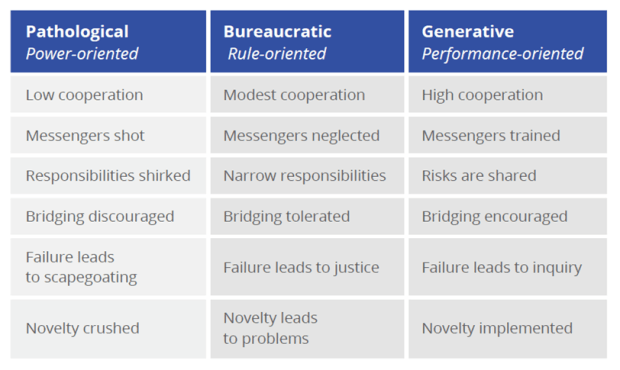
This has been mentioned before in my posts – but notice (courtesy of Puppet from a study done by Westrum in 2004) the illuminating chart of the three types of organizations:
Now notice the Five Dysfunctions of a Team by Patrick Lencioni:

  1. Absence of trust (unwilling to be vulnerable within the group)
  2. Fear of conflict (seeking artificial harmony over constructive passionate debate)
  3. Lack of commitment (feigning buy-in for group decisions, creating ambiguity)
  4. Avoidance of accountability (ducking the responsibility to call peers on counterproductive behavior, which sets low standards)
  5. Inattention to results (focusing on personal success, status and ego before the team)


Notice anything interesting? Let’s match up the sick organization on the far left – the power-based Pathological one – with that list of five dysfunctions:

So now we get a glimmer of light on why organizations with high-performing IT departments tend to be high-performing organizations – and why the reverse is also true, a sick IT shop, or one enslaved to the business or at the mercy of a cowboy group of developers, is a good indicator of underperformance. Companies that embrace DevOps as a culture tend to be high-trust, risk-friendly. They’re not afraid of differing opinions or radical ideas like Netflix’s Evil Chaos Monkey. People tend to waste less energy taking potshots at other teams/departments – and more attention to the common shared goal.

As the Phoenix Project brings out, the relationship between a CEO and a CIO is like a dysfunctional marriage – both sides feel powerless and held hostage by the other. This is true of Dev and Ops as well – and I’ve been in that sick marriage more than once. The essence of the book is forming a strong bond where the union becomes much closer by sharing goals and work based on company needs.

Other Thoughts from The Book

Common Agile Myths

  1. DevOps is just automation or infrastructure as code (no, that’s the tool – it’s part of it, but not the whole)
  2. DevOps replaces Agile (DevOps is meant to complete Agile – where bits aren’t just going into QA, but out the door to production)
  3. DevOps replaces ITIL/ITSM (It embodies ITIL concepts)
  4. DevOps means NoOps (DevOps means a truly empowered, nonsiloed Ops)
  5. DevOps is only for startups
  6. DevOps is only for open source software


On #5 and #6 above, this comes down to “We can’t do DevOps, because we’re special/unique/a snowflake.” But think of some of the companies today that are leading in the DevOps world and where they were just a few years ago:

  • Amazon until 2001 ran on OBIDOS content delivery service, dangerous and problematic to maintain
  • Twitter struggled to scale frontend monolithic Ruby on Rails system – took multiple years to rewrite
  • LinkedIn in 2011 six months after IPO had to freeze features for massive overhaul
  • Etsy in 2009 was “living in a sea of their own engineering filth”
  • Facebook in 2009 at breaking point, staff continually firefighting, releases painful and dangerous


I must read The Goal by Eli Goldratt. I love the thought – there is always a constraint or bottleneck in any organization (men, material, machines) that dictates the output of the entire system. Until you create a system that manages the flow of work to the constraint, the constraint is constantly wasted – and likely drastically underutilized. Technical debt skyrockets, and you can’t deliver to the business at full capacity. A following step is to exploit the constraint – where its not allowed to waste any time, ever. It should never be waiting on anything, and it should always be working on the highest priority commitment IT made to the rest of the enterprise.

A little something on that dirty word… money.

Just a little riff on personal finances.

Had the pleasure recently of reading “The Debt Free Spending Plan“. It’s very practical and pragmatic in dealing with debt and managing money. For too many of us, we’re never taught personal finance like we are other essential topics like math, reading, etc in school. As a result – and I think this is deliberate – we get stuck in these cycles with large amounts of credit card debt and spending on things we really can’t afford or even enjoy. I know in my case – when I think of my household expenses (and fishing equipment!) – I tend to think of my house as being a type of colander. I dump money into it and it just runs out the bottom!

So, time to put some thinking into managing a budget. The book is fairly long; I’ll boil it down to the essentials, and you can think about picking it up on your own.

  1. Gather up all your credit cards and freeze them. (Some people literally freeze them into a block of ice in their freezer – so before they use them, they have to defrost it!)
  2. Make up a monthly budget. (more on this below) Everything should be categorized, from income – to Bills and lastly Daily Needs (fuel, food, etc).
  3. Total this up. What’s left over – the balance – can go into Short Term Savings (for things like car expenses that are impossible to predict), Long Term Savings (a buffer), and lastly Fun Money (vacation getaways, fishing gear, etc).
  4. The basic principle is you should always be running in the black. ONce you do step #3 above you will know how much you have to live on each month. You should have money set aside even when you say things like “Oh, I never buy clothes.” Stick cash for clothing – even if just $10 – into an envelope. You can stash it or spend it – but don’t forget to save up for that category. Make sure money is left over for fun and vacation $, even if just a few dollars each month.
  5. You will need to go through this budget every month on the 28th and refactor. Add $ where it’s called for to each category, or take it away. The author recommends picking a category each month (like Gym, for example) and seeing if you can reduce it. could you go to a less snazzy gym and save a few bucks for fun money?
  6. Now buy a notebook. (Or use Mint for us tech savvy types!) Each daily need should have its own tab, with the $ you have to spend on it on the title. (Fuel – $275 for example). Once each day, you will take your receipts – or your debit card expenses – and write down what you’ve spent on each category and update the running total. (2/6/2015 Chevron -$46 = $184.84, for example)
  7. Have two savings accounts – a short term savings and a healthy reserves for emergencies.

There’s some other money saving tips there that she explores in more detail – avoiding bulk stores (it encourages overspending), cooking at home, getting a cheaper cell phone etc with three quotes minimum for any major purchase, using a HSA/Medical Savings Plan, etc. But in short it’s a nice and sweet little 5-step program:

  1. Plan for monthly bills and daily needs.
  2. Keep a running total of daily needs spending.
  3. Have a bill payment plan where bills are paid each month automatically
  4. Have a savings account for what you want and need
  5. Keep a record of all of the above.


That’s it! Nice and simple. I’m going to give this a try – and see if it doesn’t improve some things. I really miss the days of being a DINK (double-income no-kids) kind of family. Hopefully with this program we can have the room to do more fun things guilt free- because we’ll be in the black.

Puppet End to End. Well, more like Beginning to Beginning.

I’ve been experimenting a little more with setting up Puppet. So far, I’ve successfully been able to get Puppet up and going – and now, I’m left with the feeling OK, that was neat I guess. Now what? There’s an ocean of possibilities when it comes to Puppet and its integration points with Azure – infrastructure as code to configuration management. I’m just scratching the surface, and I’m not pretending that any of the below is anything but the fumblings of a complete newbie. Still, I wanted to share with you my list of steps in preparing Puppet on Azure – as the first in what hopefully will be a series as I use Puppet as an engine to drive my DevOps learnings. Hope this helps!


Setting Up Your First Puppet Master in Azure

  • We need to set up Azure CLI first.
    • Install (using the steps in this article) node.js from the official install site. You could do this on a VM, or right on your laptop.
    • Command prompt – Admin privilege – run npm install azure-cli –global
    • Then run command azure account download
    • Take the file and save it somewhere convenient – I saved it to c:\junk\azure.publishsettings
    • Then run azure account import {filename}
    • I ran azure config mode arm at this point too in a command prompt.
  • Then fill in azure account show to confirm you have the right account selected.

  • Now we go to VisualStudio Online – login at https://app.vssps.visualstudio.com/profile/view?mkt=en-us and go to your VSO portal.
  • On a new tab, go to the azure portal – https://manage.windowsazure.com/

  • Click New, then Compute -> Virtual Machine -> From Gallery.
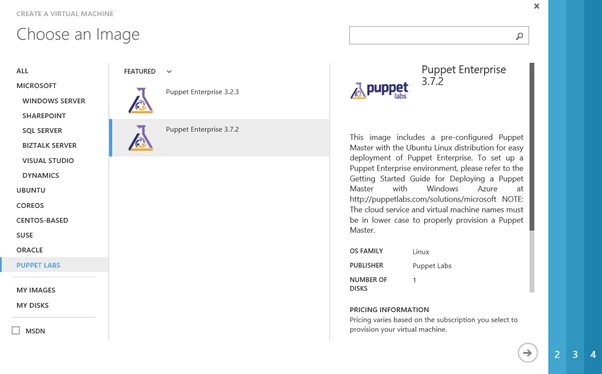
  • Then, select the Puppet Labs node, and select the latest build of Puppet Enterprise. On my build, this is 3.7.2.


  • Choose a lower-case unique name of 3-15 characters. Standard Tier, Size at least A2, a username, and – choose a password over uploading an SSH key. This is obviously just for a demo.


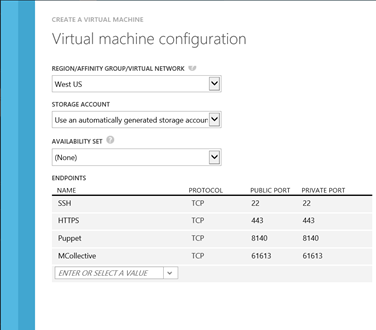
  • then fill in your other values. Always select “create a new cloud service”, and open up three ports – 1) HTTPS (port 443), Puppet (8140), and MCollective (61613)


  • Go to a new browser window – it may take 10 minutes for this to appear and be fully provisioned/available – and access your URL. In my case, this is https://dhpuppetmaster.cloudapp.net . I don’t know yet what the password is, but I’m going to find out – in the next step.


  • Then, open up bitvise. (I’m really pleased with this SSH client in particular, but feel free to substitute whatever you like.)


  • In the prompts that follow – go ahead and save the remote hosts public key when it prompts. Use the username and password you used in originally creating the VM.
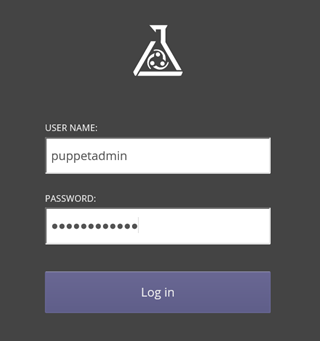
  • In the bitvise cmd prompt window that appears – don’t you just love linux? – run sudo grep ‘auth_user_email’ /etc/puppetlabs/installer/answers.install. Write down the user information it gives you. In this case it’s admin@dhpuppetmaster.cloudapp.net
  • Now run sudo grep ‘auth_password’ /etc/puppetlabs/installer/database_info.install


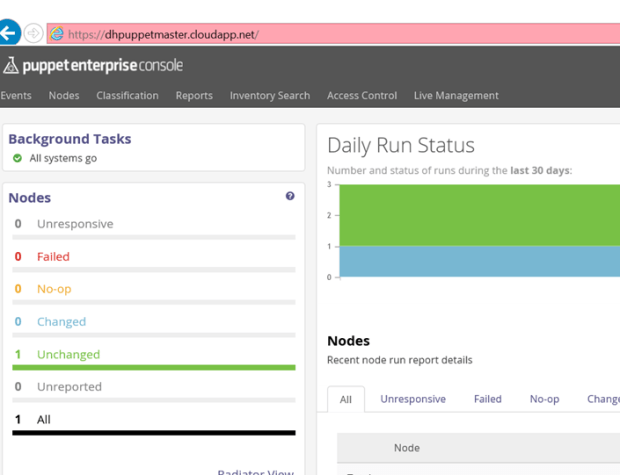
  • Then go back and check out that URL for your Puppet master box – in my case https://dhpuppetmaster.cloudapp.net/ OMG what am I looking at here? ISn’t this great?


Setting Up a Node


  • Now we’ve set up a Puppet Master – let’s set up a node. Create a VM – same as above, but this time let’s create a Windows Server 2012 from the Gallery. Remember to make the name lowercase – everything else can be default values.


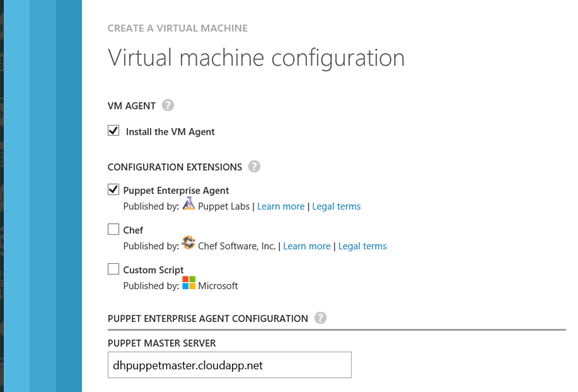
  • The tricky part is the last page – here you want to select the Puppet Agent checkbox. Fill in the name of your Puppet server.


  • Then – once its done spinning up – go back to your Puppet admin window, and select Node Requests on the top right. You should see your new node’s request in the list. Approve it – and congrats! You now are all set up with a Puppet master and a node.


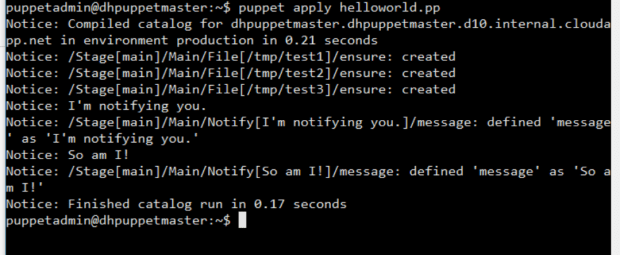
  • OK, now I have a working Puppet node and puppetmaster set of VM’s. Now what? Well, following the steps in this blog post – he had as many problems with the obtuse and overly generic Puppet documentation as I did! – I created a text file called helloworld.pp in a junk directory, copied it over to my root folder (/home/puppetadmin) using FTP, and then ran puppet apply hello_world.pp. (The contents of the .pp file are in the article link.) I’m sure I’m violating all kinds of best practices here but in the absence of better documentation – here it is.


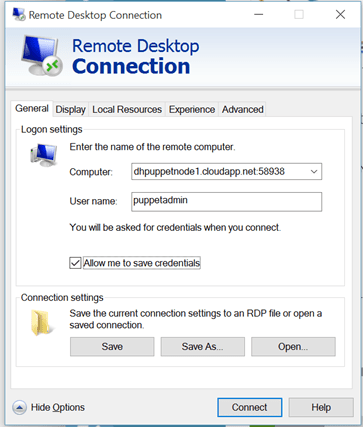
  • Did it work though? I RDP onto the box – look at the Endpoints tab to view the dynamically changing public endpoint for RDP –

  • Anddddddd I see – nothing. Wow. So, clearly I’m missing something. It’s at this point – after a few hours of fumbling around – that I am admitting I’m like a six year old with scissors here. Time to go back to the drawing board and figure out more about how Puppet likes to work – before “learning by doing”.


Links Goodness

I will continue this with some more posts later. But in the meantime, here’s some helpful URL’s that may be of use to you in your DevOps quest:


DevOps and the game of Life.

Remember the old game of Life?

Pretty discouraging by the way. You work, you work, go to college / don’t go to college, pick up fellow travelers/family members – and at the end they add up your score. You either end up in a nice big house or a smaller one, and – what? Is that “winning”? Valuing things just by the money you’ve earned along the way, or the house you get with creaky knees and an enlarged prostate – well, that seems pretty empty to me.

The last time I gave a presentation on DevOps, I remember thinking how short I came up. I was talking about how certain cultures are very resistant to change. Most of the audience were died-in-the-wool developers, and had no problems jumping on the DevOps bandwagon. But they were frustrated at the lack of power they had to change the culture they were in. I remember making some noises about “keeping on trying” and the like.

I can say that I have seen even very resistant cultures change over time. And there’s been some great articles on building up a community of practice on DevOps from the ground up. So, free thinking a little, I went thru that blog post on guerilla-type subversive DevOps efforts – and combined it with the excellent writeup on some anti-patterns, and tried to make a game of it.

I was only mildly successful. See below – that’s as far as I’m getting for now. It’s a pretty lame game. Needs some work. But, there it is…

Between this and the articles I’m looking through on our new Release Management capabilities – it’s busy times here! Hope you are doing well as well.