DevOps

Powershell, Azure Automation and DevOps – Just The Links

Doing some work with a customer around Azure Automation. Here’s some links and resources that I’ve found very helpful as I’m levelling up. Powershell is tried and true and for customers that use scripting / runbooks for building out infrastructure, you don’t have to leave CI/CD at the door. I love the DevOps stack here around YAML pipelines in ADO, Pester, package management, full auditing and rollbacks. I’ll be adding to this over the next few weeks but I’d love your thoughts and additions.

  • There’s a series that Andrew wrote on this that I quite like. Here’s one on accessing a private Powershell repo from Azure Pipelines for example. Another, more complete example, this repo (link here)uses the Pester test framework – written in Powershell! It also uses PSScriptAnalyzer to check for coding standards (in this case just static code analysis). The project is built using InvokeBuild. All build dependencies handled by PSDepend, and Azure Pipelines perform all the tasks around test / build / publishing (see azure-pipelines.yml). With ADO you can use Azure Artifacts to host a private or public PS repository for your modules (samplemodule.nuspec). This is how you get rollbacks etc.
  • Andrew did the best writeup I’ve seen yet on DevOps in Powershell. (this is Mar 2020 but all still valid). This includes
    • Version control with GitHub or Azure Repos.
    • Test automation – we at MSFT favor Pester. Including code coverage analysis (which can be published with each build as a Publish Test Results Task in Nunit format)
    • PSScriptAnalyzer for static code analysis and even custom rules
    • InvokeBuild (or psake) for build.
    • Package Management – use PSDepend to track project dependencies in a simple PS data file.
    • Documentation using PlatyPS – and I think GH Copilot can greatly help us here as well.
    • CI/CD using Azure Pipelines to fire off a Powershell task (or Azure Powershell task for Azure environment runs). (This used in conjunction with INvokeBuild)
    • Artifact Management for reusability. (NOTE I think this is 300 level stuff. We have to walk before we can run!)

GitHub Copilot Fundamentals – Just The Links

Here’s some links that might help you as you start working more with GitHub Copilot. This pairs with the GitHub Fundamentals course I’m teaching this year. The three main refs I like to point to during the class are Refactoring code (GitHub Docs), Modernizing legacy code with GitHub Copilot (GHD), and this interesting rewrite of a Perl script to Typescript.

And on the advanced topics – see the links below around GitHub MCP Server, Prototyping, and Custom Instruction Files. OMG, such good stuff…

Refactoring Code

  • Github has an excellent cookbook that has outstanding prompt suggestions. Things like improving code readability, performance, refactoring data access layers – the works.
  • Probably the best aspect is the ability to refactor, as you go, without interrupting your flow. Another good reference by Github here walks us through it.
  • For performance optimization, I love this article in the perf optimization section of the cookbook.
  • Now for some Microsoft links – the Azure Developer blog discusses how to analyze and suggest improvements around a selected block of code.

Testing

  • GitHub’s docs around testing are excellent. Testing is like eating your vegetables – we all could do more of it, yet we don’t! That kind of tedious, repetitive work is exactly what Copilot excels at.
  • MSLearn has a nice series around building a better test suite, end to end. I especially loved this blog article around testing. It’s comprehensive and covers best practices so well.
  • How can Copilot help with debugging, exception handling and testing? A very nice video, about 11 minutes long, from Harshada Hole from the Visual Studio team.

Documentation

Deployment and Operations

Instruction Files and Custom Responses

MCP Server

  • A full list (curated by GitHub) of MCP Servers. Very similar (if not parallel?) to Microsoft’s. Starting here to show what’s possible wouldn’t be a bad idea for a demo.
  • GitHub’s MCP Server. Repository Management, PR automation, CI/CD workflow intelligence to analyze build failure. A simple extension in VS Code -if allowed by policy. (walk thru text here). There’s a list of installs for other MCP hosts (Windsurf, Cursos, Jetbrains, VS, Eclipse, Claude). For more documentation if you’re getting stuck on authentication with remote servers, see this link.
  • Starting out, follow this example from GH. A very detailed walkthru that should get you to where you can use GitHub’s remote MCP server for Copilot – things like creating a new issue, listing pull requests, etc. Walks you through Oauth / PAT authentication as well.
  • If you are a video learner, I like this 10 minute overview from Andrea Griffiths / Toby Padilla.

Translation

Prompt Engineering

Prototyping and Proofs of Concept

Other Stuff

Thriving in a time of change

I’ve been thinking a lot about fear lately.

I have a very good entrepreneur friend who tells me he’s laying off many of his developers. There’s just no need for them anymore – AI is simply put doing a better job of it. In fact, you can try it yourself – go to Lovable.dev, and ask it to “create a landing page for my website on all things golden retrievers”. About 90 seconds later, there’s your website – mostly functional, just a few tweaks left. AI is a very powerful tool, one that I now find I can’t live without in my daily life. It’s chilling to think that these LLM’s are progressing to the point where they can produce code, document, find defects, and design systems architecture almost instantly – and as good (sometimes better) than I can. And it’s getting better every day.

Is it ok for me to say that this fills me with fear? What will happen to my family and I if I have to change careers? I’ve been in software development all my life. What if that, very suddenly, just goes away?

Unfortunately I have no crystal ball and I don’t know where my industry will be in five years. I do think about my girls, both 17 years old and starting to make their own way in the world. I have no idea on how to best direct them in terms of their career. It seems very likely that they will spend their twenties and thirties as I did, trying new things and failing, getting up and starting over.

So my wife and I are trying to teach them qualities that will help them succeed. Maybe we don’t know what kind of work they’ll be doing. But I can teach them how to work – that never changes. Things like how to take direction. How to actively listen. How to not make your boss’ life difficult. Being humble. Working hard, with purpose.

Listening to some of my colleagues talk about their fears this week had me thinking about what qualities I will need in the years ahead to adapt and be resilient. Here’s my thoughts:

Every lie we tell ourselves comes with a short term benefit and a long term cost. In this case, the belief that we are past the age where we can change – I am what I am – is the greatest limiter at all. It’s comforting though, and that’s the short term payoff. This is who I am. I’m a victim of events beyond my control. I’ve never been able to do that successfully. That’s just not my forte.

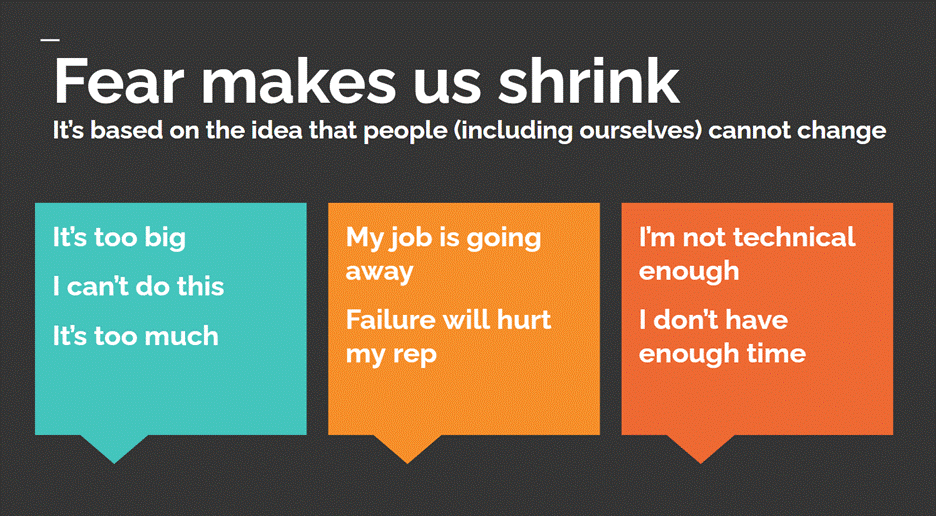
Thoughts like this are comforting, in a weird way, because it promises familiarity, stability. I don’t have to change. The long term cost is – we have stopped learning, adapting. The world is changing – we are trying to stay the same. So we say things like “it’s too big” / “it’s too much”, “I don’t have the time”, “I’m just not a technical person”, etc.

Here I’m indebted to the book “Tiny Habits“, by BJ Fogg. Famously, he would do a few pushups after every time he went to the bathroom. Over time, and we’re talking months / years, he would ramp up the number of pushups. Guess what happened over time with his personal fitness level, from that really small incremental effort?

This really helped me when I found out I had diabetes. After spending some months being totally overwhelmed with the huge changes I had to make, I read this book. I remember closing it and saying to myself, I am the type of person that goes to the gym every day. So I changed that one thing, as a daily habit. Sometimes I would go to the gym and barely show up – like I’d put on my gym shoes and maybe walk for a few minutes. But I would show up. It made a world of difference in my health.

The point of this book, to me, is that big all-out efforts, like that New Year’s Resolution to drop 20 lbs in three months, almost always fail. It’s just too much change, too fast. But incremental, small changes in my habits – like reducing and then cutting out alcohol, or going to the gym – always win, if you stick with it.

The same thing was true when I wrote my book. I called my shot – started telling people, I’m an author. I’m in the middle of writing a book, it will be out in June. I can guarantee you, if I had not have put myself out there like that, the book would never have been written.

So what does this have to do with our mindset during times of epochal change like this one?

Bear with me a bit here. The five qualities above are each worth a blog article of their own. But short and sweet – if we accept that life is impermanent and constantly in flux, and we ourselves are constantly changing with it – then we are capable of adapting to anything, can learn and master ANYTHING we put our minds to. That’s an incredibly empowering thought. In fact, if we have a specific goal we want to accomplish – say, writing a book, or learning the piano, or getting more healthy physically – we can build a little habit and grow it steadily over time to reach that goal. And because we’re trying to learn like children do – without ego, without fear of failure, playing with new things and having fun – growth comes naturally. We’re learning from failure, and we’re persistent, because we have a clear goal and a solid plan. There’ll be days where we can do little or nothing, but we’re not going to burn out – because we forgive ourselves and realize plateaus are a part of life.

The fact is that AI is here to stay and it’s a disruptive change. It’s a threat, no question – but it’s also an opportunity. This is a great time to move away from the employee mindset, and think about creativity – making something new, something distinctively YOURS. AI and large language models are amazing tools, and they’re going to empower us to be creative and do meaningful, high impact work in ways we can’t even imagine. And the best part is, this field is brand new. The barriers will never be lower than this, the frameworks are still taking shape and will never be easier to adopt. So this is the perfect time to try something new in an exciting field where there’s nothing but upside. I can create and make art in my own way in this space, this month.

What new things will you try or learn about this month? I’m excited to find out!

“Hands On Kubernetes” – first thoughts

So these are my first thoughts on the Hands on Kubernetes book by Nills Franssens et al…

It’s a solid book! I enjoyed especially the first chapter where it’s setting the stage for the demos / hands on work in the following chapters. Obviously there’s been some new additions in what capabilities Azure Kubernetes Service (AKS) has to offer since, which I’ll try to explain.

In chapter 2, the book asks you to create a new AKS cluster using the Azure Portal. THis could be done with CLI, ARM, or Terraform of course… The new thing here is the ability to create a cluster with Azure Arc. That allows you to use things like Azure Policy and Azure Monitor to control / observe your containers when you’re running them onprem (say using VMWare vSphere or Azure Stack HCl), or using Google Cloud or AWS. For now though we’ll just create a straight up cluster:

… which once you’re done with all the options should take about 5 minutes or so, on US West 3 region. A few notes here – you’re going to NOT want to set up Availability Zones (of course you would do this for a prod workload), and you want a STANDARD setup of 2 nodes (not Dev/Test, which would normally be the best pick) – because we’re going to want to experiment with Azure Monitor to check our observability. The AKS pricing tier you want is “free”, and the node count range is a new option – select “2-5”.

A quick snapshot of the bare bones setup we’re using here:

When that AKS cluster is finished being spun up, you’ll see something like the following:

What happened here exactly though? Select “Go to resource” – and you’ll be able to inspect what was created. For example, the Resources section shows any running deployments / pods, and it’s where you create new resources. In the Node pools, you can scale up/down by adding nodes – and add a new node pool, potentially even with a different (beefed up) VM size. In the Cluster config page, you can upgrade the control plane – and then the individual node pools in a followup step. This is also where you’d enable RBAC or integrate with Azure AD.

Insights though is where we can actually view the cluster’s utilization and how it performs under load:

From here it’s a walk in the park. You COULD download from GitHub the source materials for the book. I found selecting the quick start application gave me a very nice starting point… a simple Voting app that’s easy to create / destroy:

The next option to play with is the last one – “Connect to cluster”. From here you’re given all the information you need to connect via Bash or Azure Cloud Shell to your newly created resources. This is where you can run some of the commands noted in the book as we’re starting to play around with cmd line explorations –

kubectl get node 

az aks get-credentials --resource-group rg-handsonaks --name handsonaks

… And that’s it for now. You can easily go into the control panel again and remove the entire resource group to bring yourself back to a clean start state.

Closing Thoughts and Next Up

I feel like here’s a good point though to talk about the WHY of things… Software development seems to be making these leaps forward about every decade. In the early 2000’s, the big change took the form of a pattern and a practice – the pattern being Scrum and Agile, the technology / process taking the form of source control. Skip forward another 10 years, to say about 2014, and the leap forward was DevOps. Again this change becomes a pattern (Infra as Code), and a practice (CI/CD, and config mgmt)… The upcoming change seems to still be taking shape, but the 2020’s definitely seem to be the era when the pattern of microservices is achieving dominance – with the tech behind this being Kubernetes and Docker. The stuff we used to hear about “microservices only being for the large enterprises” or “Kubernetes isn’t meant for production workloads” is just not holding any water – it’s FUD.

Other things I want to play with down the road:

Monitoring What Matters – John-Daniel Trask of Raygun

I had a great talk recently with one of my favorite peeps – John-Daniel Trask, CEO of Raygun. We talk about the importance of monitoring and making that connection with the customer experience, and what he’s seen go right – and wrong – in working with companies large and small. We’re huge fans of Raygun and see this company’s growth as a natural byproduct of producing the right product that reinforces all the behaviors we want out of the DevOps movement. Enjoy!

I always enjoy talking with John-Daniel and he was a big factor in monitoring and metrics taking up so much room in my book. Here’s some of the topics we cover:

  • How to aggregate errors so you don’t feel like you’re putting out a tire fire with a water pistol
  • Best practices around real user monitoring, crash monitoring and APM
  • First things first; why crash reporting should be the first thing you port out
  • How John-Daniel is adjusting to life as a new father (welcome Henry!) and what it was like growing a global business as a young entrepreneur
  • How Google changed the game around how responsive and user-centric websites and services are
  • A fact we often forget: software is written ultimately for humans. “Software gives us the power to amplify human ability.”
  • Another great all-time quote, from his mentor: “It’s not the big that eats the small, it’s the fast that eats the slow.”

One last great quote to end on: “DevOps is about making engineering teams as reliably fast as possible.”


A link to the interview is here – and it’s on the podcast platform of your choice. AppleGoogleSpotify, blah blah…. We’re on all the major platforms now, including AnchorAppleGoogleSpotifyPocketCasts, and RadioPublic. Please support the podcast, and we’d love to hear your feedback about the book!

Enjoy the podcast!