Year: 2014

Getting started with app dashboarding using Application Insights.

Application Insights have been getting some buzz recently with TechEd and other events. Why is that?

Let’s start with an existing website. Once I installed the VISX file for Application Insights and restarted Visual Studio, I can right mouse click on my project and add Application Insights Telemetry to the project.


It looks like you MUST have your project hosted on Visual Studio Online for this to work. I dusted off my old account and…

Hmmm. What ARE these cool new dashboards that just appeared in my web project?

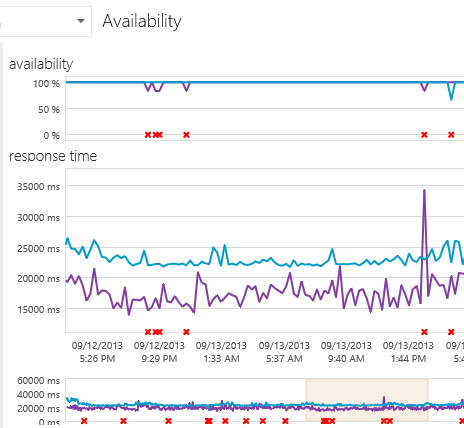
Let’s build it and deploy out to a website. We’re going to follow the step by step instructions here. (and… screeching halt – this won’t work for my app, since it’s an intranet app and not public-facing. Sigh.) Still, I’m going to leave this here since it shows – adding dashboarding to show availability and performance for your website is literally just a right-mouse click. You can check for:

availability
track usage

…including what pages/features are being used by your customers:

v


.. and even set up tiles with a custom dashboard. Think about deploying this along with your site. I was so impressed with the real-world metrics that came OOTB with Azure. Microsoft’s definitely upped the ante with Application Insights.

Other Tidbits


Some good advice from the redoubtable Julie Lerman this month in MSDN. Updating from EF4 to EF6 (and now EF7 I guess!) is relatively trivial – mainly some namespace changes. But breaking up a large data model into pieces, while HIGHLY desirable from a performance standpoint, is a little more substantial – and changing from ObjectContext to the newer DbContext API is fairly involved. She recommends doing it one piece at a time. Start with a separate model project, split out as you like – then change your app references one by one and see what functionality breaks. There’s some big performance gains you’ll see in going from EF4 to 5/6; it’s well worth it. Please check out her books and teaching videos on Pluralsight, they’re terrific.

Side note – I thought this Grantland article was terrific. Nintendo started with a small market, kept a laser focus on a specific niche (9-to 14-year olds) and grew with one dynamic product, Donkey Kong. They survived and counterpunched Universal when they tried to shake them down with a copyright claim extortion from the 1933 movie King Kong. And they deliberately created marketing buzz with a specific look and only fulfilling a fraction of vendor requests. This long term strategy over short term profits – combined with the Seal of Quality and a strict licensing program that weeded out all but serious development companies – fueled their rise from the wreckage of the American video game companies like Atari.

Theming It Up! I love you Bootstrap, never leave me alone again…


So, here’s my “second version” of my site. Using plain vanilla Bootstrap. Barf, urf, yuck.

How do I kinda beef this up look-wise without spending half a lifetime in CSS-land?

Well, I tried using some of the free Metro themes. And, it looked… better but still really plain.


So, cough up $10 or so and get a professional’s assistance. I went through probably about 20 designs and ended up setting – for the bargain-basement price of $8 – on the Atropos theme. (It just looked a little more professional than the 2nd place winner, Flanzo – if I wanted something a little more forward-looking I would have gone with Clean or – something I really like in terms of look – Smart.

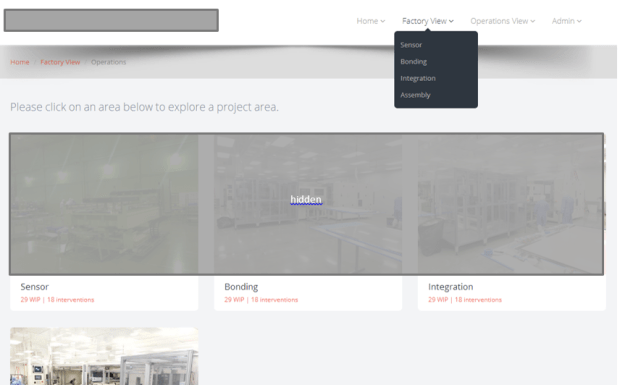
Anyway I just took the embedded HTML assets – which are actually nicely organized – and dropped them into my root folder and built it. Stripped out some pieces piece by piece and – looky here!


I’m not a UX expert – that’s a legitimate and very-little understood specialty – and I don’t like pretending to be one. Paying an expert a few bucks to pop together a great looking site, where I can drop in some simple HTML – and have it work on any device, FAST, is a great plus.

Still looking for UX ideas? A friend put together a GREAT looking site – again using Bootstrap – here: http://www.crossfitreflexion.com – feel free to give that a look. That’s a clean user interface, and it looks GREAT on a mobile device.


Themes I looked through


Blogging notes and tools… Viva Live Writer and PreCode!

Last night my wife and I – on one of those once-in-a-blue-moon date nights – went to a great concert at the Mississippi Studios in North Portland. The opening acts were TERRIBLE – especially the ‘performance artist’, which was a complete trainwreck. We’re talking screeches, weird jerking kind of dances, losing her notes and shuffling through papers on the floor, and these long awkward pauses. But, Catherine Feeny was TERRIFIC. I was so impressed that she was able to do so much with a two-person group. It was a GREAT show! (The fact that the tickets were under $8 made it all the sweeter.)

I’ve been a lazy blogger for a long time – meaning I just copy-and-paste my images into Microsoft Word, and publish. No muss, no fuss, and the tool doesn’t get in the way. The issue is, my code snippets don’t surface properly. Images can’t be googled and are evil for code; the hoster I’m using (sadly) doesn’t like a <scripts> tag or anything beyond plain vanilla HTML. So, what to do?

I set up Live Writer recently and have been experimenting with it, in combination with the PreCode tool at this location. It’s relatively easy to set up – once you’re in you can just click on the “PreCode” snippet on the insert toolbar:

image

This gives me a nice snippet as below.


        public void Configuration(IAppBuilder app)
        {
            app.MapSignalR();
            //ConfigureAuth(app);
        }


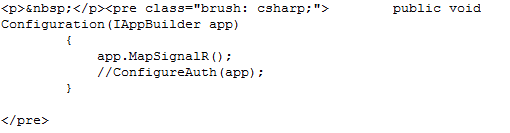
Really all it does is insert a < pre > tag around your HTML like this:

image


Simple, and beautiful. Just like Catherine’s music!

Scott H did a great post on the subject, if you want to get a leg up on the other options available to you…

Chatting with SignalR


I haven’t messed around much with SignalR yet – but it’s going to become an important part of my toolbox whenever it comes to asynchronous surfacing of data. This isn’t a fit for every application – often near-time is fine – but for instant, up to date numbers – think a stock screen or a chat application – it’s TERRIFIC. Let’s do a simple demo and see how it works:

First open up Visual Studio 2013 and create a web application:

And make sure it’s an MVC app:

At the Package Manager Console, enter “install Microsoft.aspnet.signalr” – yes this could be done in NuGet as well:

NuGet Route:

Search for SignalR and install Microsoft ASP.NET SignalR (installing this will install Core Components, Javascript, and System.web pieces).

You’ll see a readme file (after it downloads its dependent assemblies) like the following. Love that explicit messaging!

Add those lines above to a class called Startup.cs in the root folder – if you installed this it should already be pre-created –so it has a Configuration method that looks like this:


public
void Configuration(IAppBuilder app)

{

app.MapSignalR();


//ConfigureAuth(app);

}


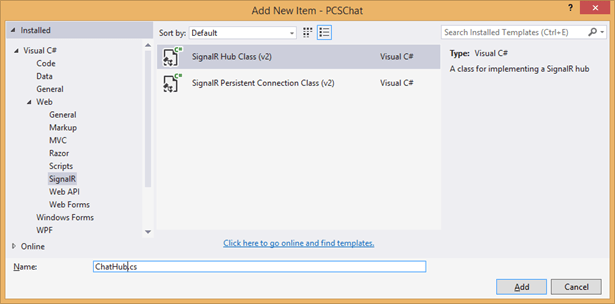
I’ve chosen to comment out configuration for the authentication, since we’re not going to do that for this demo. Then, create a new folder called “Hubs” and add a new SignalR Hub Class:


Replace the “Hello” method with the following for this simple chat application:


        public void Configuration(IAppBuilder app)
        {
            app.MapSignalR();
            //ConfigureAuth(app);
        }

Above, the Clients.All is dynamically created – so it’s very customizable. We could put the Clients into groups, or exclude a set (Admins, for example).

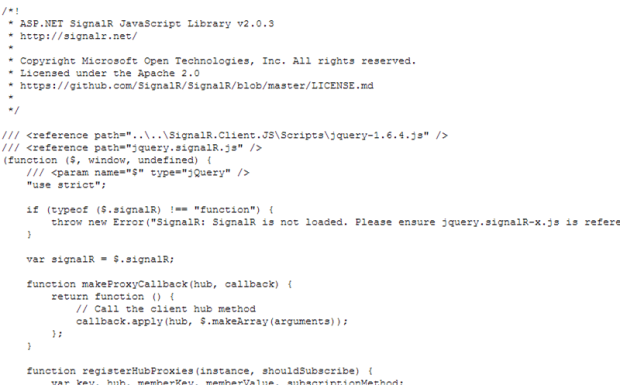
Try building your project, and point to SignalR/hubs. Notice the following when I navigate to {localhost}/SignalR/hubs:


Notice in the footer area your shiny new method with a Send. If you had built this earlier, you’d be seeing a Hello function visible to clients:


Let’s use Knockout for the fancy-dancy data binding. Use NuGet to pull down the latest version of KnockoutJS. Then, create a javascript class under Scripts and fill it with the following code:


(function () {


var chatHub = $.connection.chatHub;

$.connection.hub.logging = true;

$.connection.hub.start();


chatHub.client.newMessage = function (message) {

model.addMessage(message);

};


var Model = function () {


var self = this;

self.message = ko.observable(“”),

self.messages = ko.observableArray()

self.counters = ko.observableArray()

};


Model.prototype = {


sendMessage: function () {


var self = this;

chatHub.server.send(self.message());

self.message(“”);

},


addMessage: function (message) {


var self = this;

self.messages.push(message);

}


};


var model = new Model();


$(function () {

ko.applyBindings(model);

});


}());

Now to add a client to allow the creation of messages. You could add the following to an empty view using MVC, or embed this in a user control – or use Bootstrap’s modal to have it as a popup.


<script
src=”../Scripts/jquery.signalR-2.0.3.js”></script>

<script
src=”../SignalR/hubs”></script>

<script
src=”../Scripts/knockout-3.1.0.js”></script>

<script
src=”../Scripts/chatSurf.js”></script>

<div
class=”row”>


<div
class=”col-md-4″>

Comments:


<input
type=”text”
placeholder=”Message”
data-bind=”value: message
/>


<button
class=”btn btn-primary”
data-bind=”click: sendMessage“>Send</button>


</div>


<div
class=”col-md-8″>


<div
data-bind=”foreach: messages“>


<div
data-bind=”text: $data“></div>


</div>


</div>

</div>


That’s enough for our demo purposes. I dragged the user control onto another form and build the project – let’s see what we get:

You’ll notice, there’s no identity for the current user – that’s something I need to add to my application (since currently users are not authenticated). That’s for a future iteration. Also, next up – I want to make that a scrollable DIV showing the most recent 5 posts, have Knockout save its records to a database, and allow the flagging of particular messages as Critical (with specific coloring).

However, it was an instructive walkthrough for me of what SignalR can do. For real-time streaming of information – such as facility alerts that you want broadcast to a set of subscriber clients – it’s REALLY hard to beat.

Some Footnotes

  • Note that Scott Hanselman did a neater example using just a handful of lines of code in this post. Some of the coding is a little dated but it does show a chat app in <12 lines of code:


“So and So Is Not a Valid Script Name.”

I was going to have this post be about SignalIR, but due to various things… just didn’t happen today. Long story short, I ended up creating a new project from scratch – only I had it be a MVC project with Webforms tacked on, versus the other way around – and added all the references I needed to get Metro-Bootstrap to work. Along the way, I decided to do some refactoring and moved everything under /docs and /css to the Content folder – I dislike having CSS elements scattered every which way. However, I got this funky message:

‘Jquery is not a valid script name. Must end in .js” – or the like.

Hmm. Well, I went into NuGet and updated everything I could think of. Then I went to the BundleConfig class, Global.asax, and Web.config – and looked for where I was registering the prefix “jquery”.

Long story short, this was fixed by in NuGet adding packages for AspNet.ScriptManager.jQuery as below (and I added the *.WebForms as well). This handled the registration and added the correct javascript to the Scripts folder. This was a real pain until I nailed it down, and I wanted to pass it on.