Year: 2014

Code snippet – expanding hierarchies in SQL Server

I seem to remember posting on this subject back in December – but I can’t find it. Sigh. (note – just found the post, here – it’s down a ways but still there.) I have a table called Symptom that contains a hierarchical structure – i.e. a ID field and a ParentID field, in this implementation. (Yes I could have used HierarchyID – we opted not to, after looking at all our options.)

Note we could have used recursion. If this was >10 levels or so, I would do that. But SQL is great at joins and they execute very fast; we’ll use this approach for now. See http://www.codeproject.com/Articles/16032/Expanding-SQL-Hierarchies-The-Dualistic-Approach or the Microsoft SQL Server Bible 2008 by Paul Nielsen for more on expanding hierarchies and the adjacency pattern.


-- Retrieve the whole hierarchy from level 1 to level 5
declare @t table (
l1 int, l2 int, l3 int,  l4 int, l5 int, id int, depth int)

-- Populate @t: expand msg hierarchy for levels 1-5
insert into @t
select m1.SymptomID, m2.SymptomID, m3.SymptomID, m4.SymptomID, m5.SymptomID, null, 1
from Symptom as m1
left outer join Symptom m2 on m1.SymptomID=m2.ParentID
left outer join Symptom m3 on m2.SymptomID=m3.ParentID
left outer join Symptom m4 on m3.SymptomID=m4.ParentID
left outer join Symptom m5 on m4.SymptomID=m5.ParentID
where m1.ParentID is NULL

-- Calculate node level for each node and get tree depth
declare @depth int
update @t set depth = depth + 1 where l2 is not null
update @t set depth = depth + 1 where l3 is not null
update @t set depth = depth + 1 where l4 is not null
update @t set depth = depth + 1 where l5 is not null
select @depth = max(depth) from @t

-- Since we have made several joins, we have only leaf nodes of level 4 in  -- @t. Add missing leaf nodes of level 1
insert into @t select distinct l1, NULL, NULL, NULL, NULL, NULL, 1 from @t where l2 is not NULL
-- Add missing leaf nodes of level 2
insert into @t select distinct l1, l2, NULL, NULL, NULL, NULL, 2 from @t where l3 is not NULL
-- Add missing leaf nodes of level 3
insert into @t select distinct l1, l2, l3, NULL, NULL, NULL, 3 from @t where l4 is not NULL
-- Add missing leaf nodes of level 4
insert into @t select distinct l1, l2, l3, l4, NULL, NULL, 3 from @t where l5 is not NULL

-- Populate id field, get the rightmost msg id from @t
update @t set id=coalesce(l5, l4, l3, l2, l1)

select id
, depth
, SymptomFullDesc = 
CASE WHEN depth = 1 THEN l1.SymptomDesc 
WHEN depth = 2 THEN l1.SymptomDesc + ' > ' + l2.SymptomDesc
WHEN depth = 3 THEN l1.SymptomDesc + ' > ' + l2.SymptomDesc + ' > ' + l3.SymptomDesc 
WHEN depth = 4 THEN l1.SymptomDesc + ' > ' + l2.SymptomDesc + ' > ' + l3.SymptomDesc + ' > ' + l4.SymptomDesc
WHEN depth = 5 THEN l1.SymptomDesc + ' > ' + l2.SymptomDesc + ' > ' + l3.SymptomDesc + ' > ' + l4.SymptomDesc + ' > ' + l5.SymptomDesc
END
from @t t
left outer join Symptom l1 on t.l1 = l1.SymptomID
left outer join Symptom l2 on t.l2 = l2.SymptomID
left outer join Symptom l3 on t.l3 = l3.SymptomID
left outer join Symptom l4 on t.l4 = l4.SymptomID
left outer join Symptom l5 on t.l5 = l5.SymptomID
ORDER BY depth, SymptomFullDesc
Don’t shortchange architecture.

Can I say, I’m actually a little disappointed in EntityFramework right now. We were moving to more of a model based solution with the second version of our software, but found these pitfalls:

  1. In all but the simplest Admin forms stored procedures will be necessary. For example, you will want to update against a table – but run checks against a balance, or update a ParentID, or modify related information – you’ll have to spill across multiple entities. The simplest way I know of doing this without a lot of wasted code is db-side sprocs.
  2. EF works TERRIFIC when you’re binding directly to a table. But as soon as you have to use sprocs there’s a TON of manual coding and clicks that has to happen. This means the same or more amount of work than in old-school DAL layers.

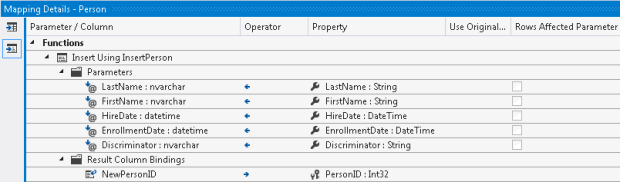
For example, look at this EF sproc mapping:

Say it with me – Eeeeessshhhhh. Having done a few dozen of these mappings so far I can say it’s a painful process and as fraught with peril as any DAL layer. And, since it’s graphically based and not a class, I frankly don’t trust it as much when it comes to making changes. EF does a good job of prepopulating many of these, but not always – especially if the table name and the field name are the same, or if the casing is slightly off (Id versus ID for example). I may end up sighing, throwing up my hands, and rolling back to a SqlDataSource instead.

Long story short – I would love to blame our ever-increasing list of functionality but specs are specs, and I don’t think things like soft-delete or cascading changes are unique to this application/working environment. And, I’m looking back on the road we chose not to take – BOWA (Breeze-OData-WebAPI-AngularJS) and wishing we had spent a few more weeks on architecture and a firm set of guidelines/standards. It would have paid off handsomely when it came to maintenance and durability for this app.

Explorations with Azure – knocking out a pilot website in about two hours.

So recently I was asked to put together a pilot website for a friend who’s not super tech-savvy. His business may or may not ever get off the ground; like most of us he’s wanting to float something out there and see if it goes somewhere. An internet storefront seemed like a great place to start.

OK, so after the requisite weeks of haggling over the name, I scaffolded out a site and posted it on Azure. I’m happy to announce that the site is awesome, very responsive – and best of all, free. It’s a VERY good use case for what Azure does very well – quick ramp-up sites that may or may not see full-size production traffic.

My first step was to create a Visual Studio Online project. This was simple – see below:

Following this I opened up the project in Visual Studio 2013. I had to map the workspace and pull down the code – in this case it was empty – before we could see our old friend Source Control Explorer.

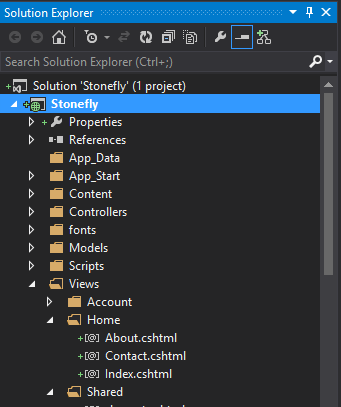
Now, to work. I clicked, File, New Project, and selected ASP.NET Web Application. I selected Application Insights and synched it up with my new stonefly.visualstudio.com account.


I used the MVC option as my main option – but also added WebForms and WebAPI in case I want to tack them on in the future. Now, I’ve got a set of code available – that I can see is ready to be checked in. Right mouse click that baby and check in the code!


Back to your Azure account. Click on New Web Site and select the Custom Create option. I entered in my desired URL and a bare-bones SQL option – and, this is important, selected the Publish From Source Control option.

Selecting that option took me to the authorize connection screen in Azure, where I synched up my stonefly.visualstudio.com sourcecode with the new Azure website that was being spun up. Select the Authorize Now option here.

Once I did this, it took me back to Visual Studio 2013 – where a publish profile was ready to go for me. I skipped through the now-familiar Profile -> Connection -> Settings -> Preview steps – they were all set up nicely by the Azure publish profile – and clicked Publish.


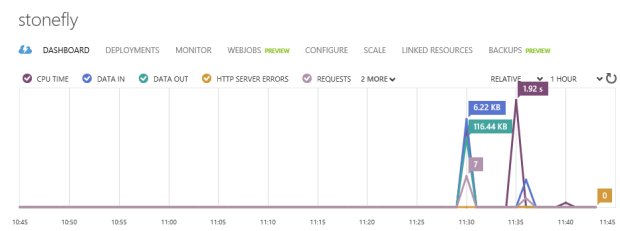
… and, my site was published – lickity split. I could view it on stonefly. I also get all that cool less-is-more Azure dashboarding, showing requests/response time:

Best of all, I now have my site up and my code available in a repository that I can access anywhere. Feel free to check it out. No need to walk around with thumbdrives anymore. And, there’s something about building out a demo site quick and cheaply like this that appeals to me. Add to it that my TFSOnline account was free – yes, free (if MSFT ever changes that I could move over to GitHub) – and the case for handling this in Azure versus going all-out and spinning it up on discountasp.net or the like becomes pretty compelling. This is enough for my friend to evaluate and decide on next steps. Sprinkle in some HTML and CSS, and suddenly we’ve got ourselves a going concern:

Now, I could buy a DNS address (like, I don’t know, stoneflysoftware.azu or the like) and register it with Azure. But I probably won’t. As you can see from this site, it ain’t cheap – we’re talking $56/month for basic, which is a great deal if you have 6 or more sites you’d like to host, or you need true geodistributed 99.9% HA coverage on your site. Scott Hanselman has a whole series of articles on pennypinching with Azure that I’d recommend, including this nifty video on using Azure as a CDN.


EntityFramework – “The provider did not return a ProviderManifest instance”

Quick post for the day. I was trying to configure a data source in a listview – converting over to EntityFramework from a SQL data source – and I got this funky message:

Hmmm. Why is this? Well, I had to open up my data models project, and change the ProviderManifestToken=”2012″ attribute to “=2008”.

\

And voila. Changing that one key – and this is a known bug with EntityFramework 6 that the team has on their list to fix – got me where I needed to go. I had my lot tracking admin screen up and going in about 5 minutes.

Webforms Versus MVC – Honestly, Who Cares?

P.s. – Webforms, rightly, have a bad name – because of bloated codebehind. But what happens when you drag on a listview, and click on the little arrow in the Design pane – and point to an EF data source with a PK? Suddenly, you have a fully functioning page – with NO codebehind – and all your upd/ins/del statements are coming straight from EF. That seems pretty clean to me.

To me – and to many others – ASP.NET Webforms and MVC are equivalent forms. IF your webform has no bloated codebehind, and is running from either a EF-generated model or, better, knockoutJS data binding – don’t you have a clean and easy to maintain architecture?

Webforms are bad if you have bloated codebehind. They’re good and equivalent to MVC without that code smell. MVVM – well, that is a superior pattern to both – but that’s for a future post.

Science cannot move forward without heaps!

So today I was having an issue where the site would build perfectly locally, but would burp up garbage when I published it out to DEV. So, after messing around with the source code a little, I started back at the beginning, with a raw HTML page, then built a master page, and voila – the issue was in something I’d missed in migrating the CSS code over from an older site. Now I could build my monument to CSS3/HTML5 while ignoring the piles of dead code littered along the path behind. Reminds me of that classic Futurama quote:

Professor Farnsworth: “This time I’m sure I fixed the mind-switcher.”

Amy: Good. I’m sick of cleaning up those heaps of dead rhesus monkeys!”

Professor Farnsworth: “Science cannot move forward without heaps!”


An interesting article on the ultimate dead end of ‘truthiness’ here – Language and the Cheshire Grin of Donald Rumsfeld: “…He was trying to articulate a philosophy, and in articulating the philosophy he was basically saying things that he believed but which made no sense. I think that’s probably the best way to describe it. He knew these expressions. He wrote this to the president of the United States: “The absence of evidence isn’t the evidence of absence.” … Then all of a sudden the ballistic missile commission picks it up, and Rumsfeld runs with it, and it’s trucked out during the run-up to the Iraq war.  UN weapons inspector goes to Iraq and can’t find any evidence of a WMD—that’s not absence of evidence, that’s direct evidence that the suspected WMDs are simply not there. The way I describe it is that it’s like someone tells you there’s an elephant in the room. You open the door and you look in the room, you open the closets, you look under the bed, you go through the bureau drawers, and you don’t find an elephant. Is that absence of evidence or evidence of absence? I would submit it’s the latter. But this gobbledygook use of nomenclature and terminology just creates endless confusion, vagueness, ambiguity—and I would submit that they kept doing this with respect to everything.”