Author: elvisboats

Short Version: I'm married to the amazing (and amazingly forgiving) Jennifer, proud possessor of two amazing kids, crazy about all things trouty with fly fishing. I'm an Application Development Manager with Microsoft, and am based out of Portland, Oregon. Long Version: I grew up in Oregon, and moved down to California with the original goal of finishing my education in Civil Engineering, but I found application development and RDBMS systems much more exciting! I do miss the mountain biking in California and the awesome Mexican food, but Oregon is my home and I have never regretted moving back to start a family. Plus it gives me more time for fly fishing for trout and steelhead on the beautiful Deschutes river in central Oregon! ;-) Working for Microsoft has by far been the best experience of my professional life; it's great working with a group of people that are passionate about writing good code and continually improving development practices and firepower. Past assignments have included Providence Health Plans, Kroger, and managing a .NET development team at Columbia Sportswear. Working at Columbia in particular gave me a great customer-side perspective on the advantages that Azure offers a fast-moving development team, the dos and don’ts of agile development/scrum, and the cool rich Ux experiences that SPAs (Single Page Applications) can offer with Breeze, OData, WebAPI, and modern Javascript libraries. Microsoft did a fantastic job of engaging with Columbia and understanding our background and needs; I witnessed their teams win over an initially hostile and change-averse culture. The end result was a very satisfying and mutually beneficial partnership that allowed Columbia to build dynamic applications and services using best-of-breed architecture. I’m a MCDBA and a Certified Scrum Master.

EntityFramework – “The provider did not return a ProviderManifest instance”

Quick post for the day. I was trying to configure a data source in a listview – converting over to EntityFramework from a SQL data source – and I got this funky message:

Hmmm. Why is this? Well, I had to open up my data models project, and change the ProviderManifestToken=”2012″ attribute to “=2008”.

\

And voila. Changing that one key – and this is a known bug with EntityFramework 6 that the team has on their list to fix – got me where I needed to go. I had my lot tracking admin screen up and going in about 5 minutes.

Webforms Versus MVC – Honestly, Who Cares?

P.s. – Webforms, rightly, have a bad name – because of bloated codebehind. But what happens when you drag on a listview, and click on the little arrow in the Design pane – and point to an EF data source with a PK? Suddenly, you have a fully functioning page – with NO codebehind – and all your upd/ins/del statements are coming straight from EF. That seems pretty clean to me.

To me – and to many others – ASP.NET Webforms and MVC are equivalent forms. IF your webform has no bloated codebehind, and is running from either a EF-generated model or, better, knockoutJS data binding – don’t you have a clean and easy to maintain architecture?

Webforms are bad if you have bloated codebehind. They’re good and equivalent to MVC without that code smell. MVVM – well, that is a superior pattern to both – but that’s for a future post.

Science cannot move forward without heaps!

So today I was having an issue where the site would build perfectly locally, but would burp up garbage when I published it out to DEV. So, after messing around with the source code a little, I started back at the beginning, with a raw HTML page, then built a master page, and voila – the issue was in something I’d missed in migrating the CSS code over from an older site. Now I could build my monument to CSS3/HTML5 while ignoring the piles of dead code littered along the path behind. Reminds me of that classic Futurama quote:

Professor Farnsworth: “This time I’m sure I fixed the mind-switcher.”

Amy: Good. I’m sick of cleaning up those heaps of dead rhesus monkeys!”

Professor Farnsworth: “Science cannot move forward without heaps!”


An interesting article on the ultimate dead end of ‘truthiness’ here – Language and the Cheshire Grin of Donald Rumsfeld: “…He was trying to articulate a philosophy, and in articulating the philosophy he was basically saying things that he believed but which made no sense. I think that’s probably the best way to describe it. He knew these expressions. He wrote this to the president of the United States: “The absence of evidence isn’t the evidence of absence.” … Then all of a sudden the ballistic missile commission picks it up, and Rumsfeld runs with it, and it’s trucked out during the run-up to the Iraq war.  UN weapons inspector goes to Iraq and can’t find any evidence of a WMD—that’s not absence of evidence, that’s direct evidence that the suspected WMDs are simply not there. The way I describe it is that it’s like someone tells you there’s an elephant in the room. You open the door and you look in the room, you open the closets, you look under the bed, you go through the bureau drawers, and you don’t find an elephant. Is that absence of evidence or evidence of absence? I would submit it’s the latter. But this gobbledygook use of nomenclature and terminology just creates endless confusion, vagueness, ambiguity—and I would submit that they kept doing this with respect to everything.” 

Getting started with app dashboarding using Application Insights.

Application Insights have been getting some buzz recently with TechEd and other events. Why is that?

Let’s start with an existing website. Once I installed the VISX file for Application Insights and restarted Visual Studio, I can right mouse click on my project and add Application Insights Telemetry to the project.


It looks like you MUST have your project hosted on Visual Studio Online for this to work. I dusted off my old account and…

Hmmm. What ARE these cool new dashboards that just appeared in my web project?

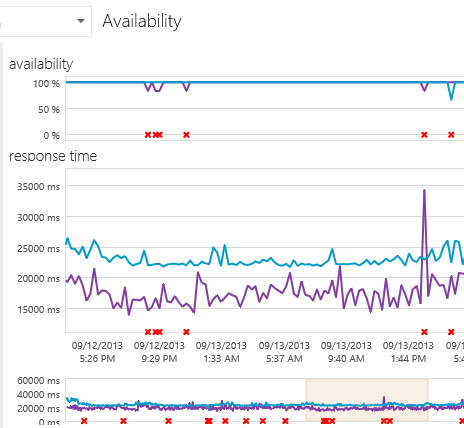
Let’s build it and deploy out to a website. We’re going to follow the step by step instructions here. (and… screeching halt – this won’t work for my app, since it’s an intranet app and not public-facing. Sigh.) Still, I’m going to leave this here since it shows – adding dashboarding to show availability and performance for your website is literally just a right-mouse click. You can check for:

availability

track usage

…including what pages/features are being used by your customers:

v


.. and even set up tiles with a custom dashboard. Think about deploying this along with your site. I was so impressed with the real-world metrics that came OOTB with Azure. Microsoft’s definitely upped the ante with Application Insights.

Other Tidbits


Some good advice from the redoubtable Julie Lerman this month in MSDN. Updating from EF4 to EF6 (and now EF7 I guess!) is relatively trivial – mainly some namespace changes. But breaking up a large data model into pieces, while HIGHLY desirable from a performance standpoint, is a little more substantial – and changing from ObjectContext to the newer DbContext API is fairly involved. She recommends doing it one piece at a time. Start with a separate model project, split out as you like – then change your app references one by one and see what functionality breaks. There’s some big performance gains you’ll see in going from EF4 to 5/6; it’s well worth it. Please check out her books and teaching videos on Pluralsight, they’re terrific.

Side note – I thought this Grantland article was terrific. Nintendo started with a small market, kept a laser focus on a specific niche (9-to 14-year olds) and grew with one dynamic product, Donkey Kong. They survived and counterpunched Universal when they tried to shake them down with a copyright claim extortion from the 1933 movie King Kong. And they deliberately created marketing buzz with a specific look and only fulfilling a fraction of vendor requests. This long term strategy over short term profits – combined with the Seal of Quality and a strict licensing program that weeded out all but serious development companies – fueled their rise from the wreckage of the American video game companies like Atari.

Theming It Up! I love you Bootstrap, never leave me alone again…


So, here’s my “second version” of my site. Using plain vanilla Bootstrap. Barf, urf, yuck.

How do I kinda beef this up look-wise without spending half a lifetime in CSS-land?

Well, I tried using some of the free Metro themes. And, it looked… better but still really plain.


So, cough up $10 or so and get a professional’s assistance. I went through probably about 20 designs and ended up setting – for the bargain-basement price of $8 – on the Atropos theme. (It just looked a little more professional than the 2nd place winner, Flanzo – if I wanted something a little more forward-looking I would have gone with Clean or – something I really like in terms of look – Smart.

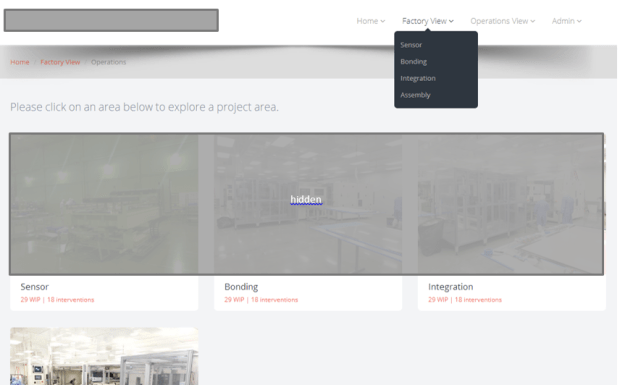
Anyway I just took the embedded HTML assets – which are actually nicely organized – and dropped them into my root folder and built it. Stripped out some pieces piece by piece and – looky here!


I’m not a UX expert – that’s a legitimate and very-little understood specialty – and I don’t like pretending to be one. Paying an expert a few bucks to pop together a great looking site, where I can drop in some simple HTML – and have it work on any device, FAST, is a great plus.

Still looking for UX ideas? A friend put together a GREAT looking site – again using Bootstrap – here: http://www.crossfitreflexion.com – feel free to give that a look. That’s a clean user interface, and it looks GREAT on a mobile device.


Themes I looked through


Blogging notes and tools… Viva Live Writer and PreCode!

Last night my wife and I – on one of those once-in-a-blue-moon date nights – went to a great concert at the Mississippi Studios in North Portland. The opening acts were TERRIBLE – especially the ‘performance artist’, which was a complete trainwreck. We’re talking screeches, weird jerking kind of dances, losing her notes and shuffling through papers on the floor, and these long awkward pauses. But, Catherine Feeny was TERRIFIC. I was so impressed that she was able to do so much with a two-person group. It was a GREAT show! (The fact that the tickets were under $8 made it all the sweeter.)

I’ve been a lazy blogger for a long time – meaning I just copy-and-paste my images into Microsoft Word, and publish. No muss, no fuss, and the tool doesn’t get in the way. The issue is, my code snippets don’t surface properly. Images can’t be googled and are evil for code; the hoster I’m using (sadly) doesn’t like a <scripts> tag or anything beyond plain vanilla HTML. So, what to do?

I set up Live Writer recently and have been experimenting with it, in combination with the PreCode tool at this location. It’s relatively easy to set up – once you’re in you can just click on the “PreCode” snippet on the insert toolbar:

image

This gives me a nice snippet as below.


        public void Configuration(IAppBuilder app)
        {
            app.MapSignalR();
            //ConfigureAuth(app);
        }


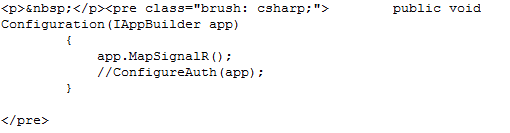
Really all it does is insert a < pre > tag around your HTML like this:

image


Simple, and beautiful. Just like Catherine’s music!

Scott H did a great post on the subject, if you want to get a leg up on the other options available to you…