I remember laughing at the American car companies in the 80’s that – panicked by the unmatched quality coming out of Toyota – sent spies and emissaries out to Japan to emulate what was being done in the factories. They were given complete access, took it back to America – and it fell flat on its face. The Japanese product managers implementing Lean in the manufacturing floors snickered that they were copying the image of Buddha without the spirit. How could they ever implement something they didn’t understand? In part, those American car company manufacturers missed the essence of kata, or continuous improvement through repetition. By neglecting culture, any tool or process they tried just ended up in the same dead end.
I just finished reading the Phoenix Project by Gene Kim etc – oddly enough, on a trip out to Phoenix – and found myself wanting to smack myself in the forehead. There are so MANY things about DevOps that I did not understand, even a year ago. It would have made the last five years of my life immeasurably smoother – if I had understood the principles and thoughts behind what I was trying to do. (Insert cargo cult joke here)
We don’t have a DevOps Manifesto yet – and one is badly needed. In the meantime, we have two books that sum things up. If you haven’t read the Old Testament and New Testament of DevOps – that’s the Phoenix Project and Continuous Delivery by Jez Humble – you are missing out. The Phoenix Project is ¾ management-speak – a hero leader who steps in and methodically saves a failing company, you know the old story of the guy pointing majestically at the sunset on a horse? But, here’s the thing – if you want to convince CxO type people of the importance of DevOps, you need to read this book. It speaks the language of management – so it will help you tell a story that your management and the CIO would want to hear. And buried in its pages are some real depth.
Creating Flow – the Three Ways
I used to show a picture of Hillsboro, Oregon on the 26 during rush hour. This is, no one will argue, a fully utilized freeway. But, is it efficient?
The key to the Toyota Lean principles – and Kanban and Agile and everything else – is creating that flow. That means a buffer in every day, in every week, where we have space to think about how work is done – not just the what.
|
What |
How |
|
The First Way: Maximizing flow with small batch sizes and intervals of work, never passing defects downstream, global goals |
Continuous build, integration and deployment Creating environments on demand Limiting Work in Process Building systems that are safe to change |
|
The Second Way: Establishing quality at the source. Constant feedback from right to left, ensuring we prevent problems from happening again and enabling faster detection/recovery. |
Stopping the line when builds/tests fail Fast automated test suites Shared goals/pain between Dev / IT Pervasive production telemetry showing if customer goals are met |
|
The Third Way: Creating a culture that fosters experimentation and risk. |
High trust culture versus command and control Allocation >20% of Dev/Ops cycles towards nonfunctional requirements Constant reinforcement of DevOps CoE and improvements kata |
This is really illuminating. For example, think of the “stopping the line” item above for the Second Way. How many times did I – in previous assignments – take any bugs from the previous release and kick it to last in order, behind the fun stuff that I really wanted to work on? Even in smaller teams of three – where I thought “we’ll never step on each others toes” – how many integration issues did we have, right before important demos? And by neglecting automated testing, how many defects did I end up passing downstream – creating systems that were inherently difficult to change?
Dysfunction and DevOps – The Importance of culture
This has been mentioned before in my posts – but notice (courtesy of Puppet from a study done by Westrum in 2004) the illuminating chart of the three types of organizations:
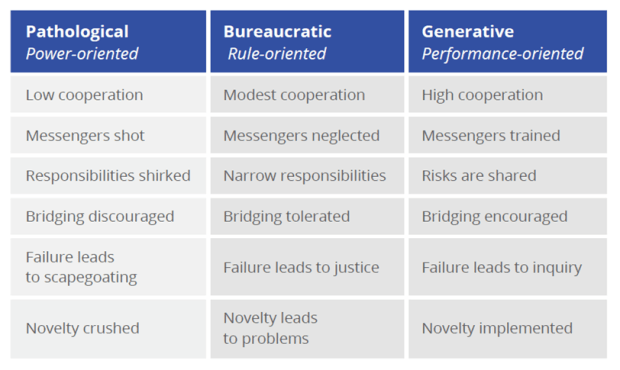
Now notice the Five Dysfunctions of a Team by Patrick Lencioni:
- Absence of trust (unwilling to be vulnerable within the group)
- Fear of conflict (seeking artificial harmony over constructive passionate debate)
- Lack of commitment (feigning buy-in for group decisions, creating ambiguity)
- Avoidance of accountability (ducking the responsibility to call peers on counterproductive behavior, which sets low standards)
- Inattention to results (focusing on personal success, status and ego before the team)
Notice anything interesting? Let’s match up the sick organization on the far left – the power-based Pathological one – with that list of five dysfunctions:

So now we get a glimmer of light on why organizations with high-performing IT departments tend to be high-performing organizations – and why the reverse is also true, a sick IT shop, or one enslaved to the business or at the mercy of a cowboy group of developers, is a good indicator of underperformance. Companies that embrace DevOps as a culture tend to be high-trust, risk-friendly. They’re not afraid of differing opinions or radical ideas like Netflix’s Evil Chaos Monkey. People tend to waste less energy taking potshots at other teams/departments – and more attention to the common shared goal.
As the Phoenix Project brings out, the relationship between a CEO and a CIO is like a dysfunctional marriage – both sides feel powerless and held hostage by the other. This is true of Dev and Ops as well – and I’ve been in that sick marriage more than once. The essence of the book is forming a strong bond where the union becomes much closer by sharing goals and work based on company needs.
Other Thoughts from The Book
Common Agile Myths
- DevOps is just automation or infrastructure as code (no, that’s the tool – it’s part of it, but not the whole)
- DevOps replaces Agile (DevOps is meant to complete Agile – where bits aren’t just going into QA, but out the door to production)
- DevOps replaces ITIL/ITSM (It embodies ITIL concepts)
- DevOps means NoOps (DevOps means a truly empowered, nonsiloed Ops)
- DevOps is only for startups
- DevOps is only for open source software
On #5 and #6 above, this comes down to “We can’t do DevOps, because we’re special/unique/a snowflake.” But think of some of the companies today that are leading in the DevOps world and where they were just a few years ago:
- Amazon until 2001 ran on OBIDOS content delivery service, dangerous and problematic to maintain
- Twitter struggled to scale frontend monolithic Ruby on Rails system – took multiple years to rewrite
- LinkedIn in 2011 six months after IPO had to freeze features for massive overhaul
- Etsy in 2009 was “living in a sea of their own engineering filth”
- Facebook in 2009 at breaking point, staff continually firefighting, releases painful and dangerous
I must read The Goal by Eli Goldratt. I love the thought – there is always a constraint or bottleneck in any organization (men, material, machines) that dictates the output of the entire system. Until you create a system that manages the flow of work to the constraint, the constraint is constantly wasted – and likely drastically underutilized. Technical debt skyrockets, and you can’t deliver to the business at full capacity. A following step is to exploit the constraint – where its not allowed to waste any time, ever. It should never be waiting on anything, and it should always be working on the highest priority commitment IT made to the rest of the enterprise.










 /* driftboatdave */