Author: elvisboats

Short Version: I'm married to the amazing (and amazingly forgiving) Jennifer, proud possessor of two amazing kids, crazy about all things trouty with fly fishing. I'm an Application Development Manager with Microsoft, and am based out of Portland, Oregon. Long Version: I grew up in Oregon, and moved down to California with the original goal of finishing my education in Civil Engineering, but I found application development and RDBMS systems much more exciting! I do miss the mountain biking in California and the awesome Mexican food, but Oregon is my home and I have never regretted moving back to start a family. Plus it gives me more time for fly fishing for trout and steelhead on the beautiful Deschutes river in central Oregon! ;-) Working for Microsoft has by far been the best experience of my professional life; it's great working with a group of people that are passionate about writing good code and continually improving development practices and firepower. Past assignments have included Providence Health Plans, Kroger, and managing a .NET development team at Columbia Sportswear. Working at Columbia in particular gave me a great customer-side perspective on the advantages that Azure offers a fast-moving development team, the dos and don’ts of agile development/scrum, and the cool rich Ux experiences that SPAs (Single Page Applications) can offer with Breeze, OData, WebAPI, and modern Javascript libraries. Microsoft did a fantastic job of engaging with Columbia and understanding our background and needs; I witnessed their teams win over an initially hostile and change-averse culture. The end result was a very satisfying and mutually beneficial partnership that allowed Columbia to build dynamic applications and services using best-of-breed architecture. I’m a MCDBA and a Certified Scrum Master.

Noodling around with Entity Framework.

Entity Framework is the default way that Microsoft wants us to be noodling around with data. And it’s easy to see why – this is MSFT’s answer to the challenge posed by Ruby, well over ten years ago. EF gets better with every version.


From the Getting Started documentation, it should just be a simple matter of

  1. Add a new diagram – and make sure for delete (for example) all changes are set to cascade.
  2. Add a new web form + master page.
  3. Add an Entity Data Source. In design view, configure it to point to your Entities data source you created in step #1.
  4. Add a new GridView. Select your entity data source. Select Enable Paging…. down to Enable Delete. Delete the ID fields.
  5. Set the Dates template, etc on any custom fields.
  6. Set up the ContextTypeName attribute to enable lazy loading.

However, I’m getting a “The provider did not return a ProviderManifest instance” error message. This usually indicates an issue with the connection string. I’ve tried switching to Integrated Security, changing the username/pwd – no dice. I honestly think this is a bug with EF6, since I’m using the most recent version of Entity Framework and I can’t recall seeing this issue in EF5.

Since the forms use sprocs by and large, and we are using webforms, I’m OK with – for now – going old-school and using sprocs not EF for my data connections. For our new app though I am going to revisit this and use either Linq-to-SQL or preferably that nifty BackboneJS/KnockoutJS + MVC stack and a webapi data layer.

jquery and bootstrap hassles…


Had an issue the other day where I was creating a new project (part of spring cleanup!) and adding in security like I wanted. Then this bad boy came around:


‘jquery’ is not a valid script name.  The name must end in ‘.js’.

Hmmm. What causes this?


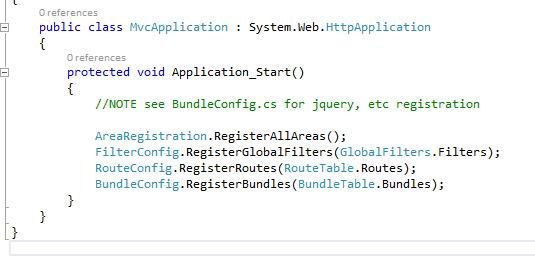
Look at Global.asax – see the BundleConfig pointer?


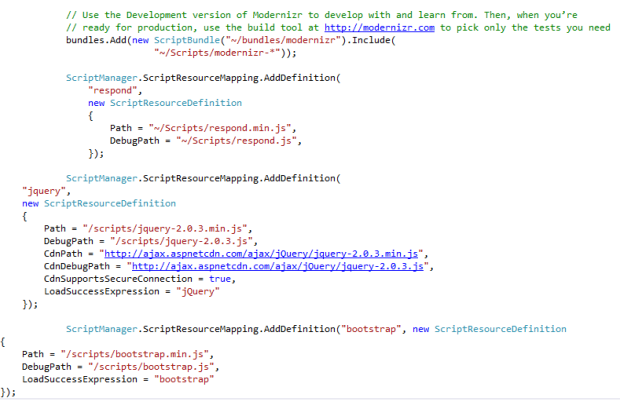
So, this gives us our starting place. We need to make changes to BundleConfig.cs (under App_Start) and the Site.Master page.


So for example to add a “bootstrap” name we can point to in our site master, we use the following snippet:


ScriptManager.ScriptResourceMapping.AddDefinition(“bootstrap”, new
ScriptResourceDefinition

{

Path = “/scripts/bootstrap.min.js”,

DebugPath = “/scripts/bootstrap.js”,

LoadSuccessExpression = “bootstrap”

});


Now in Site.Master the following ScriptReferences should work with no errors:


Whittling away on security.

It’s here I must acknowledge my debt to this post. Great writing and excellent code, I’m in awe. What I’m doing below is just tinkering with this example really.

The authentication model that comes out of the box with ASP.NET works great – if you’re creating a standard external website. But what about if you want a more locked-down model – where people have to be authorized by a gatekeeper (an Admin?)

Note, the forms out of the box – Register, Manage, Login, Logoff – are all focused on self registration. We want a very limited set of behavior:

  • Allow an admin to view a list of user accounts
  • Allow an admin to create a new user
  • Allow an admin to edit user details
  • Allow the deletion of users
  • Assign roles to a user
  • Login and logoff behavior.

Here’s the steps I followed to do this in my application:

  1. Strip out AccountController down to the bare bones. (And don’t forget to R-click to remove and sort Usings)
  2. Clean up – remove _RemoteAccountPartial, _External*.cshtml views.
  3. Go into Login and Manage and remove references to ExternalLogin in the lower <div> sections.
  4. In Models\AccountviewModels – remove the ExternalLoginConfirmationViewModel. We won’t be using this!
  5. In IdentityModels.cs – add a FirstName, LastName, Email properties, and add methods in a new IdentityManager class (see Appendix)
  6. Modify the AccountViewModels class, heavily. Again, copy and paste code from the Appendix
  7. Heavy changes to AccountController class. We’re going to change the behavior of Register, and add an Index, Edit, Delete, and UserRoles paired set of methods.
  8. Copy over Register.html from Appendix.
  9. R-click Edit method in the AccountController, and select Add View.
    1. Edit view name
    2. Edit template
    3. Model – EditUserViewModel (leave the data context blank)
  10. Repeat above for Delete and Index. (For Index use the List default template)
  11. Replace the code in Index.cshtml
  12. R-click on the UserRoles method of AccountController, and select Add View.
    1. Empty template
    2. SelectUserRolesViewModel
  13. Create a new folder called Views\Shared\EditorTemplates. Right-click on it and select Add View. Call it Select RoleEditorViewModel
    1. Select Empty
    2. SelectRolesEditorViewModel
  14. Modify _Layout.cshtml shared view, and add a new link to Admin. remove the navbar-collapse <div> and replace.
  15. Remove the Register action link from LoginPartial
  16. Open up Package Manager Console, and enable EF migration with this command: Enable-Migrations -EnableAutomaticMigrations
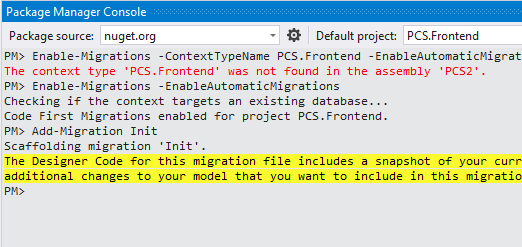
  1. Open up Migrations => Configurations – and add seed data. See the Migration.cs class in the sample.
  2. Back to Package Manager Console. Run the following two commands in order:
    1. Add-Migration-Init
    2. Update-Database-verbose


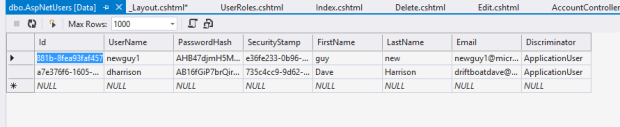
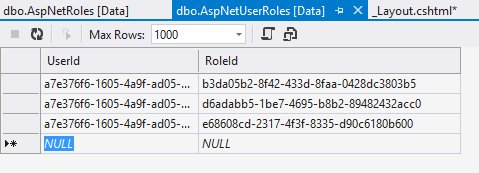
Note in the AspNetUsers table – I can see the dharrison row as our chosen admin.
We have three roles available to us:


UserRoles contains links to each of these:


Now you can control access in the Controller part of MVC by using attributes like:

[Allow Anonymous]

[Authorize(Roles = “x”)]

For example see my HomeController class below. This lets the Index access be pretty much wide open, but the About and Contact screens are locked down.


public
class
HomeController : Controller

{


public
ActionResult Index()

{


return View();

}


//see the fanciness below. We’re screening off all but authorized users from the About and Contact pages.

[Authorize(Roles = “Admin, CanEdit, User”)]


public
ActionResult About()

{

ViewBag.Message = “Your application description page.”;


return View();

}


[Authorize(Roles = “Admin, CanEdit, User”)]


public
ActionResult Contact()

{

ViewBag.Message = “Your contact page.”;


return View();

}

}

}


In the web.config I set up access so the root folder is pretty much wide open- but the Forms subfolder is locked down:

<location
path=Forms>

    <system.web>

        <authorization>

<allow
roles=Admin, CanEdit, User/>

            <deny
users=*/>

        </authorization>

    </system.web>

</location>


<system.web>


<authorization>

<allow
roles=Admin, CanEdit, User/>

</authorization>


ASP.NET Ajax Control Toolkit

I’m embarrassed to say, I hadn’t visited the AJAX control toolkit suite for a while… with the advent of MVC and the abolition of Postbacks/session state (or so I thought), I was putting all that stuff in my rear view mirror. But, suffice to say, there are still times when you’re going to be using WebForms.


So, here’s some of my favorite controls from this suite – and why:

  • Accordion – panels collapse/expand.
  • Animation – such as for a popup modal window
  • Auto Complete – auto complete text in a textbox
  • Balloon Popup – great for Help on individual controls.
  • Calendar – for any date data entry
  • Cascading Dropdowns – amazing how many bogus examples there are of exactly this functionality on the web that will lead you down the wrong path.
  • ComboBox – think a dropdownlist with some basic extensions, like autocomplete. Not clear here if this really gives that much of an advantage but it does allow data entry into a ddl.
  • DragPanel – for drag and drop controls.
  • FilteredTextBox – to constrain user entry. (Note this isn’t foolproof! Javascript can be disabled client side so don’t trust this for all data entry client-side.)
  • Gravatar – avatars for user entry
  • HoverMenu – hover over a row to display edit/update commands for example
  • HTMLEditorExtender – allows uploading images, rich text entry
  • NoBot – provides captcha-like bot/spam detection and prevention. Watches for number of requests per IP address per unit of time, forces a delay between request/response, or disabling JS in the browser (“most relevant where 100% effectiveness is not required… for low traffic sites.”) Eeeeeesh.


And there’s others – MultiHandleSlider (slider controls), NumericUpDown (up/down controls for month, integers), PasswordStrength(tests password strength), Rating (with star displays), ReorderList (drag and drop order of steps), TabContainer for tabs to organize contents – I’m not a fan of this one, should be separate pages to keep code neat).

The whole Webforms/SmartUI pattern – it’s more of an antipattern – is very dated and I’m running against the constraints of the model every day. But there are times when it’s called for… I’ll post on that later. If you are working in that space, I do love using these controls over paid-for heavyweight suites (looking at you, Telerik/infragistics/etc).