Author: elvisboats

Short Version: I'm married to the amazing (and amazingly forgiving) Jennifer, proud possessor of two amazing kids, crazy about all things trouty with fly fishing. I'm an Application Development Manager with Microsoft, and am based out of Portland, Oregon. Long Version: I grew up in Oregon, and moved down to California with the original goal of finishing my education in Civil Engineering, but I found application development and RDBMS systems much more exciting! I do miss the mountain biking in California and the awesome Mexican food, but Oregon is my home and I have never regretted moving back to start a family. Plus it gives me more time for fly fishing for trout and steelhead on the beautiful Deschutes river in central Oregon! ;-) Working for Microsoft has by far been the best experience of my professional life; it's great working with a group of people that are passionate about writing good code and continually improving development practices and firepower. Past assignments have included Providence Health Plans, Kroger, and managing a .NET development team at Columbia Sportswear. Working at Columbia in particular gave me a great customer-side perspective on the advantages that Azure offers a fast-moving development team, the dos and don’ts of agile development/scrum, and the cool rich Ux experiences that SPAs (Single Page Applications) can offer with Breeze, OData, WebAPI, and modern Javascript libraries. Microsoft did a fantastic job of engaging with Columbia and understanding our background and needs; I witnessed their teams win over an initially hostile and change-averse culture. The end result was a very satisfying and mutually beneficial partnership that allowed Columbia to build dynamic applications and services using best-of-breed architecture. I’m a MCDBA and a Certified Scrum Master.

Chatting with SignalR


I haven’t messed around much with SignalR yet – but it’s going to become an important part of my toolbox whenever it comes to asynchronous surfacing of data. This isn’t a fit for every application – often near-time is fine – but for instant, up to date numbers – think a stock screen or a chat application – it’s TERRIFIC. Let’s do a simple demo and see how it works:

First open up Visual Studio 2013 and create a web application:

And make sure it’s an MVC app:

At the Package Manager Console, enter “install Microsoft.aspnet.signalr” – yes this could be done in NuGet as well:

NuGet Route:

Search for SignalR and install Microsoft ASP.NET SignalR (installing this will install Core Components, Javascript, and System.web pieces).

You’ll see a readme file (after it downloads its dependent assemblies) like the following. Love that explicit messaging!

Add those lines above to a class called Startup.cs in the root folder – if you installed this it should already be pre-created –so it has a Configuration method that looks like this:


public
void Configuration(IAppBuilder app)

{

app.MapSignalR();


//ConfigureAuth(app);

}


I’ve chosen to comment out configuration for the authentication, since we’re not going to do that for this demo. Then, create a new folder called “Hubs” and add a new SignalR Hub Class:
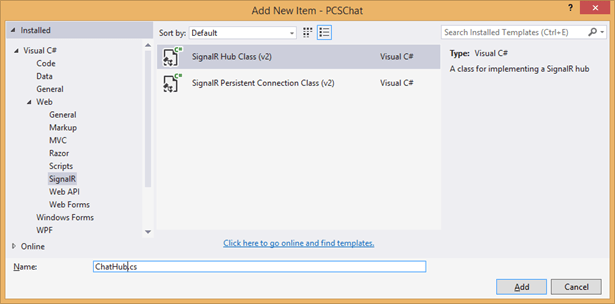
 

Replace the “Hello” method with the following for this simple chat application:


        public void Configuration(IAppBuilder app)
        {
            app.MapSignalR();
            //ConfigureAuth(app);
        }

Above, the Clients.All is dynamically created – so it’s very customizable. We could put the Clients into groups, or exclude a set (Admins, for example).

Try building your project, and point to SignalR/hubs. Notice the following when I navigate to {localhost}/SignalR/hubs:
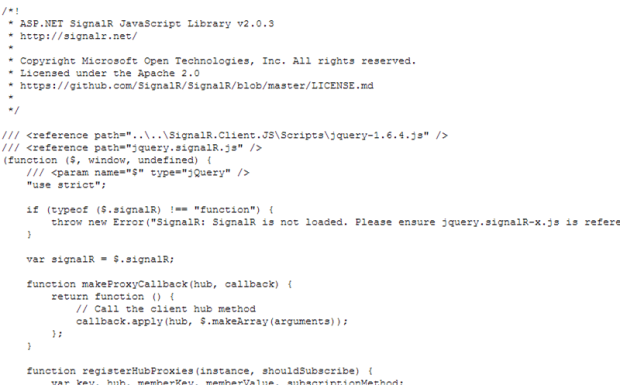
 

Notice in the footer area your shiny new method with a Send. If you had built this earlier, you’d be seeing a Hello function visible to clients:

 

Let’s use Knockout for the fancy-dancy data binding. Use NuGet to pull down the latest version of KnockoutJS. Then, create a javascript class under Scripts and fill it with the following code:


(function () {


var chatHub = $.connection.chatHub;

$.connection.hub.logging = true;

$.connection.hub.start();


chatHub.client.newMessage = function (message) {

model.addMessage(message);

};


var Model = function () {


var self = this;

self.message = ko.observable(“”),

self.messages = ko.observableArray()

self.counters = ko.observableArray()

};


Model.prototype = {


sendMessage: function () {


var self = this;

chatHub.server.send(self.message());

self.message(“”);

},


addMessage: function (message) {


var self = this;

self.messages.push(message);

}


};


var model = new Model();


$(function () {

ko.applyBindings(model);

});


}());

Now to add a client to allow the creation of messages. You could add the following to an empty view using MVC, or embed this in a user control – or use Bootstrap’s modal to have it as a popup.


<script
src=”../Scripts/jquery.signalR-2.0.3.js”></script>

<script
src=”../SignalR/hubs”></script>

<script
src=”../Scripts/knockout-3.1.0.js”></script>

<script
src=”../Scripts/chatSurf.js”></script>

<div
class=”row”>


<div
class=”col-md-4″>

Comments:


<input
type=”text”
placeholder=”Message”
data-bind=”value: message
/>


<button
class=”btn btn-primary”
data-bind=”click: sendMessage“>Send</button>


</div>


<div
class=”col-md-8″>


<div
data-bind=”foreach: messages“>


<div
data-bind=”text: $data“></div>


</div>


</div>

</div>


That’s enough for our demo purposes. I dragged the user control onto another form and build the project – let’s see what we get:

You’ll notice, there’s no identity for the current user – that’s something I need to add to my application (since currently users are not authenticated). That’s for a future iteration. Also, next up – I want to make that a scrollable DIV showing the most recent 5 posts, have Knockout save its records to a database, and allow the flagging of particular messages as Critical (with specific coloring).

However, it was an instructive walkthrough for me of what SignalR can do. For real-time streaming of information – such as facility alerts that you want broadcast to a set of subscriber clients – it’s REALLY hard to beat.

Some Footnotes

  • Note that Scott Hanselman did a neater example using just a handful of lines of code in this post. Some of the coding is a little dated but it does show a chat app in <12 lines of code:


“So and So Is Not a Valid Script Name.”

I was going to have this post be about SignalIR, but due to various things… just didn’t happen today. Long story short, I ended up creating a new project from scratch – only I had it be a MVC project with Webforms tacked on, versus the other way around – and added all the references I needed to get Metro-Bootstrap to work. Along the way, I decided to do some refactoring and moved everything under /docs and /css to the Content folder – I dislike having CSS elements scattered every which way. However, I got this funky message:

‘Jquery is not a valid script name. Must end in .js” – or the like.

Hmm. Well, I went into NuGet and updated everything I could think of. Then I went to the BundleConfig class, Global.asax, and Web.config – and looked for where I was registering the prefix “jquery”.

Long story short, this was fixed by in NuGet adding packages for AspNet.ScriptManager.jQuery as below (and I added the *.WebForms as well). This handled the registration and added the correct javascript to the Scripts folder. This was a real pain until I nailed it down, and I wanted to pass it on.


Salary Negotiation for Sissies.

First off, may I say, I really SUCK something awful at negotiating salary. And why wouldn’t I? I do it maybe once a year, if that; I’m negotiating directly for myself (no middleman), and it’s outside my core skill as an engineer. I want to move past this as fast as possible and get back to doing what I love: everything BUT talking about money. Well, guess what? That’s the story of every other programmer I’ve ever met.

I’ll do you a solid and not drone on endlessly what you can read in more detail (and much better written) elsewhere. But, it does come down to these points:

  • Never give a number.
  • Salary negotiation is the most important financial decision you make. More even than owning a home.
  • Your actual (fully loaded) cost to an employer is several times your base salary. They will not get a bonus by nickel and diming you, and they will not be offended if you ask. You will not be blackballed. $5,000 is, in the scheme of things, chump change.
  • They’ve sunk thousands invested in just talking with you, so – assuming you have agreement-in-principle after several rounds of interviews – they want you. Negotiating will never make worthwhile offers worse.
  • Once again, never be the first to give a number.
  • Use words like “We” and “You” (which is better, since people care a lot more about their problem than yours.)

Ahead of time you should know the following:

  • What the marketplace will support.
  • What you are worth, what value you provide – with specific examples.
  • Know your three numbers – the money you want, a good “settle” number, and the drop dead bottom line. NEVER tell them that third number!

Do NOT say – “What’s the salary range?” You should already know this from your market research. Dice and LinkedIn exist, use them! In your tone, don’t be adversarial – and give longer answers than in interviews. Iterate that you’re excited about the job. The tone is, I want to be here, I’m going to add a tremendous amount of value, here’s what I’m worth – let’s find a fair # that works for both of us.

Talking Points

So here’s some scripts to talk from:

“What’s your current salary?”

  • Do NOT say: A specific number. You can’t lie here. But you are backed into a corner… and this isn’t the time to So you evade:
  • I’m willing to entertain any reasonable offer.
  • I’m confident I’m within your range.

“I really need a number to move the process forward.”

  • Do NOT say: First and foremost, NEVER give a number. They’re trying to get you to compromise your negotiating position.
  • Say: “I’m more concerned about discovering whether we’re a mutual fit. If we’re a great fit, then I can be flexible on the numbers with you and you can be flexible with me. If we’re not a great fit, then numbers are ultimately irrelevant, because your companies only hires A players and I only work at roles where I would be an A player.”
  • Honorable mention: It’s so important to me that this is a good mutual fit. Let’s talk about why I’m a great fit for this position; I know you’re concerned about ____. In addition to my previous successes, I have some great ideas on what I’d do on this… Would you like me to drill into those or is there another job area you’re more concerned about.”
  • Well, you know, I would hate to have to walk away from the negotiation over this. Working with your company looked like it would have been such a wonderful opportunity. The market is tight right now. Hmm. Well, salary is one part of the total compensation package. In terms of total compensation, we’re probably looking at something like $200K, correct? (30-50% + FT salary)
    • OTHER AREAS: Training. Vacation days. Project assignments. Travel.
  • “Hmmm. This is an important decision where we both have to walk away happy. That means me taking a specific number to my wife for consideration.

“We were thinking about $60,000 and maybe throwing in a can of pork and beans.”

  • “60,000 is interesting but not quite where we need to be to get this done. Do you have any flexibility on that number? … That isn’t quite what I had in mind, but the right package offer could make that attractive. How much vacation comes with the package?… If you could do X days a year (or a bonus of $___, etc), I could compromise on $*****.”
  • “First off, I just want to say, I’m very excited about this opportunity. I really want to work for XCORP. The experience I bring to the table in previous roles directly translates to this and I believe warrants a much higher salary. In terms of my own research on the marketplace, the range is more like $XXXX to XXXX. Given my experience and my ability to deliver value, I believe I deserve to be at the higher end of the scale.
  • At the end of the day, I would look at this as an investment. At the end of the day, I think I’ll be able to deliver more than that $XXX difference.

OK, I talked with my manager, and he’s offering $67,000. Plus two cans of pork and beans. Would that be acceptable?

  • “You know, one of the things we didn’t talk about was all the things around salary. Stock options, bonuses, vacation days. What can you come to the table with here.”
  • “I think that goes a long way towards closing the gap. I really appreciate your flexibility there, because I am committed to this role, and options are a great way to demonstrate you’re committed. What would the review cycle be for my performance as far as evaluating my candidacy for a promotion and a raise? My understanding is that it tends to be a year, ”


Other links:


Don’t call yourself a programmer.

This post is terrific. To sum it up –

  • Don’t call yourself a programmer, which is a codeword for peon. You’re an engineer.
  • Engineers are hired to create business value, not to program.
  • If you’re not working for a revenue center – i.e. if you can’t tie your work directly into reducing costs or adding revenue – get a job where you can.
  • Coworkers and bosses are not your friends.
  • Sending in a resume to an ad / Dice position is for losers. Most hiring is done behind the scenes, for positions that never hit publicly. So network.
  • You’re not defined by your chosen software stack. Look for opportunities to branch out and try new things. Pilot projects rock.
  • Modesty doesn’t sell. Neither to buzzwords. If you can’t explain what you do to an eight year old, try it again – and make sure you can communicate how you create value.
  • … and at the end of the day, your life happiness will not be dominated by your career.

That last point, I buy into mentally but not yet emotionally. I do tend to invest quite heavily in the success of project X or company Y. Isn’t life simpler when we’re more heavily invested in our OWN success?

WebDeploy again and IIS setup issues


Went thru setting up a new server with Web Deploy. once again (and it feels like I’ve posted on this a dozen times, but it’s probably only about 10) I walked thru the following:

  1. Remote desktop onto the box.
  2. Setup Google Chrome so I could get around IE’s insane “trusted sites” security-through-obstruction policies.
  3. Installed Microsoft Web Platform Installer 4.6.
  4. Used this tool to install Web Deploy 3.5.
  5. Used WPI to set up IIS Recommended Configuration

At this point I was able to go into Visual Studio and deploy a website out to the Default Web Site\{MySiteName} folder that I created. Yay! IIS_IUSRS had sufficient privileges, etc.

Still though I was getting this error message:

Which was odd.The “ASP.NET is not installed” note is a dead giveaway. My first thought was that we were missing some security settings or a key component. But no, everything looked jake:


I tried an admin command prompt and reregistering aspnet_regiis as follows:

c:\Windows\Microsoft.NET\Framework\v4.0.30319\aspnet_regiis.exe -i


… but had forgotten that in Windows Server 2012 this is done with the “Turn Windows Features On and Off” app. So, I ran that – and lo and behold, a few key things that ASP.NET 4.5 needs weren’t set up initially:


I guess this is what happens when someone else “sets up” a server partially (sigh). Easy to fix though. After the setup of these missing roles, voila – suddenly I could (without a restart even!) browse to my site locally, and remotely. Easy!