Author: elvisboats

Short Version: I'm married to the amazing (and amazingly forgiving) Jennifer, proud possessor of two amazing kids, crazy about all things trouty with fly fishing. I'm an Application Development Manager with Microsoft, and am based out of Portland, Oregon. Long Version: I grew up in Oregon, and moved down to California with the original goal of finishing my education in Civil Engineering, but I found application development and RDBMS systems much more exciting! I do miss the mountain biking in California and the awesome Mexican food, but Oregon is my home and I have never regretted moving back to start a family. Plus it gives me more time for fly fishing for trout and steelhead on the beautiful Deschutes river in central Oregon! ;-) Working for Microsoft has by far been the best experience of my professional life; it's great working with a group of people that are passionate about writing good code and continually improving development practices and firepower. Past assignments have included Providence Health Plans, Kroger, and managing a .NET development team at Columbia Sportswear. Working at Columbia in particular gave me a great customer-side perspective on the advantages that Azure offers a fast-moving development team, the dos and don’ts of agile development/scrum, and the cool rich Ux experiences that SPAs (Single Page Applications) can offer with Breeze, OData, WebAPI, and modern Javascript libraries. Microsoft did a fantastic job of engaging with Columbia and understanding our background and needs; I witnessed their teams win over an initially hostile and change-averse culture. The end result was a very satisfying and mutually beneficial partnership that allowed Columbia to build dynamic applications and services using best-of-breed architecture. I’m a MCDBA and a Certified Scrum Master.

Things I Learned from Getting To Yes – and Negotiating like a Winner

One thing about good business books – they’re few and far between. Most just parrot previous books – with a few nicey-nice feel-good stories thrown in.

I really enjoyed Getting To Yes. The best nugget of advice I found towards the end. “Don’t ask ‘who’s more powerful?’ If you conclude that you are more powerful, you may relax and not prepare as well as you should. If you conclude that you are weaker, you will be discouraged and again not devote sufficient attention to how you might persuade them. In fact, a great deal can be done to enhance your negotiation power even when the resource balance is one-sided. You won’t find out what’s possible unless you try. Sometimes people seem to prefer feeling powerless and believing that there is nothing they can do to affect a situation. That belief helps them to avoid feeling responsible or guilty about inaction. It also avoids the costs of trying to change the situation. It is a self-defeating and self-fulfilling attitude. The best rule of thumb is to be optimistic – to let your reach exceed your grasp. The more you try for, the more you are likely to get. Studies of negotiation consistently show a strong correlation between aspiration and result. Within reason, it pays to think positively.”

Four elements of principled negotiation

  1. People – Separate the people from the problem.
    1. Be soft on the people, hard on the problem.
    2. Proceed independent of trust.
    3. Understand the role of perception. Out of a mass of detailed information, people tend to pick out and focus on those facts that confirm their prior perceptions and to disregard or misinterpret those that call their perceptions into question… the ability to see the situation as the other side sees it is one of the most important skills a negotiator can possess.
    4. Have the other side participate in the process to give them a feeling of participation.
    5. Make emotions explicit and acknowledge them as legitimate. “You know, the people on our side feel we have been mistreated and are very upset. We’re afraid…”
  2. Interests – Focus on interests, not positions.
    1. Explore interests.
      1. Acknowledge their interests as part of the problem. “As I understand it your interests as a construction company are… do I understand you correctly? Do you have other important interests?”
      2. Be specific on your interests. “Three times in the last week, xxx”
      3. Use cognitive dissonance. By expressing strong support for a company representative personally while strongly attacking the company’s stance, the listener will hear an inconsistency and subconsciously work to reconcile it.
    2. Avoid having a bottom line.
  3. Options – Invent multiple options looking for mutual gains before deciding what to do.
    1. Brainstorming- define the purpose, choose a few participants, change the environment (informal), and choose a facilitator. Clarify ground rules and set participants side by side facing the problem. Record the ideas in full view. Afterwards, star the most promising ideas, and set a time to evaluate the ideas and decide.
  4. Criteria – Insist that the result be based on some objective standard. (Yield to principle not pressure. Reason and be open to reason.)
    1. Have a BATNA – a Best Alternative to a Negotiated Agreement – in your back pocket. The better this is, the greater your power.
    2. Use the one-text format (a written proposal) back and forth w/yes-no voting by opposing sides with a mediator.

Phrases to Remember

  • “What concerns of yours would this proposal fail to take into account?” (don’t defend your ideas, invite criticism)
  • Ask them what they would do in your position: “If you were leading this association, how would you act?”
  • Recast an attack on you as an attack on the problem: “When you say that xxx, I hear your concern about XXX…What can we both do now to reach an agreement as quickly as possible?”
  • Silence is one of your best weapons. Use it.
  • “Please correct me if I’m wrong. Have we been misinformed?”
  • “We appreciate what you’ve done for us.”
  • “Our concern is fairness.”
  • “I must not be making myself clear. Of course xxx… But that’s not the point. More important to us than making a few dollars is the feeling of being treated fairly. No one likes to feel cheated. We want ot handle this problem fairly on the basis of some independent standard, rather than who can do what to whom.”
  • “Trust is a separate issue.”
  • “Can I ask you a few questions to see whether my facts are right?”
  • What’s the principle behind your action?
  • Let me see if I understand what you’re saying.
  • Now that I think I understand your point of view, let me talk to my partner and explain it. Can I get back to you tomorrow sometime?
  • Let me show you where I have trouble following some of your reasoning.
  • One fair solution might be….
  • If we could reach agreement now, X. If we can’t reach an agreement, Y. We are extremely reluctant to take that course. We feel confident we can settle this matter fairly to your satisfaction and ours.
  • It’s been a pleasure dealing with you.

Common Tricky Tactics

  • Phony facts. (If you can’t verify it, its not a fact.)
  • Ambiguous authority (giving a second bite of the apple) – going to a second person for approval. Ask first, “Just how much authority do you have in this particular negotiation?”
  • Dubious intentions.
  • Psychological warfare. (short chair, back to the open door, sun in eyes.) If you find the physical surroundings prejudicial, do not hesitate to say so. Suggest changing chairs or taking a break/reschedule.
  • Personal attacks. (“Looks like you were up all night. Things not going well?”)
  • Good guy / bad guy routine
  • Threats
  • Extreme demands
  • Refusal to negotiate
  • Escalating demands (Yes, but there is one small problem…) – Call this to their attention and take a break.
  • Calculated delays

IE incompatibility notes

Quick post for the day. We had an issue where the site was rendering great in IE and Chrome locally, but when we promoted it out – kablooey! How to fix?

Checking the client browser mode (and using IE’s dev tools) showed that our default browser mode settings were to IE7. (Not sure why this was, but it’s part of our awesome standard config evidently). Edge setting (or the most recent, a la Chrome) would be more correct. So, in the header, try this tag:

<meta http-equiv=”X-UA-Compatible” content=”IE=edge”>

Code snippet – expanding hierarchies in SQL Server

I seem to remember posting on this subject back in December – but I can’t find it. Sigh. (note – just found the post, here – it’s down a ways but still there.) I have a table called Symptom that contains a hierarchical structure – i.e. a ID field and a ParentID field, in this implementation. (Yes I could have used HierarchyID – we opted not to, after looking at all our options.)

Note we could have used recursion. If this was >10 levels or so, I would do that. But SQL is great at joins and they execute very fast; we’ll use this approach for now. See http://www.codeproject.com/Articles/16032/Expanding-SQL-Hierarchies-The-Dualistic-Approach or the Microsoft SQL Server Bible 2008 by Paul Nielsen for more on expanding hierarchies and the adjacency pattern.


-- Retrieve the whole hierarchy from level 1 to level 5
declare @t table (
l1 int, l2 int, l3 int,  l4 int, l5 int, id int, depth int)

-- Populate @t: expand msg hierarchy for levels 1-5
insert into @t
select m1.SymptomID, m2.SymptomID, m3.SymptomID, m4.SymptomID, m5.SymptomID, null, 1
from Symptom as m1
left outer join Symptom m2 on m1.SymptomID=m2.ParentID
left outer join Symptom m3 on m2.SymptomID=m3.ParentID
left outer join Symptom m4 on m3.SymptomID=m4.ParentID
left outer join Symptom m5 on m4.SymptomID=m5.ParentID
where m1.ParentID is NULL

-- Calculate node level for each node and get tree depth
declare @depth int
update @t set depth = depth + 1 where l2 is not null
update @t set depth = depth + 1 where l3 is not null
update @t set depth = depth + 1 where l4 is not null
update @t set depth = depth + 1 where l5 is not null
select @depth = max(depth) from @t

-- Since we have made several joins, we have only leaf nodes of level 4 in  -- @t. Add missing leaf nodes of level 1
insert into @t select distinct l1, NULL, NULL, NULL, NULL, NULL, 1 from @t where l2 is not NULL
-- Add missing leaf nodes of level 2
insert into @t select distinct l1, l2, NULL, NULL, NULL, NULL, 2 from @t where l3 is not NULL
-- Add missing leaf nodes of level 3
insert into @t select distinct l1, l2, l3, NULL, NULL, NULL, 3 from @t where l4 is not NULL
-- Add missing leaf nodes of level 4
insert into @t select distinct l1, l2, l3, l4, NULL, NULL, 3 from @t where l5 is not NULL

-- Populate id field, get the rightmost msg id from @t
update @t set id=coalesce(l5, l4, l3, l2, l1)

select id
, depth
, SymptomFullDesc = 
CASE WHEN depth = 1 THEN l1.SymptomDesc 
WHEN depth = 2 THEN l1.SymptomDesc + ' > ' + l2.SymptomDesc
WHEN depth = 3 THEN l1.SymptomDesc + ' > ' + l2.SymptomDesc + ' > ' + l3.SymptomDesc 
WHEN depth = 4 THEN l1.SymptomDesc + ' > ' + l2.SymptomDesc + ' > ' + l3.SymptomDesc + ' > ' + l4.SymptomDesc
WHEN depth = 5 THEN l1.SymptomDesc + ' > ' + l2.SymptomDesc + ' > ' + l3.SymptomDesc + ' > ' + l4.SymptomDesc + ' > ' + l5.SymptomDesc
END
from @t t
left outer join Symptom l1 on t.l1 = l1.SymptomID
left outer join Symptom l2 on t.l2 = l2.SymptomID
left outer join Symptom l3 on t.l3 = l3.SymptomID
left outer join Symptom l4 on t.l4 = l4.SymptomID
left outer join Symptom l5 on t.l5 = l5.SymptomID
ORDER BY depth, SymptomFullDesc

Don’t shortchange architecture.

Can I say, I’m actually a little disappointed in EntityFramework right now. We were moving to more of a model based solution with the second version of our software, but found these pitfalls:

  1. In all but the simplest Admin forms stored procedures will be necessary. For example, you will want to update against a table – but run checks against a balance, or update a ParentID, or modify related information – you’ll have to spill across multiple entities. The simplest way I know of doing this without a lot of wasted code is db-side sprocs.
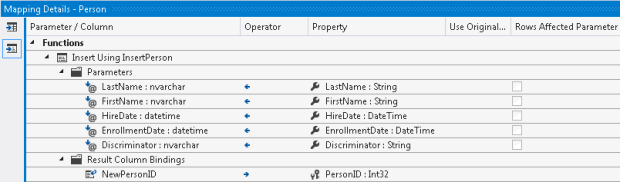
  2. EF works TERRIFIC when you’re binding directly to a table. But as soon as you have to use sprocs there’s a TON of manual coding and clicks that has to happen. This means the same or more amount of work than in old-school DAL layers.

For example, look at this EF sproc mapping:

Say it with me – Eeeeessshhhhh. Having done a few dozen of these mappings so far I can say it’s a painful process and as fraught with peril as any DAL layer. And, since it’s graphically based and not a class, I frankly don’t trust it as much when it comes to making changes. EF does a good job of prepopulating many of these, but not always – especially if the table name and the field name are the same, or if the casing is slightly off (Id versus ID for example). I may end up sighing, throwing up my hands, and rolling back to a SqlDataSource instead.

Long story short – I would love to blame our ever-increasing list of functionality but specs are specs, and I don’t think things like soft-delete or cascading changes are unique to this application/working environment. And, I’m looking back on the road we chose not to take – BOWA (Breeze-OData-WebAPI-AngularJS) and wishing we had spent a few more weeks on architecture and a firm set of guidelines/standards. It would have paid off handsomely when it came to maintenance and durability for this app.

Explorations with Azure – knocking out a pilot website in about two hours.

So recently I was asked to put together a pilot website for a friend who’s not super tech-savvy. His business may or may not ever get off the ground; like most of us he’s wanting to float something out there and see if it goes somewhere. An internet storefront seemed like a great place to start.

OK, so after the requisite weeks of haggling over the name, I scaffolded out a site and posted it on Azure. I’m happy to announce that the site is awesome, very responsive – and best of all, free. It’s a VERY good use case for what Azure does very well – quick ramp-up sites that may or may not see full-size production traffic.

My first step was to create a Visual Studio Online project. This was simple – see below:

Following this I opened up the project in Visual Studio 2013. I had to map the workspace and pull down the code – in this case it was empty – before we could see our old friend Source Control Explorer.

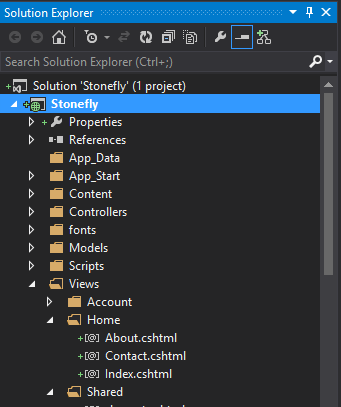
Now, to work. I clicked, File, New Project, and selected ASP.NET Web Application. I selected Application Insights and synched it up with my new stonefly.visualstudio.com account.


I used the MVC option as my main option – but also added WebForms and WebAPI in case I want to tack them on in the future. Now, I’ve got a set of code available – that I can see is ready to be checked in. Right mouse click that baby and check in the code!


Back to your Azure account. Click on New Web Site and select the Custom Create option. I entered in my desired URL and a bare-bones SQL option – and, this is important, selected the Publish From Source Control option.

Selecting that option took me to the authorize connection screen in Azure, where I synched up my stonefly.visualstudio.com sourcecode with the new Azure website that was being spun up. Select the Authorize Now option here.

Once I did this, it took me back to Visual Studio 2013 – where a publish profile was ready to go for me. I skipped through the now-familiar Profile -> Connection -> Settings -> Preview steps – they were all set up nicely by the Azure publish profile – and clicked Publish.


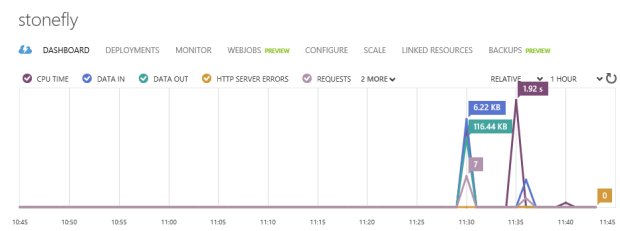
… and, my site was published – lickity split. I could view it on stonefly. I also get all that cool less-is-more Azure dashboarding, showing requests/response time:

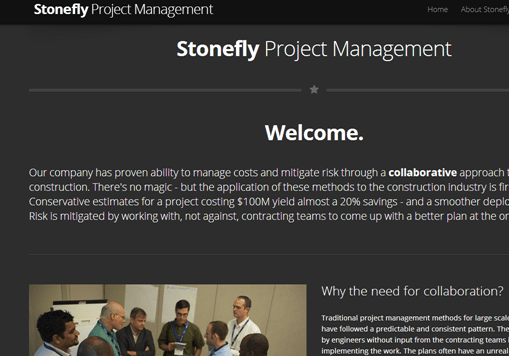
Best of all, I now have my site up and my code available in a repository that I can access anywhere. Feel free to check it out. No need to walk around with thumbdrives anymore. And, there’s something about building out a demo site quick and cheaply like this that appeals to me. Add to it that my TFSOnline account was free – yes, free (if MSFT ever changes that I could move over to GitHub) – and the case for handling this in Azure versus going all-out and spinning it up on discountasp.net or the like becomes pretty compelling. This is enough for my friend to evaluate and decide on next steps. Sprinkle in some HTML and CSS, and suddenly we’ve got ourselves a going concern:

Now, I could buy a DNS address (like, I don’t know, stoneflysoftware.azu or the like) and register it with Azure. But I probably won’t. As you can see from this site, it ain’t cheap – we’re talking $56/month for basic, which is a great deal if you have 6 or more sites you’d like to host, or you need true geodistributed 99.9% HA coverage on your site. Scott Hanselman has a whole series of articles on pennypinching with Azure that I’d recommend, including this nifty video on using Azure as a CDN.