Year: 2014

Are Single Page Applications (SPAs) for everybody and everything?

Take a look at these two statements. Which is true?

  • “To say that SPA development is the future is an extreme understatement.”
  • “SPAs are how some of the best applications on the Web offer fluid UX and responsiveness, while minimizing payloads and round-trips to the server.”

The interesting thing is, both of these are from the same article (March 2014 MSDN Magazine). I think the second statement is demonstrably true – but the first statement is an exaggeration. Over time Single Page Applications (SPAs) will become ONE way of writing applications – maybe even the default way – but far from the only way. And it’s safe to say that the way we write SPAs now will change dramatically over the next five years. Let me explain why.

Migrations are usually gradual

If you’re starting from scratch, a SPA is a great way to go. However, the typical migration I see in the enterprise isn’t all at once, but more of a shallow-end-of-the-pool kind of adoption that allows teams to grow into client-side development:

  • An existing Webforms app starts to use some Javascript/jQuery functionality.
  • Over time, this becomes more complex and more jQuery plugins start appearing, where jQuery/JS usage starts significantly changing the page structure
  • Pieces or the entire application starts migrating to the MVC framework for communicating with the server and presenting views
  • The app starts becoming a mini-SPA. Most pieces are still served up using views/controllers, but some critical pathways are served up client-side with asynchronous data requests. This is done one baby step at a time, and most of the application remains straight up MVC/webforms.
  • Migration to full SPA. There’s a login and a forgot password request page, but all other client interactions are handled within a SPA framework.
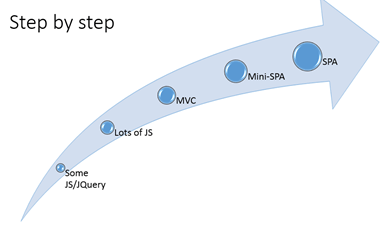
Why is this?

SPAs aren’t a silver bullet for your development woes

Too often we don’t take into account the maturity or size of a development team in making architecture recommendations. For example, a while ago I was involved in a development effort where the team looked at SPAs/WebAPI and abandoned it as “too expensive”, in favor of a prototype approach with ASP.NET webforms. Seeing as how we had a very crude SDLC and a nonexistent peer/code review and release management strategy, I had to agree with this decision. Maturity wise, the team wasn’t where we could have leveraged the best aspects of MVVM and AngularJS – we just didn’t have the pieces in place without a team commitment to testing, reuse and code quality. It’s pointless to make the leap to client-side development without taking care of the essentials first.

No one is arguing here that client-side JS frontend doesn’t offer a potentially fantastic Ux experience and more maintainable/testable code in the long run. The downside is a very sharp learning curve, sometimes spotty documentation, and a plethora of rapidly changing JS libraries to choose from. If the dev team has only MVC/webform experience, you’ll need to invest in specific training and experience, and the tooling for JS libraries is not nearly as good as what you can get with webforms/MVC. It’s well worth it – if you are able to accept those costs and commit to the longer ramp-up that implies.

Not all applications will fit the SPA model

I don’t feel that all applications need or should be SPAs. If you’re writing an app that will have most of the heavy lifting done server-side with a sprinkling of jQuery/JS, going to a MV* framework could be overkill. If the app design calls for a lot of data manipulation and presentation happening browser-side – for example an app that could download all the scripts, styles and markup a client could need in one payload and then perform additional behavior in the background – well, that’s a SPA. In that case a JS MV* framework will pay off.

What’s the future?

As we’ve grown from classic icky ASP => ASP.NET webforms => MVC => SPAs with MVVM, each time we’re refining our approaches and the challenges have made us better programmers. So, this is a sea change – thinking in terms of a rich UI and the user experience. Even for internal apps – users now have an elevated set of expectations from Ux-forward apps they use on their tablets and smart-phones. We have to embrace this change, with both arms. It’s no longer about Java vs C#/.NET, Eclipse vs Visual Studio. JS and the client experience will hold sway. I’m thinking in the next few years we’ll see MSFT really fill in the gaps when it comes to JS development tooling – we already are with the 4.5 release

I remember when XML came out, and then MVC – there was a kind of sharp “everything we have must be converted to this now” reaction, followed by a reset where it became a new tool in our library. I think SPAs will follow the same path, where they’ll be used sometimes, where appropriate – where Ux is king, where the dev team can handle it, and where everything can be done client-side.

Maybe you agree with this – maybe you don’t. And as I continue exploring AngularJS and other frameworks maybe I’ll change my mind and talk about how foolish I was in my prophecies. More importantly, maybe the market will disagree – and agree more with the author at the start of this writeup about SPAs being the future, the be-all, the everything. In that case, maybe 80-90% of the code we’ll be writing in six years will be JS – and some new way-cool JS library, the great-great-grandkid of AngularJS, will rule supreme. But for now, I’m going to advocate with my clients a really careful look at what the SPA frameworks they’re looking at can deliver – and whether the benefits of that client-side emphasis outweighs the disadvantages of a rapidly-morphing paradigm.


 Resource Links:


Eat that frog! Time management and taming the savage Inbox.

Living an email-driven life? Do your priorities switch by the minute? Find yourself having problems saying no? This blog might be helpful to you if you’re having problems focusing with an avalanche of things coming at you from all directions.

So I’m working from home now, and it’s been a wild ride so far. One of the first things I did was take that 2 hours I was spending a day commuting – and cut it over to more valuable activities. I’ve been walking about 4 miles a day and spending a LOT more time with my girls. It’s been, frankly, terrific. It’s also a terrific opportunity to loaf and become directionless if I let it. No one is around kicking me in the rear end, making me set priorities, and chew through to-do’s. So, how will I manage my time so I will be a responsible and effective employee WITHOUT working in a bullpen?

I decided early on not to try to work harder – but work smarter with ‘sharpening the saw’. So, I checked out some books on time management. One is called “The First 90 Days”, another “You’re In Charge – Now What?”, and then I looked at some material on the internet – and provided by Microsoft on their engineering site. I’ll get to those other two books later, but here’s what I’ve found.

  • Don’t check email first thing in the morning. This is failure to plan, and you’ll become intercept-driven. Instead eat that frog – and don’t check your email until you get at least one important task done.
  • Eat that frog. Plan out at the end of the day your 2-3 most important (not urgent) actions that you want to take. Write it on your calendar and get it done. (Very Agile!)
  • The importance of routines. At the end of the day, ask yourself – what did I do today? What will I focus on tomorrow? What could be improved?
  • Track your tasks. Use sticky notes. Use Kanban (either online or sticky notes with waiting / in progress / done columns). Use Outlook reminders, TFS, or a list in SharePoint. But for Pete’s sake, use SOMETHING.

More can be found below; I particularly found the “focus in the age of distraction” pieces interesting. But, here are the changes I’m going to try over the next week:

  1. Morning diary. This will help me keep track of where I am, and where I want to be.
  2. Pomodoro. 50 minutes working, 20 minutes break. I downloaded FocusTime, but there’s other tools available that will set your outlook/IM display to Busy – Do Not Disturb and give you scheduled blocks of productive time to focus – and then take a break to refocus.
  3. 8-10 am is disconnection time. I’ll schedule it in Outlook. I’ll also set 3 times a day to check email.

In more detail…

Overwhelmed by an Avalanche of Tasks? Frogs Versus Alligators

“If you eat a live frog first thing in the morning, you can go through the rest of the day knowing the worst is behind you. And if it’s your job to eat two frogs, it’s best to eat the biggest one first.” 

– Mark Twain


Rather than a simple to do list, try placing your tasks in one of the four following quadrants.


Think of the unappetizing frogs as the important tasks, and snapping alligators the urgent tasks of our working lives. You will find some tasks are both urgent and important. Certainly, take care of the upper-left quadrant first. But the upper right important tasks, require your devoted attention, too, or long-range projects will never get off the ground. You can address less important tasks later. And, you may find your urgent tasks may become less urgent.


Three main things to remember:

  • Plan your day and determine your most important task, whether urgent or long-range.
  • Schedule time for yourself to eat that frog.
  • Completely avoid the alligator pit. It’s not important.

Can’t focus? How To Focus In The Age of Distraction

We live in constant tension between the urgent and the important. The problem is that the important task rarely must be done today or even this week.  … But the urgent tasks call for instant action—endless demands pressure every hour and day. … The momentary appeal of these tasks seems irresistible and important, and they devour our energy. But in the light of time’s perspective their deceptive prominence fades; with a sense of loss we recall the important task pushed aside.  We realize we’ve become slaves to the tyranny of the urgent.

-Charles Hummel

Most of us know that multi-tasking works for computers, but not humans. Not really. So, avoid context switching loss with some of these tips:

  • Avoid context switching—moving from one task or tool to another takes you out of the flow of work
  • Shut off tools like Outlook, Communicator, and Bugger
  • Block off your calendar to work on big tasks
  • Close your door
  • Work off hours
  • Avoid unnecessary meetings (when you are listed as optional)
  • Schedule meetings close together, so that your focus time is less broken up
  • Use a tool like FocusTime, Pomodoro, etc to help you disable toast alerts and set a timer to focus on what you need to. 50 minutes work, 20 minutes break is all you need. (I used to put a orange cone on top of my desk to help me concentrate, but that didn’t work too great.)


Still Can’t Prioritize? …Use OneNote to Track Your Tasks (and Look Great For The Boss!)

It’s a great idea to have a format like above in OneNote. (I’ve used both EverNote and Google Keep – OneNote is, so far, by far my tool of choice.) Create a list (Ctrl-1) with three sections – DONE, TO DO, and QUESTIONS. Right before you have your 1×1 with your manager, forward this on to him/her and use it for talking points. (P.S. it’s great come review-time as well!) It synchs with your phone, so you’ll always have it handy. Take notes during the meeting with your manager on that page. After the meeting, copy the page to a new page, change the date in the title, remove the Done items, and continue working on your updated Working On task list.

Slammed With Unreasonable Requests? Saying No With Chutzpah

Peace begins with saying No – you can’t accommodate every request. You can and should say no as part of your prioritization.  If a person comes and asks you to do something, show them the list of things you are presently working on.  Ask them to prioritize their task relative to the other task you are working on.

Tips:

  • Say no, but explain why.  This is the bottom left quadrant of the Covey Quadrant system. 
  • Ask them to talk with your manager/lead.  Your manager/lead is responsible for your productivity, so if your manager/lead agrees it is important enough to work on, then you can add it to your list.
  • Don’t say No right away.  Get the person to submit their request via email, and then discuss it with your manager for their take on the request.  If you don’t feel comfortable asking your manager, ask a trusted co-worker.  Sometimes the person won’t want to take the time to type up their request and will either go to someone else or do it themselves. 
  • Suggest they contact another person who is better qualified for their request, or might have time available for the task.


If you do say No to a request, note it down and let your manager know about it during your next one-on-one.  Explain why you said no, and ask them if they agree with your decision.  Spin this as you are trying to learn when and how to say no, and are looking for their guidance. 

For more on this, check out “The Power of a Positive No“.

Living an Inbox-Driven Life? Aim for a Zero Inbox Triage Tree

The picture below says it all.


MVC best practices – quick thought

A great article from the redoubtable Dino Esposito on best practices for MVC apps. Shockingly, he advocates weighing the pros and cons of Bootstrap before adopting it. His points are logical – you’re not writing pure HTML, any more than writing jQuery and calling it “javascript” – but I’m not sure if there’s as big of a downside as he thinks. Maybe for a more mobile-targeted display the content sizes would be an issue. http://www.codemag.com/Article/1405071

Things I Learned from Getting To Yes – and Negotiating like a Winner

One thing about good business books – they’re few and far between. Most just parrot previous books – with a few nicey-nice feel-good stories thrown in.

I really enjoyed Getting To Yes. The best nugget of advice I found towards the end. “Don’t ask ‘who’s more powerful?’ If you conclude that you are more powerful, you may relax and not prepare as well as you should. If you conclude that you are weaker, you will be discouraged and again not devote sufficient attention to how you might persuade them. In fact, a great deal can be done to enhance your negotiation power even when the resource balance is one-sided. You won’t find out what’s possible unless you try. Sometimes people seem to prefer feeling powerless and believing that there is nothing they can do to affect a situation. That belief helps them to avoid feeling responsible or guilty about inaction. It also avoids the costs of trying to change the situation. It is a self-defeating and self-fulfilling attitude. The best rule of thumb is to be optimistic – to let your reach exceed your grasp. The more you try for, the more you are likely to get. Studies of negotiation consistently show a strong correlation between aspiration and result. Within reason, it pays to think positively.”

Four elements of principled negotiation

  1. People – Separate the people from the problem.
    1. Be soft on the people, hard on the problem.
    2. Proceed independent of trust.
    3. Understand the role of perception. Out of a mass of detailed information, people tend to pick out and focus on those facts that confirm their prior perceptions and to disregard or misinterpret those that call their perceptions into question… the ability to see the situation as the other side sees it is one of the most important skills a negotiator can possess.
    4. Have the other side participate in the process to give them a feeling of participation.
    5. Make emotions explicit and acknowledge them as legitimate. “You know, the people on our side feel we have been mistreated and are very upset. We’re afraid…”
  2. Interests – Focus on interests, not positions.
    1. Explore interests.
      1. Acknowledge their interests as part of the problem. “As I understand it your interests as a construction company are… do I understand you correctly? Do you have other important interests?”
      2. Be specific on your interests. “Three times in the last week, xxx”
      3. Use cognitive dissonance. By expressing strong support for a company representative personally while strongly attacking the company’s stance, the listener will hear an inconsistency and subconsciously work to reconcile it.
    2. Avoid having a bottom line.
  3. Options – Invent multiple options looking for mutual gains before deciding what to do.
    1. Brainstorming- define the purpose, choose a few participants, change the environment (informal), and choose a facilitator. Clarify ground rules and set participants side by side facing the problem. Record the ideas in full view. Afterwards, star the most promising ideas, and set a time to evaluate the ideas and decide.
  4. Criteria – Insist that the result be based on some objective standard. (Yield to principle not pressure. Reason and be open to reason.)
    1. Have a BATNA – a Best Alternative to a Negotiated Agreement – in your back pocket. The better this is, the greater your power.
    2. Use the one-text format (a written proposal) back and forth w/yes-no voting by opposing sides with a mediator.

Phrases to Remember

  • “What concerns of yours would this proposal fail to take into account?” (don’t defend your ideas, invite criticism)
  • Ask them what they would do in your position: “If you were leading this association, how would you act?”
  • Recast an attack on you as an attack on the problem: “When you say that xxx, I hear your concern about XXX…What can we both do now to reach an agreement as quickly as possible?”
  • Silence is one of your best weapons. Use it.
  • “Please correct me if I’m wrong. Have we been misinformed?”
  • “We appreciate what you’ve done for us.”
  • “Our concern is fairness.”
  • “I must not be making myself clear. Of course xxx… But that’s not the point. More important to us than making a few dollars is the feeling of being treated fairly. No one likes to feel cheated. We want ot handle this problem fairly on the basis of some independent standard, rather than who can do what to whom.”
  • “Trust is a separate issue.”
  • “Can I ask you a few questions to see whether my facts are right?”
  • What’s the principle behind your action?
  • Let me see if I understand what you’re saying.
  • Now that I think I understand your point of view, let me talk to my partner and explain it. Can I get back to you tomorrow sometime?
  • Let me show you where I have trouble following some of your reasoning.
  • One fair solution might be….
  • If we could reach agreement now, X. If we can’t reach an agreement, Y. We are extremely reluctant to take that course. We feel confident we can settle this matter fairly to your satisfaction and ours.
  • It’s been a pleasure dealing with you.

Common Tricky Tactics

  • Phony facts. (If you can’t verify it, its not a fact.)
  • Ambiguous authority (giving a second bite of the apple) – going to a second person for approval. Ask first, “Just how much authority do you have in this particular negotiation?”
  • Dubious intentions.
  • Psychological warfare. (short chair, back to the open door, sun in eyes.) If you find the physical surroundings prejudicial, do not hesitate to say so. Suggest changing chairs or taking a break/reschedule.
  • Personal attacks. (“Looks like you were up all night. Things not going well?”)
  • Good guy / bad guy routine
  • Threats
  • Extreme demands
  • Refusal to negotiate
  • Escalating demands (Yes, but there is one small problem…) – Call this to their attention and take a break.
  • Calculated delays

IE incompatibility notes

Quick post for the day. We had an issue where the site was rendering great in IE and Chrome locally, but when we promoted it out – kablooey! How to fix?

Checking the client browser mode (and using IE’s dev tools) showed that our default browser mode settings were to IE7. (Not sure why this was, but it’s part of our awesome standard config evidently). Edge setting (or the most recent, a la Chrome) would be more correct. So, in the header, try this tag:

<meta http-equiv=”X-UA-Compatible” content=”IE=edge”>