I haven’t messed around much with SignalR yet – but it’s going to become an important part of my toolbox whenever it comes to asynchronous surfacing of data. This isn’t a fit for every application – often near-time is fine – but for instant, up to date numbers – think a stock screen or a chat application – it’s TERRIFIC. Let’s do a simple demo and see how it works:
First open up Visual Studio 2013 and create a web application:

And make sure it’s an MVC app:

At the Package Manager Console, enter “install Microsoft.aspnet.signalr” – yes this could be done in NuGet as well:

NuGet Route:
Search for SignalR and install Microsoft ASP.NET SignalR (installing this will install Core Components, Javascript, and System.web pieces).

You’ll see a readme file (after it downloads its dependent assemblies) like the following. Love that explicit messaging!

Add those lines above to a class called Startup.cs in the root folder – if you installed this it should already be pre-created –so it has a Configuration method that looks like this:
        public void Configuration(IAppBuilder app)
        {
            app.MapSignalR();
            //ConfigureAuth(app);
        }
I’ve chosen to comment out configuration for the authentication, since we’re not going to do that for this demo. Then, create a new folder called “Hubs” and add a new SignalR Hub Class:
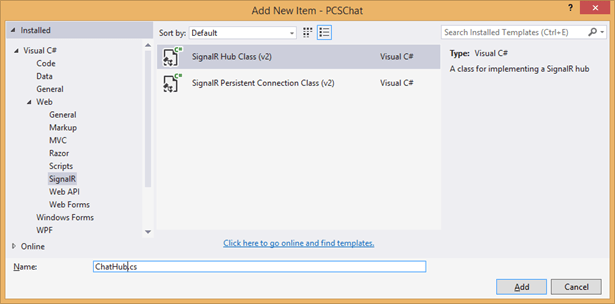
Replace the “Hello” method with the following for this simple chat application:
public void Configuration(IAppBuilder app)
{
app.MapSignalR();
//ConfigureAuth(app);
}
Above, the Clients.All is dynamically created – so it’s very customizable. We could put the Clients into groups, or exclude a set (Admins, for example).
Try building your project, and point to SignalR/hubs. Notice the following when I navigate to {localhost}/SignalR/hubs:
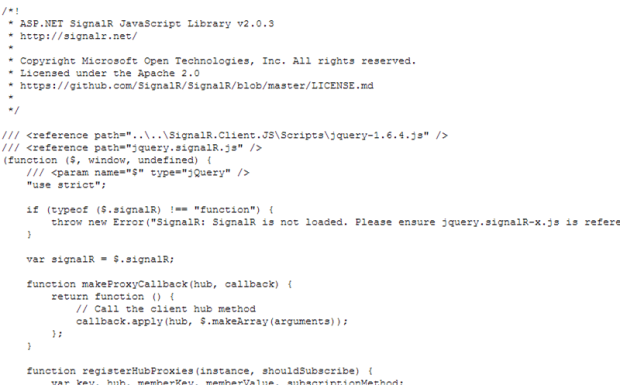
Notice in the footer area your shiny new method with a Send. If you had built this earlier, you’d be seeing a Hello function visible to clients:

Let’s use Knockout for the fancy-dancy data binding. Use NuGet to pull down the latest version of KnockoutJS. Then, create a javascript class under Scripts and fill it with the following code:
(function () {


var chatHub = $.connection.chatHub;

$.connection.hub.logging = true;

$.connection.hub.start();


chatHub.client.newMessage = function (message) {

model.addMessage(message);

};


var Model = function () {


var self = this;

self.message = ko.observable(“”),

self.messages = ko.observableArray()

self.counters = ko.observableArray()

};


Model.prototype = {


sendMessage: function () {


var self = this;

chatHub.server.send(self.message());

self.message(“”);

},


addMessage: function (message) {


var self = this;

self.messages.push(message);

}


};


var model = new Model();


$(function () {

ko.applyBindings(model);

});


}());
Now to add a client to allow the creation of messages. You could add the following to an empty view using MVC, or embed this in a user control – or use Bootstrap’s modal to have it as a popup.
<script
src=”../Scripts/jquery.signalR-2.0.3.js”></script>
<script
src=”../SignalR/hubs”></script>
<script
src=”../Scripts/knockout-3.1.0.js”></script>
<script
src=”../Scripts/chatSurf.js”></script>
<div
class=”row”>
<div
class=”col-md-4″>
Comments:
<input
type=”text”
placeholder=”Message”
data-bind=”value: message“
/>
<button
class=”btn btn-primary”
data-bind=”click: sendMessage“>Send</button>
</div>
<div
class=”col-md-8″>
<div
data-bind=”foreach: messages“>
<div
data-bind=”text: $data“></div>
</div>
</div>
</div>
That’s enough for our demo purposes. I dragged the user control onto another form and build the project – let’s see what we get:

You’ll notice, there’s no identity for the current user – that’s something I need to add to my application (since currently users are not authenticated). That’s for a future iteration. Also, next up – I want to make that a scrollable DIV showing the most recent 5 posts, have Knockout save its records to a database, and allow the flagging of particular messages as Critical (with specific coloring).
However, it was an instructive walkthrough for me of what SignalR can do. For real-time streaming of information – such as facility alerts that you want broadcast to a set of subscriber clients – it’s REALLY hard to beat.
Some Footnotes
- Note that Scott Hanselman did a neater example using just a handful of lines of code in this post. Some of the coding is a little dated but it does show a chat app in <12 lines of code:

- There’s been at least one cool rudimentary game developed using SignalR: http://shootr.signalr.net
- Microsoft has an excellent set of tutorials on the subject: http://www.asp.net/signalr/overview/signalr-20/getting-started-with-signalr-20/tutorial-getting-started-with-signalr-20 (and also here for more examples)
- And I’d be remiss if I didn’t mention Scott Allen’s excellent set of tutorials on Pluralsight. He even did one using MongoDB. The guy’s AMAZING.
 /* driftboatdave */
I know this site provides quality depending articles or reviews and other stuff, is there any other
web site which offers these things in quality?