Any developer knows the heartbreak of going through keeping an old app framework up to date – or “lifting and shifting” onto the cloud. I have some not-so-fond memories of spending weeks at times tracking down build errors and mysterious compatibility problems as libraries shift with important apps (built naturally with minimal to no test harness, cause who has time for that!)
Good news! There’s this cool new agent-driven feature in Copilot that promises to allow developers to automate (or at least smooth the process) modernizing apps. GitHub for example is making this claim around dev productivity, with these use cases.

And their vision of how organizations can use AI agents and Copilot in particular is really far reaching. The SRE agent in particular I’m very, VERY interested in!

So as a developer – Copilot can help me migrate to Azure, or upgrade runtime and frameworks, for a set of application types (Azure App Service, Container Apps, AKS) and even allow security hardening:

Let’s find out how easy this is though! I’m thinking this might make a compelling demo for our customers that are trying to maintain / upgrade their legacy apps using Copilot and agent-driven workflows. So let’s kick the tires a bit:
Visual Studio and .NET Walkthrough
So using this AdventureWorks web app target repo – let’s see what the Modernize experience is like. Currently for .NET upgrades (October 2025) this feature is still in Preview – I will say the Java one seems a little more fully featured.
So far so good though. A simple right click (assuming you’ve installed that Modernization add on) – you see a Modernize option (here I’m using Claude Sonnet) right clicking on the solution / project in Solution Explorer:

I could also have just entered “explore more modernization options” in Chat. Here’s what I’m seeing for options:

So I select the Upgrade one. I’m thinking the target long term support .NET framework of 8.0 is good. It generates a slick looking upgrade plan in Markdown:

I continue with the upgrade – and whoop, we got our real-world upgrade issues right off the bat. That first one is because Entity Framework references were removed during the upgrade. I’ll have GHCP fix those by clicking those Investigate buttons – and let’s try to build again.
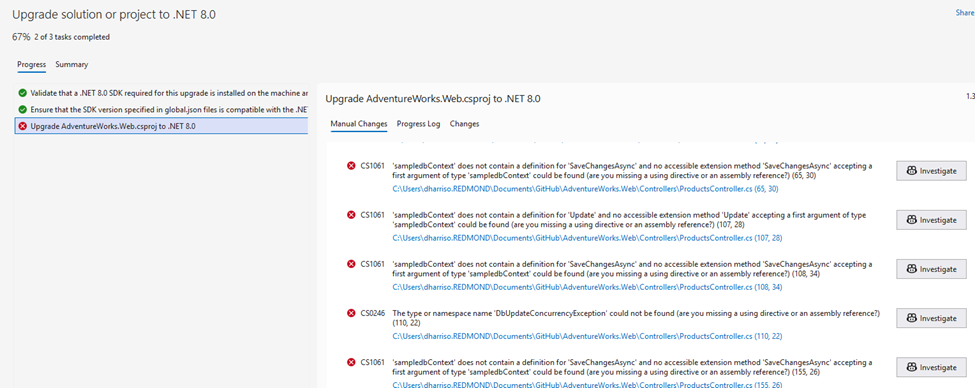
And I hit another error (this time on “Endpoint Routing does not support …UseMVC”) – and I ask Copilot to investigate that as well. Copilot presents me with a few options:

Call me silly, but let’s go with option 1 – the least intrusive / impactful one. I ask Copilot to remove startup.cs and replace Program.cs with their recommended code, and commit pending changes. The next build should work right?

Still getting errors then, now “InvalidOperationException” on the connectionString property not being initialized properly. Copilot actually did a good job of catching these – there’s LOTS of “confirm” prompts, you’ll have to click OK dozens of times. But in the end I did end up with a successful app conversion.

Java walkthrough using Visual Studio Code
I did a walkthrough using this article (based on this Spring repo). I’m not a Java developer and didn’t have Java runtime set up on my desktop, which led to its own headaches! But overall this was the smoothest upgrade and I’d give it high grades. It did a fairly smooth upgrade to Java 21, kicking off with a safe, testable migration plan:

Here’s the steps Copilot is recommending:
- Install Java 21 on your development environment
- Run ./gradlew clean build to verify the build works
- Execute the testing phases outlined in the migration plan
- Deploy to staging environment for validation
So I asked Copilot to help me install Java 21. A few winget commands later – it even ran that step 2 autonomously to confirm everything was working. I had about 20 minutes of background tasks in setting up Java, working thru compilation issues with the newer Jakarta EL API changes (?). But, long story short – it does work:
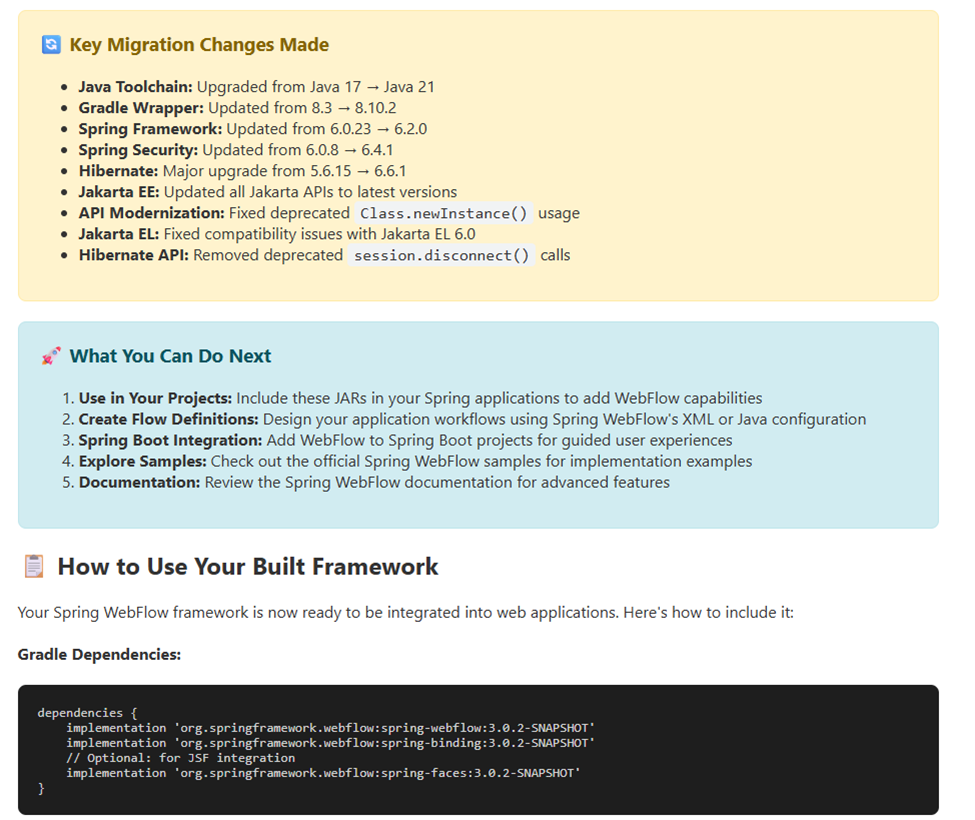
I’ll be honest here and say I don’t know enough about Spring, or Java period, to fully test that applet. So I’m trusting the upgrade report a bit! But it does build and run successfully. Nothing else to see here folks!
BTW the Java assessment report is quite slick looking:
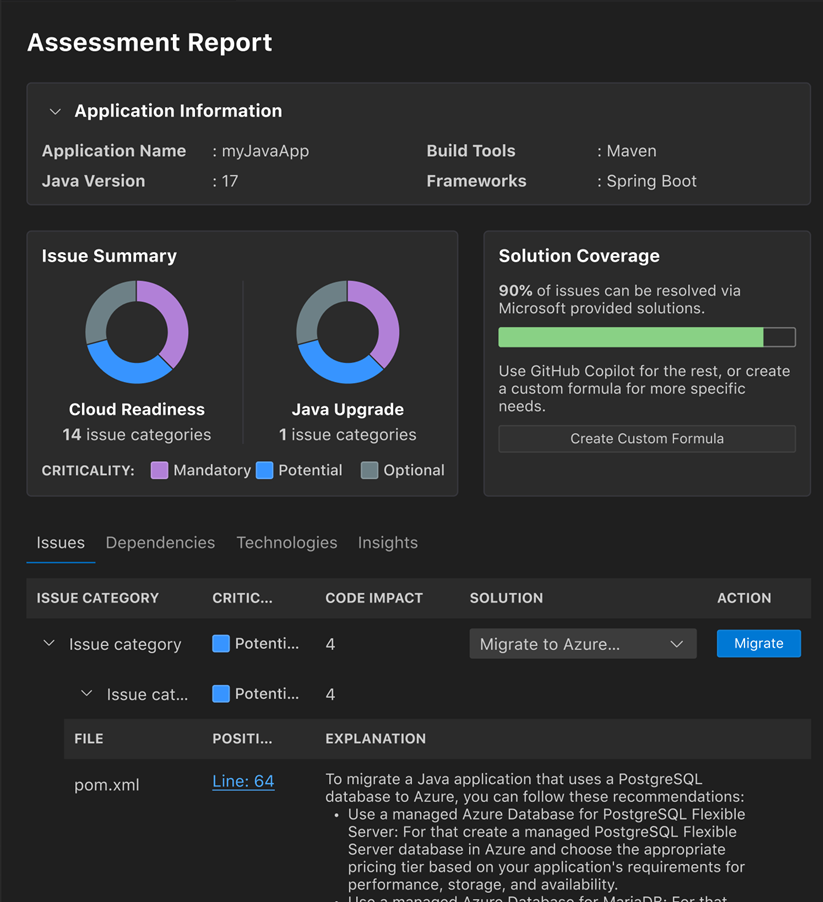
Some caveats:
- You do need to have the new GitHub Copilot Pro / Pro+ / Business / Enterprise plan license.
- If you try to use the current MSLearn walkthrough using .NET on a MSMQ sample project (ContosoUniversity), be prepared for lots and LOTS of upgrade issues. I had to install message queuing / MSMQ (cause that’s super old) and it took a fair amount just to get it to build I think there’s a reason why the documentation kind of peters out. I tried to make the leap to a more modern .NET version and hit nothing but trouble around type/namespace names issues – this is the kind of nightmare the whole Modernization process was supposed to prevent. I think in real life I’d be building out a test harness first – using GHCP naturally – and THEN changing parts of it at a time. Maybe moving the MSMQ portion to Service Bus (without touching the core .NET version) would be a smoother path. Anyway – my thinking is, it’s too big a lift at present, start with a cleaner / more modern sample repo like AdventureWorks. Another option would be just doing the Migrate to Entra ID or Migrate to Azure Service Bus as predefined tasks.
- Why the focus on a modernization report etc? GitHub explains it best with their upgrade path:

What I would like to do more of down the road is to play more with these predefined tasks to perform code remediation around common migration scenarios – or even roll your own:
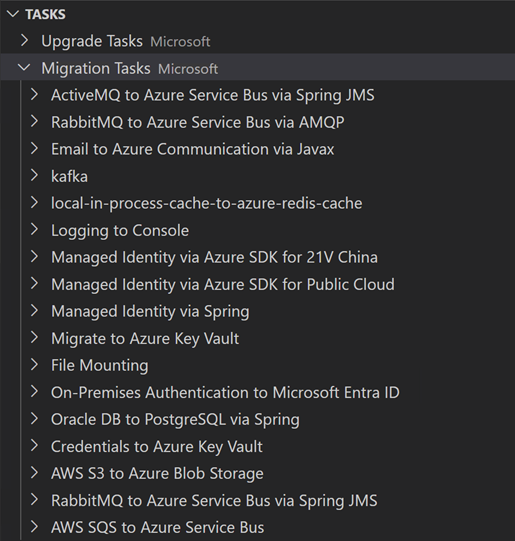
Other links and resources
- Documentation hub: aka.ms/ghcp-appmod
- Try app modernization for Java: aka.ms/ghcp-appmod/java
- Try app modernization for .NET: aka.ms/ghcp-appmod/dotNET
- …and lastly some great videos, one for Java (8 min) and .NET with Matt Soucoup (21 min).
 /* driftboatdave */