ASP.NET

GitHub Copilot and App Modernization

Any developer knows the heartbreak of going through keeping an old app framework up to date – or “lifting and shifting” onto the cloud. I have some not-so-fond memories of spending weeks at times tracking down build errors and mysterious compatibility problems as libraries shift with important apps (built naturally with minimal to no test harness, cause who has time for that!)

Good news! There’s this cool new agent-driven feature in Copilot that promises to allow developers to automate (or at least smooth the process) modernizing apps. GitHub for example is making this claim around dev productivity, with these use cases.

And their vision of how organizations can use AI agents and Copilot in particular is really far reaching. The SRE agent in particular I’m very, VERY interested in!

So as a developer – Copilot can help me migrate to Azure, or upgrade runtime and frameworks, for a set of application types (Azure App Service, Container Apps, AKS) and even allow security hardening:

Let’s find out how easy this is though! I’m thinking this might make a compelling demo for our customers that are trying to maintain / upgrade their legacy apps using Copilot and agent-driven workflows. So let’s kick the tires a bit:

Visual Studio and .NET Walkthrough

So using this AdventureWorks web app target repo – let’s see what the Modernize experience is like. Currently for .NET upgrades (October 2025) this feature is still in Preview – I will say the Java one seems a little more fully featured.

So far so good though. A simple right click (assuming you’ve installed that Modernization add on) – you see a Modernize option (here I’m using Claude Sonnet) right clicking on the solution / project in Solution Explorer:

I could also have just entered “explore more modernization options” in Chat. Here’s what I’m seeing for options:

So I select the Upgrade one. I’m thinking the target long term support .NET framework of 8.0 is good. It generates a slick looking upgrade plan in Markdown:

I continue with the upgrade – and whoop, we got our real-world upgrade issues right off the bat. That first one is because Entity Framework references were removed during the upgrade. I’ll have GHCP fix those by clicking those Investigate buttons – and let’s try to build again.
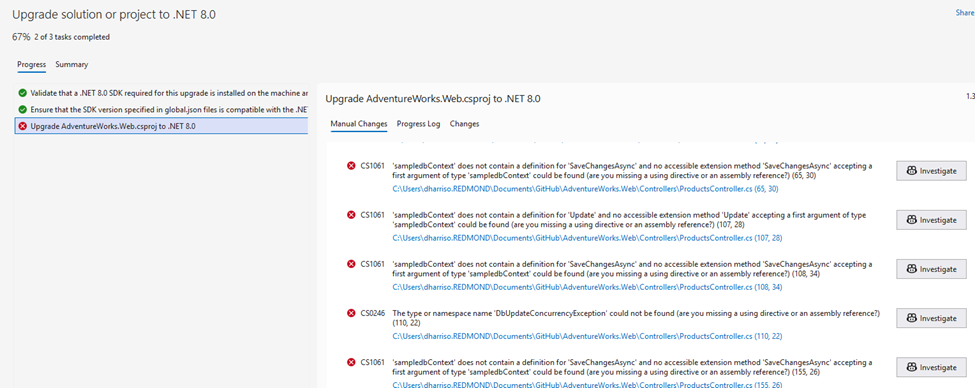
And I hit another error (this time on “Endpoint Routing does not support …UseMVC”) – and I ask Copilot to investigate that as well. Copilot presents me with a few options:

Call me silly, but let’s go with option 1 – the least intrusive / impactful one. I ask Copilot to remove startup.cs and replace Program.cs with their recommended code, and commit pending changes. The next build should work right?

Still getting errors then, now “InvalidOperationException” on the connectionString property not being initialized properly. Copilot actually did a good job of catching these – there’s LOTS of “confirm” prompts, you’ll have to click OK dozens of times. But in the end I did end up with a successful app conversion.

Java walkthrough using Visual Studio Code

I did a walkthrough using this article (based on this Spring repo). I’m not a Java developer and didn’t have Java runtime set up on my desktop, which led to its own headaches! But overall this was the smoothest upgrade and I’d give it high grades. It did a fairly smooth upgrade to Java 21, kicking off with a safe, testable migration plan:

Here’s the steps Copilot is recommending:

  1. Install Java 21 on your development environment
  2. Run ./gradlew clean build to verify the build works
  3. Execute the testing phases outlined in the migration plan
  4. Deploy to staging environment for validation

So I asked Copilot to help me install Java 21. A few winget commands later – it even ran that step 2 autonomously to confirm everything was working. I had about 20 minutes of background tasks in setting up Java, working thru compilation issues with the newer Jakarta EL API changes (?). But, long story short – it does work:
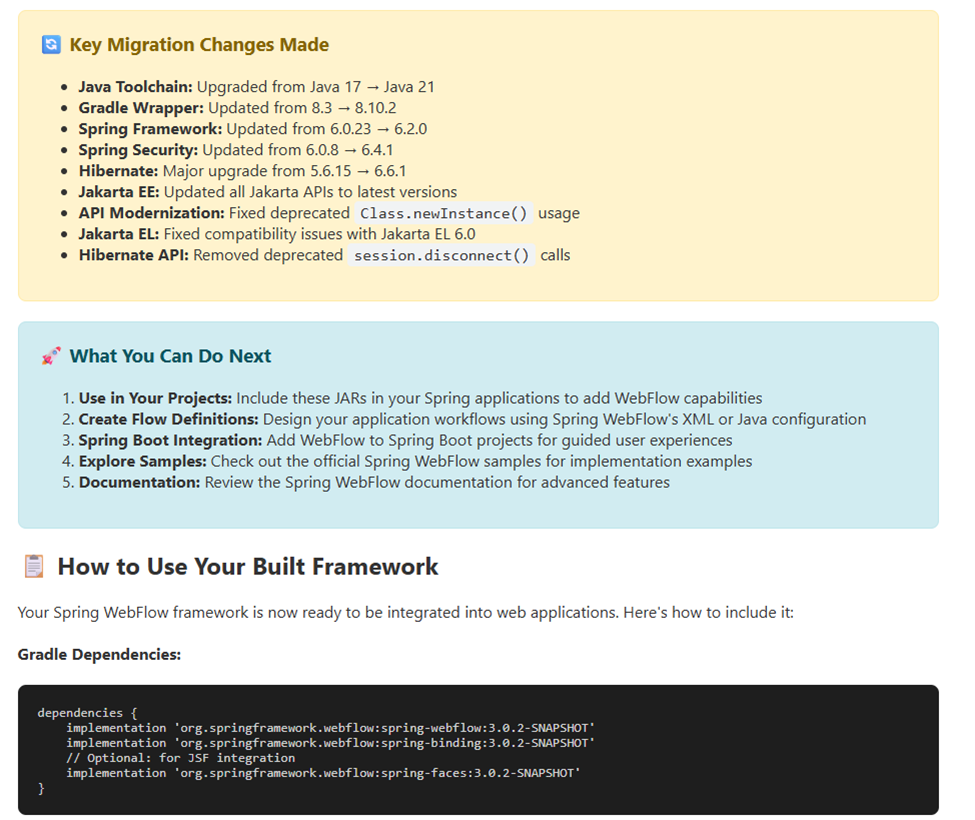
I’ll be honest here and say I don’t know enough about Spring, or Java period, to fully test that applet. So I’m trusting the upgrade report a bit! But it does build and run successfully. Nothing else to see here folks!

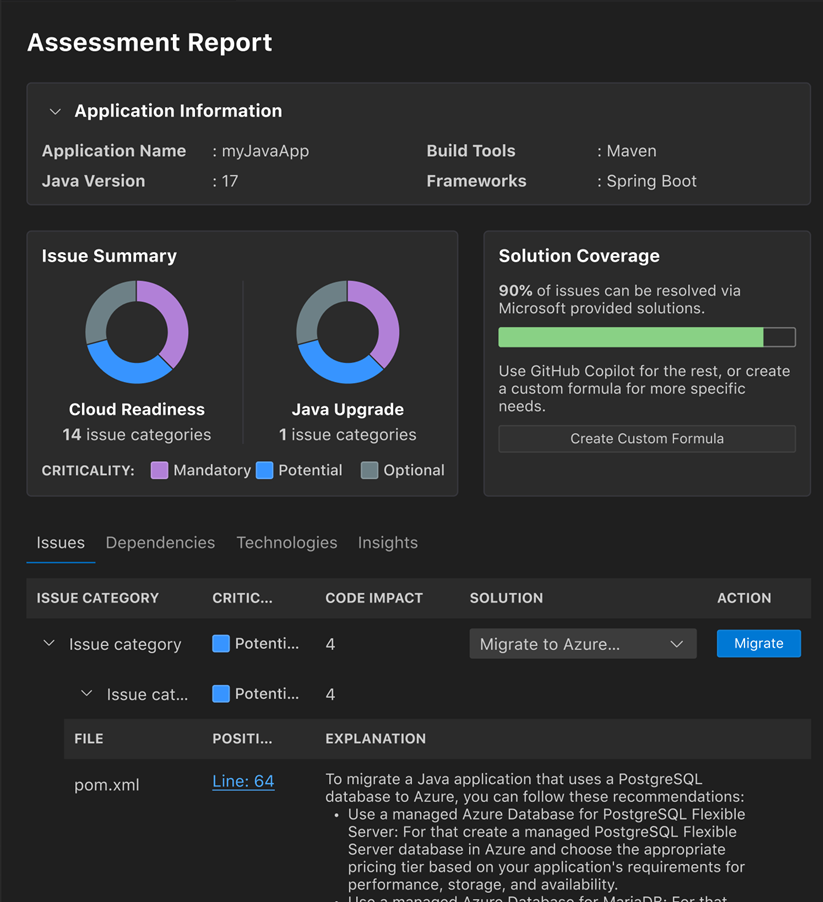
BTW the Java assessment report is quite slick looking:
Some caveats:

  • You do need to have the new GitHub Copilot Pro / Pro+ / Business / Enterprise plan license.
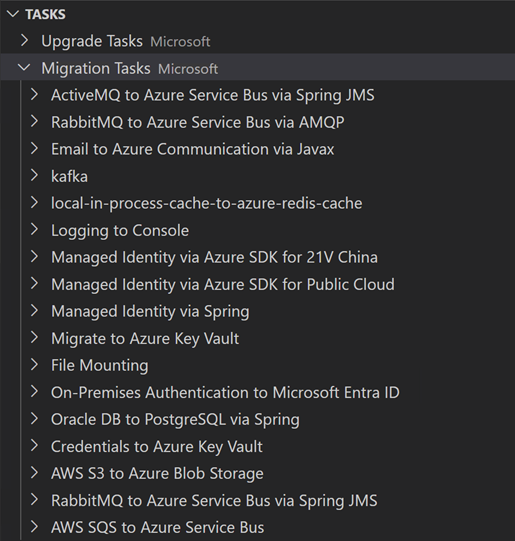
  • If you try to use the current MSLearn walkthrough using .NET on a MSMQ sample project (ContosoUniversity), be prepared for lots and LOTS of upgrade issues. I had to install message queuing / MSMQ (cause that’s super old) and it took a fair amount just to get it to build I think there’s a reason why the documentation kind of peters out. I tried to make the leap to a more modern .NET version and hit nothing but trouble around type/namespace names issues – this is the kind of nightmare the whole Modernization process was supposed to prevent. I think in real life I’d be building out a test harness first – using GHCP naturally – and THEN changing parts of it at a time. Maybe moving the MSMQ portion to Service Bus (without touching the core .NET version) would be a smoother path. Anyway – my thinking is, it’s too big a lift at present, start with a cleaner / more modern sample repo like AdventureWorks. Another option would be just doing the Migrate to Entra ID or Migrate to Azure Service Bus as predefined tasks.
  • Why the focus on a modernization report etc? GitHub explains it best with their upgrade path:

What I would like to do more of down the road is to play more with these predefined tasks to perform code remediation around common migration scenarios – or even roll your own:
Other links and resources

ASP.NET 5 Is Going To Simplify Your Life and Increase Your Productivity. Honestly, truly.

I made a mistake recently and did my shortest posting ever – basically just a URL – talking about the newest features in ASP.NET 5. Time to explore this in a little more detail. I’m still wading through what I think about ASP.NET 5 from a programming standpoint, so give me time and patience. I also stole liberally a lot of the slide pix below from Channel9, which I’m crediting in the footnotes. Sorry I’m just not that good of a graphics artist guys!

ASP.NET 5 Design Goals

Remember this compilation process?

Here’s the design goals that I see with ASP.NET 5:

  1. Simpler –
    1. No more assembly refs, manage all in NuGet or edit project.json directly. (example, in project.json search Microsoft.AspNet..Http to show Intellisense) – can edit with text editor
    2. Unified programming model that combines MVC, Web API, and Web Pages
    3. Used to have things like System.Web.Http.Routing and System.Web.MVC.Routing. Combining them simplifies runtime significantly. Web Pages, WebAPI and MVC all MVC6. (note, web pages come later)
    4. Ability to self-host or host on IIS
    5. Side-by-side versioning of the .NET Framework
    6. New tools in Visual Studio 2015
  2. Smooth and Powerful
    1. New modular HTTP request pipeline. New pipeline is modular. Not a massive block – can pick and choose so it’s lean. Apps run noticeably faster.
    2. Cloud-ready environment configuration
    3. Ability to see changes without re-building the project using Roslyn compiler (viewbag.Message = “Changed code here”; in controller logic for About
  3. Open Source and Inclusive
  4. New flexible and cross-platform runtime (full, core, cross-platform)
    1. – full is std, Core is cloud-optimized runtime, cross-platform means future Linux/Mac. Right now you’d use Mono for mac .NET dev.
  5. Open source in GitHub
    1. Nothing hidden. Can watch code as it is written, submit extensions yourself. GitHub code repositories are used for all ASP.NET 5 development across the board.

Just for example, look at the duplication below with the three silos we used to have with three unevenly joined frameworks – WebForms, MVC, and WebAPI:

From Web Pages -> MVC -> WebAPI, lots of common elements. HTML Helpers in both Web Pages and MVC. Controllers, Actions, Filters, Model Bidning, DI from MVC to Web API. This meant LOTS and lots of redundancy. Attribute routing is a classic example – two separate implementations. One model now for model, binding, DI – all in common. And they really thought about DI first in this new model.


A New Way of Working as a Developer with Roslyn

One DI abstraction that the framework leverages. It’s minimalistic, by design. Pop in your own framework to handle IOC. And one note on authentication – tokens not yet migrated. Katana was our first stop, but OWIN very in your face. Now with vNext moving more to middleware handling of authentication. If you want the bits, the code is at www.asp.net/vnext, and nightly build is at github.com/aspnet/home.

The biggest change in my mind is the new config system – big focus is on moving seamlessly from on-premise to cloud. Big frustration in the past was, you’d configure locally it’d work great, move to cloud and it would blow up. This is an environment-based config system that understands what needs to be enabled based on key/value pairs. Note, all of NuGet packages are in the root, under packages folder. Look at the References node – there are all the dependencies. Browse thru it – ok, MVC depends on Razor, which …. Etc.

And you won’t see any system.web in this app at all! New config system is called out – so you can put name/value pairs for environmental variables (DEV, QA, PROD) iand the config system will pick up the value. Browse through startup.cs – see how it sets up EF, DI, ASP.Net Identity, and MVC. See the mvc routing set up at the bottom.

One of the biggest changes is – you don’t have to do a build, wait… no you modify controller code and hit F5. Try this – comment everything out. Then add an app.UseWelcomePage(); line at the end. Try it again with app.Run(async req => await req.Response.WriteAsync(“bfsfdldaf”));

So get in the habit of doing Edit, Save, F5. This to me was a huge improvement that I didn’t know I need it.

One change in naming conventions with MVC – you used to have to inherit from controller i.e. MyConttrolllerName : Controller. Now you can just declare a class. As long as it has the word Controller at the end, you’re good.

The package publishing is also smoother. Try to publish to a file folder locally. Should be fully self-contained. Could take this on a thumbdrive and pop onto a machine WITHOUT IIS. (Still recommend IIS)

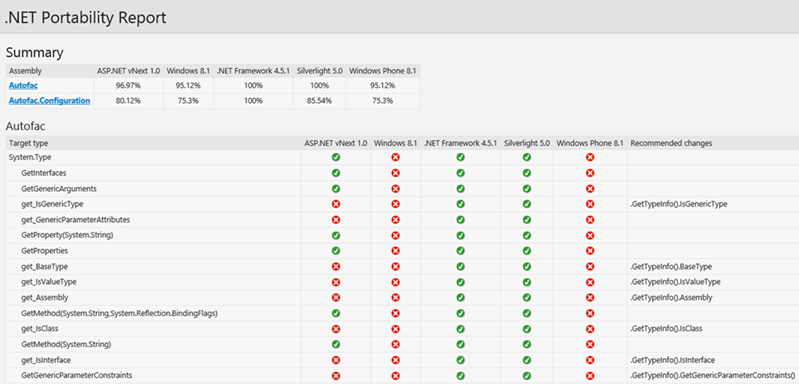
I also dig the .NET compatability profiler. For my customers, this really will hit the mark:


Bower, Grunt and Gulp Integration

It’s now much easier to incorporate jQuery, Bootstrap, and Angular client-side packages, and use Build tools like LESS, JS Minification, JSLint, and javascript unit tests.

Curious about what these tools are? They all have to do with JavaScript.

  • Bower – manages client-side packages like Javascriopt/CSS libraries. http://bower.io/
  • Grunt, Gulp are JS-based task runners (which automates routine dev tasks like minification, compilation, unit testing, linting, etc). ASP.NET 5.0 uses Grunt. See this link – note the superior way of handling dependencies to previous versions of .NET. http://gruntjs.com/getting-started
  • Npm – is a packg manager. Bundled with all of the above.

For more on this, and a complete walkthrough, check out http://www.asp.net/vnext/overview/aspnet-vnext/grunt-and-bower-in-visual-studio-2015

MVC Ch-Ch-Ch-Changes

Some link candy for you first to set the stage.

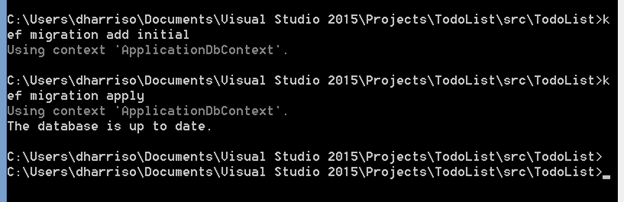
Note some big changes above to deployments and EF migrations. Finally, Microsoft listened and is going Code-First versus the former unworkable and fragile EDMX design pane, where you would drag entities onto a window. This is MUCH more workable and extensible than EF5 shtuff. As a developer, I wouldn’t even mess with anything else. A few simple command line entries:

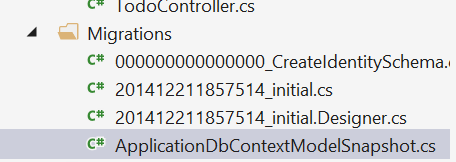
… and running these commands shows you the migration code you’d be using – for example the model snapshot and migration class. This sets up your entities (no more EDMX files!)


And ASP.NET MVC 6 now supports injection into a view from a class. See this link – http://www.asp.net/vnext/overview/aspnet-vnext/vc

And a little more on dependency injection – http://blogs.msdn.com/b/webdev/archive/2014/06/17/dependency-injection-in-asp-net-vnext.aspx

For a WebAPI walkthrough by the EXCELLENT Mike Wasson, see this link: http://www.asp.net/vnext/overview/aspnet-vnext/create-a-web-api-with-mvc-6