Author: elvisboats

Short Version: I'm married to the amazing (and amazingly forgiving) Jennifer, proud possessor of two amazing kids, crazy about all things trouty with fly fishing. I'm an Application Development Manager with Microsoft, and am based out of Portland, Oregon. Long Version: I grew up in Oregon, and moved down to California with the original goal of finishing my education in Civil Engineering, but I found application development and RDBMS systems much more exciting! I do miss the mountain biking in California and the awesome Mexican food, but Oregon is my home and I have never regretted moving back to start a family. Plus it gives me more time for fly fishing for trout and steelhead on the beautiful Deschutes river in central Oregon! ;-) Working for Microsoft has by far been the best experience of my professional life; it's great working with a group of people that are passionate about writing good code and continually improving development practices and firepower. Past assignments have included Providence Health Plans, Kroger, and managing a .NET development team at Columbia Sportswear. Working at Columbia in particular gave me a great customer-side perspective on the advantages that Azure offers a fast-moving development team, the dos and don’ts of agile development/scrum, and the cool rich Ux experiences that SPAs (Single Page Applications) can offer with Breeze, OData, WebAPI, and modern Javascript libraries. Microsoft did a fantastic job of engaging with Columbia and understanding our background and needs; I witnessed their teams win over an initially hostile and change-averse culture. The end result was a very satisfying and mutually beneficial partnership that allowed Columbia to build dynamic applications and services using best-of-breed architecture. I’m a MCDBA and a Certified Scrum Master.

Experiments with tiling and FontAwesome, and image hotspots

Just a few notes to dash off today before I’m back to the grind.

Metro and FontAwesome

I wanted a Metro tile look without having the high overhead with the Telerik set of controls, and a Windows 8 or WPF application was off limits per my client. And, I only had a few days to put together a demo. What to do?

Well, the good news is there’s a host of CSS options for you out there. This site has a comprehensive set of stylings that work OOTB. The one I chose was metro-bootstrap from this site – http://talkslab.github.io/metro-bootstrap/ – and a full description of sample components a la Bootstrap are here: http://talkslab.github.io/metro-bootstrap/components.html. So putting together an icon was fairly easy. (On FontAwesome, here’s an icon cheatsheet – excellent! http://fontawesome.io/cheatsheet/) And in a jiffy, I had a clickable interface that displayed tiles without having to jump through a lot of hoops – so I could focus on the data and not the look and feel. Yay!

Hotspots

Feels weird to say this but I’ve never put hotspots on an image before. Yet the operators at this facility think in terms of physical machines – so it makes sense for the UI to key off of a factory layout. The idea is, when you hover over a particular area or click it, a list of the part numbers in progress at that station will display. To do this, I installed Expression Web and took my snapshot and dropped a set of rectangular hotspots on the image:

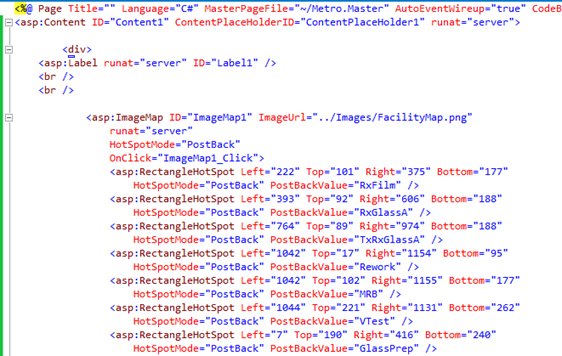
Once this was done I took the raw HTML and translated the coords to a set of Left/Top/Right/Bottom elements the way the asp:ImageMap control prefers, see below:


And, voila – a clickable image map. HTML5 goes even further with its <map> element – you can do some pretty neat things without having to resort to a ImageMap or a similar control, and keep it native. Enjoy!

Other Links


KnockoutJS and WebAPI tricks are for POCO, kids.

Below are notes – mostly for me – on trying to get a KnockoutJS/MVVM/EF6 going with an existing database. I’m not going to presume that what I attempted is impossible, but for now I’m stepping back from MVVM and going to MVC/EF6. Here’s why.

I’ll cut things short and give it to you straight. You’ll find most of the webAPI samples you see out there are code-first. I think there’s a reason for that. For MVC applications, maybe a straight up EF6 model, database-first, is the way to go – with Linq to SQL. There it is, for now.

Walkthrough

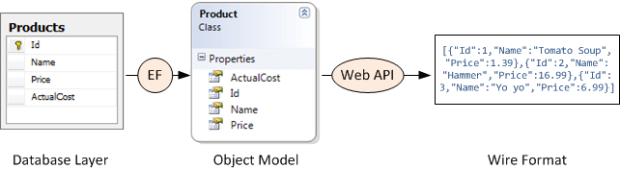
Here’s the general pattern I as going for: (Thanks Mike Wasson, you rock!)


In more detail – we’d like a wire format like the following. This works, just great, if you follow Mike’s article below explicitly, and use POCO code-first approach. It bogs down, as we’ll see, with db-first.
 

In review: Knockout.js is a Javascript library that makes it easy to bind HTML controls to data. Knockout.js uses the Model-View-ViewModel (MVVM) pattern.

  • The model is the server-side representation of the data in the business domain (in our case, products and orders).
  • The view is the presentation layer (HTML).
  • The view-model is a Javascript object that holds the model data. The view-model is a code abstraction of the UI. It has no knowledge of the HTML representation. Instead, it represents abstract features of the view, such as “a list of items”.

The view is data-bound to the view-model. Updates to the view-model are automatically reflected in the view. The view-model also gets events from the view, such as button clicks, and performs operations on the model, such as creating an order.


Our goals:

  1. Build a SPA and be able to log in with our SQL db
  2. Demonstrate ability to fire off a sproc to create a serial number
  3. Admin tools – Basic editable view of Processes and Steps.
  4. Display, entry and validation of a basic workflow on one process in buildHistory.

To do this I tried the following steps:

  1. Created a new ASP.NET website using the Single Page Application template.
  2. Changed the database connection to point to my SQL database. This has a set of tables we’ll need populated (AspNetUsers, Roles, etc.)
  3. Built and tried to log in – successful!
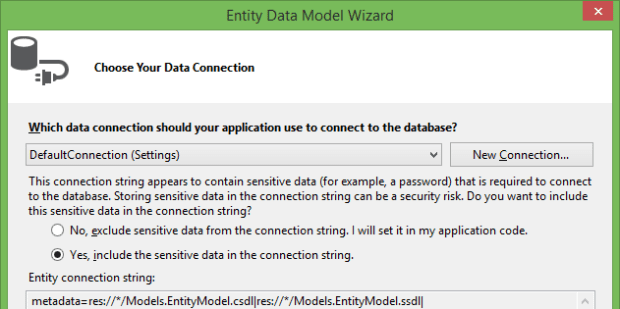
  4. Create a subfolder off Models called AutoGenerated and right click on it to add a new model to your existing db:
  5.  

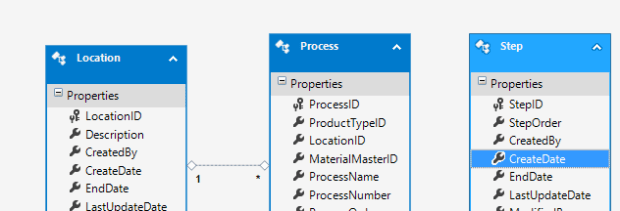
You’ll see the following:


Go through ProductType.cs and copy and paste it to the main Models folder. Then go nuts on it. Add a reference to System.ComponentModel.DataAnnotations, and add some attributes. Make the ID fields so they don’t scaffold; add some Required attributes, etc.


There’s all kinds of cool things you could do above. Add CustomValidationAttributes, link to enums for dropdown lists, data type attributes, rangeattributes, regular expression and string length validators… the world is your oyster. Side note – I saw a ref to System.ComponentModel.DataAnnotations in the project, but couldn’t refer to it in the class. Turns out, when I chose the SPA template as my starting point, it was pointed to an older .NET framework version – .NET 4.5 versus .NET 4.5.1. Big difference!

Then go into App_Start and add events using Entity Framework for the Product class.

Build. You’ll need reflection to be up to date for the next step.

Now, right click on Controllers, and select Web API 2 Controller with actions, using Entity Framework.

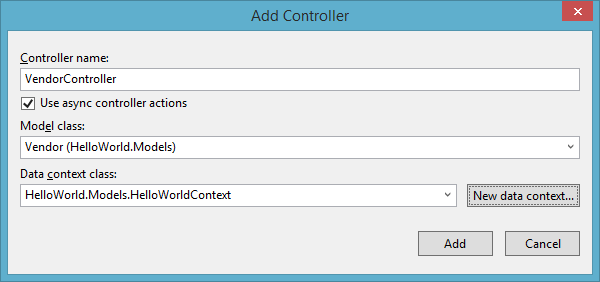
In the next screen enter a good logical name for your Controller. Here I’m shortening the table to Product. Below I clicked on the new data context button – but don’t do this, just use the context you used with EntityFramework that’s already in your web.config.
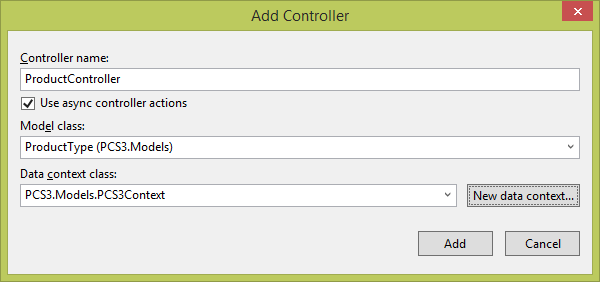
Build it in your browser. Log in, and click on the API menu item. Look at the snazziness! Your new Product API class is available and – does it serve up data?
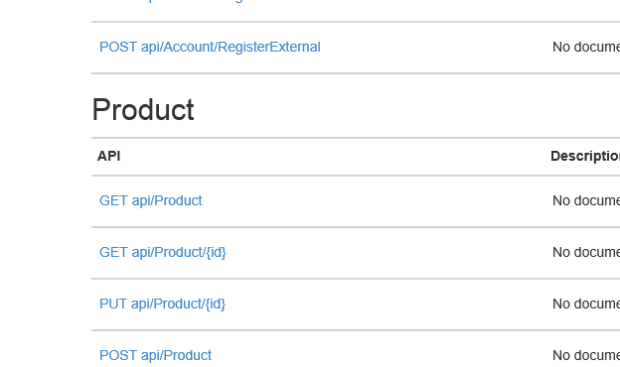
 

Punch in {yoursitename}/api/Product, and voila – hot steaming cup of JSON! (And, turns out, not so much – when I added new entities to the model, it returned EVERYTHING.)

Side Note

Trying to create a model initially didn’t show asynchronous methods available, which I favor. EntityFramework didn’t show in NuGet. However, running Install-Package EntityFramework in PackageManager Console did the trick. Now I see the following:

However, I’m still not getting reliable results. WebAPI, you’re out of time… for now. Sorry, would have been terrific if it was truly code-first.

In Summary

So, very frustrated. I think I’m trying to beat a square peg into a round hole. I’m getting [] JSON responses on my web services. Code that SHOULD work doesn’t; I honestly think WebAPI is meant for code-first/POCO approaches. There’s LOTS of examples, some very elaborate, of getting WebAPI to work – I’m thinking in particular this one and this one – without an existing db. But EF generated entities just aren’t working for us with a db-first approach. I’m running out of time; bagging it, and going with what I do know works – EF6, MVC generated controllers, so long MVVM/KnockoutJS. Simply put I don’t think we can guarantee delivery in the time the client demands at this point.


Helpful Links and References


WebAPI Blitz

Had a good buddy ask me a few minutes ago about exposing data entities in WebAPI. It’s quick, and almost painless…

Start with creating a new project called WebServices or the like in Visual Studio 2013. Select the WebAPI profile – we’ll only need MVC/WebAPI pieces, not webforms, for this sample.

Start with an Entity Framework data model – here I used the Purchasing.Vendor table from AdventureWorks2012. If you don’t have EF, but it’s POCO, no biggie – you can still right-mouse click on any of the entities and generate views/controllers. Build the project – EF uses Reflection so we need to run a build to work with these entities and expose them in WebAPI.


Right mouse click on the Controllers folder and select Add, New Controller.

In the next screen select the Web API 2 Controllers option.

In the following screen, select your exposed table and make sure you generate a new Data Context as below. I always use the async controller actions by default.

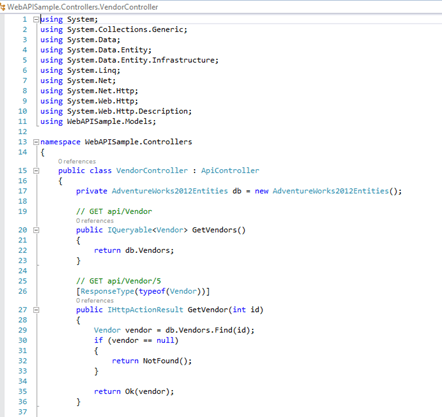
Visual studio will think a little, and then you’ll see the auto-generated class. Look at all those scaffolded goodies!

Run a publish, and navigate using one of those handy REST api calls documented above. For example, sending <myserver>/api/Vendor returned this:


I’m going to attach the ZIP folder of the project. So easy, it feels like stealing!!! WebAPISample


For more detail, see the post here – https://driftboatdave.com/2014/01/13/webapi-the-new-wcf-data-services-and-knockoutjsmvvm-explorations/


Architectural patterns in Microsoft-land: Gathering requirements

Currently we’re examining different ways of coming out with a second version of our shopfloor software, and there’s a lot of pressure to start rolling out a UI – even ahead of a stable data layer, or wireframes of how the end users want to have it interact and display information to our user base.

UI code is expensive. Putting a few days into asking some basic questions about unspoken requirements is cheap. Otherwise, you’re faced with the age-old “you gave me what I asked for but not what I wanted” relationship-ender that’s the bane of so many IT projects.

Usually business and user requirements will be defined (to some extent) at the beginning of the process. Let’s talk about system requirements – both functional and non-functional.

Functional requirements (what the system must do – “the system shall notify the administrator when a package fails) include things like the following:

  • Business rules
  • Admin functions
  • Authentication, auditing, security
  • External interfaces
  • Reporting
  • Historical data
  • Regulatory requirements

Non-functional requirements (how the system should operate – “what’s an acceptable amount of uptime?”) include:

  • Scalability
  • Capacity
  • Availability
  • Reliability
  • Recoverability
  • Maintainability
  • Performance
  • Security
  • Regulatory
  • Manageability
  • Usability
  • Interoperability

Actual users will help you with the functional requirements; non-functional requirements will come from stakeholders. Once stakeholders are identified, you can gather requirements with a variety of methods (interviews, focus groups, questionnaires, observation (either direct or indirect), documentation, and researching similar projects.

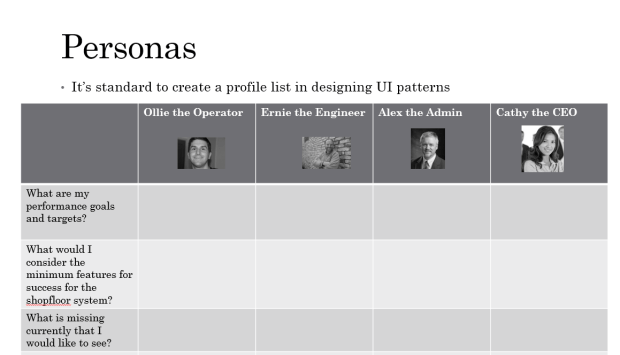
Once this is done, you could split up your target audience into personas (including a name, photo, demographics, a descriptive paragraph, and needs/goals/features from a user perspective). Once this is done, you can refine your broad list of requirements into a very fine-tuned list of requirements – including a rationale, success criteria, and a level of importance. This key and often overlooked step will help you deliver a project that the users need, instead of just what they want.

For my project, I doubt I’m going to go as deep into the sensy-style personality demographics that some do – for an internal system we’re not customer-focused enough to care where someone falls on the liberal-conservative or trendy-status quo axis. But I will take the time to recognize that we have three user types – Operator, Engineer, Admin, and Executive – and split up broad requirements into a more focused matrix. This will give us an actionable list of to-do’s, so we won’t waste time writing UI code that doesn’t fill a specific need. Something like this…


As I refine this and get a survey going – our stakeholders are tied up 90% of the time in meetings, so an online survey on SharePoint or SurveyMonkey may be the go-to solution – I’ll create some new posts. I’m happy that we’re being a little more methodical in our second version of the software. Nothing’s worse than thrash when it comes to developer happiness and productivity!


Helpful links: