I’m still playing around with In-Memory OLTP on SQL Server 2014. Already I’m impressed. It seems to be the default way, when I’m writing BI solutions in the future – or transactional systems where there’s a ton of locking issues – to magically resolve contention issues and dramatically improve throughput and performance. We’re talking 5-10x performance gains – for little or no cost in terms of redesign. With sprocs, we’re seeing sometimes 10-30x improvement. Awesome!
Use Case Scenarios
Folks, this new feature is meant for where there’s a lot of contention issues. If you have a data warehouse or where the database is highly structured, it may not be a good fit. In tables where there are a lot of singleton type actions – an atomic relationship – it’s a natural.
The thing to keep in mind is that Hadoop/NoSQL doesn’t fit every scenario. NoSQL is not meant as a replacement for OLTP and has inherent latency issues.
If you want to scale up efficiently, you need to handle transactional and machine-generated data efficiently. You can now buy a 50-core machine with 500GB of memory for 50K – chump change really – and memory is scaling up to terabyte range. CPU, because of inherent heat issues in processing, has stalled out in comparison. So if we’re going to see improvements in SQL performance It has to be in the one area that has really kicked off in the past decade – memory. Frankly speaking, the rules that were in place when SQL Server 7/2000 and above were written no longer apply when we’re talking about a TB or so of memory. The old rules assumed all pages required a potential read from the disk – but today’s lower-cost memory means we need a new costing algorithm. Waits for log writes, latch availability and lock releases can be ignored or minimized.
And, I found it very transparent. You’re managing memory in the same space, and the change is nearly painless. Just some modest changes to the primary key and some db settings, and I was good to go. For example, check out the snapshot below. Half of them are in-memory, half aren’t. Can you tell the difference? I can’t.
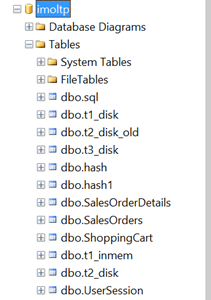
Table/indexes are now only in-memory – this is stream-based storage. It’s lock and latch-free, with no runtime compilation of sprocs – sprocs and BL are all natively compiled, meaning a huge performance gain.
Migration Path
It isn’t just moving indexed tables to memory. And it isn’t just pinning the table in the buffer pool (i.e. the venerable and now deprecated DBCC PINTABLE). There will be some changes you’ll have to make to your table structure in handling a migration. This has been described as being NOSQL for SQL Server – without having to dip into the bowels of MapReduce algorithms.
Some things to keep in mind:
- You will have to make some changes to your database structure to get in-memory OLTP working for you.
- Data is (or can be) durable and highly available – meaning you won’t lose data after a server crash.
- Row-based structure – forget about table/index structures as we know it today. A row is an atomic thing. There’s no such concept with a page as you get with an on-disk engine. Rows are versioned and there is no in-place updates. (!)
- You can create a non-durable table with the data being transient using the SCHEMA_ONLY attribute. (Think for Staging tables or for managing session state).
- You must have at least one index. There’s two types of indexes – nonclustered hash index (good for point lookups) or memory optimized nonclustered index (for ranges). Engine removes lock/latch concurrent. We’ve seen much reduced bandwidth in the transaction log, latency does remain.
- One big issue for me – Entity Framework uses ad hoc queries, meaning you won’t have in-memory OLTP benefits with native sprocs.
-
With transactions –
- Declare isolation level (no locking hints)
- Use retry logic to handle conflicts/validation failures
- Avoid using long-runing transactions (duh)
- Disk-based Snapshot, RepeatableRead/Serializable is not supported. SNAPSHOT, REPEATABLEREAD/SERIALIZABLE are all good. Data migration use Snapshot (for example where you use READCOMMITTED today)
Looking Before You Leap
There’s a management data warehouse where you can analyze the current application for potential migration. This will give you a quadrant view if it’s a good fit.
To run this, I right-clicked on the Management, Data Collection node in SSMS, and selected the Configure Management Data Warehouse option. After a splash screen, I selected my target imoltp database, and left the users/roles unmapped in the final screen. Lots of spinning wheels at this point while SQL Server thought things over and spun up my mdw. This gave me a nice graphical view on whether migrating my tables was a good thing. Here’s the best practices below for analyzing whether you should make the leap:

(note – above is from MSDN article here, http://msdn.microsoft.com/en-us/library/dn205133.aspx )
I recommend experimenting with this on a copy of your current database. See if you run the report – R-mouse click at the DB-level or on individual tables – if you don’t see significant benefits.
So for highly transactional systems or for data warehouses, think of this as being a solution.
References
Great article by Kalen Delany on the internals – a must-read: http://t.co/6IzfRnJLcu
A great MSDN overview: http://msdn.microsoft.com/en-us/library/dn133186(v=sql.120).aspx
Some Sample Scripts To Play With
CREATE
TABLE [dbo].[t3_disk](
[c1] [int] IDENTITY(1,1)
NOT
NULL,
[c2] [char](100)
NOT
NULL,
CONSTRAINT [PK_t3_disk] PRIMARY
KEY
CLUSTERED
(
[c1] ASC
)WITH (PAD_INDEX = OFF, STATISTICS_NORECOMPUTE =
OFF, IGNORE_DUP_KEY
=
OFF, ALLOW_ROW_LOCKS
=
ON, ALLOW_PAGE_LOCKS
=
ON) ON [PRIMARY]
)
ON [PRIMARY]
GO
SET
STATISTICS
TIME
OFF;
SET
NOCOUNT
ON;
— inserts – 1 at a time
DECLARE @starttime datetime2
=
sysdatetime();
DECLARE @timems INT;
DECLARE @rowcount INT
= 100000
— disk-based table and interpreted Transact-SQL
DECLARE @i int
= 0
DECLARE @c varchar(300)
BEGIN
TRAN
WHILE (@i <10000)
BEGIN
SET @c =
RIGHT(CAST((replicate(‘1’,100)
+
CAST(@i as
VARCHAR(300))) as
VARCHAR(300)), 100)
INSERT
INTO t3_disk VALUES(@c)
SET @i = @i + 1
END
COMMIT
SET @timems =
datediff(ms, @starttime, sysdatetime());
SELECT
‘Disk-based table insertion, 100000 records: ‘
+
CAST(@timems AS
VARCHAR(10))
+
‘ ms’;
–ok 225 ms.
— Interop Hash
— for bucket size see this article – http://msdn.microsoft.com/en-us/library/dn494956.aspx
–in general you want the bucket size to be between 1-2x the size of the number of unique values in the index
USE [imoltp]
GO
SET
ANSI_PADDING
ON
DROP
TABLE dbo.t3_inmem
CREATE
TABLE [dbo].[t3_inmem]
(
[c1] int
IDENTITY(1,1)
NOT
NULL PRIMARY
KEY
NONCLUSTERED
HASH
WITH (BUCKET_COUNT=20000),
[c2] [char](100)
NOT
NULL,
–could experiment as well with PRIMARY KEY NONCLUSTERED
)WITH ( MEMORY_OPTIMIZED =
ON
,
DURABILITY
= SCHEMA_AND_DATA )
SET
STATISTICS
TIME
OFF;
SET
NOCOUNT
ON;
— inserts – 1 at a time
DECLARE @starttime datetime2
=
sysdatetime();
DECLARE @timems INT;
DECLARE @rowcount INT
= 100000
DECLARE @i int
= 0
DECLARE @c varchar(300)
BEGIN
TRAN
WHILE (@i <10000)
BEGIN
SET @c =
RIGHT(CAST((replicate(‘1’,100)
+
CAST(@i as
VARCHAR(300))) as
VARCHAR(300)), 100)
INSERT
INTO t3_inmem(c2)
VALUES(@c)
SET @i = @i + 1
END
COMMIT
SET @timems =
datediff(ms, @starttime, sysdatetime());
SELECT
‘IN-memory OLTP-based table insertion, 100000 records: ‘
+
CAST(@timems AS
VARCHAR(10))
+
‘ ms’;
–105 ms.





 /* driftboatdave */