Author: elvisboats

Short Version: I'm married to the amazing (and amazingly forgiving) Jennifer, proud possessor of two amazing kids, crazy about all things trouty with fly fishing. I'm an Application Development Manager with Microsoft, and am based out of Portland, Oregon. Long Version: I grew up in Oregon, and moved down to California with the original goal of finishing my education in Civil Engineering, but I found application development and RDBMS systems much more exciting! I do miss the mountain biking in California and the awesome Mexican food, but Oregon is my home and I have never regretted moving back to start a family. Plus it gives me more time for fly fishing for trout and steelhead on the beautiful Deschutes river in central Oregon! ;-) Working for Microsoft has by far been the best experience of my professional life; it's great working with a group of people that are passionate about writing good code and continually improving development practices and firepower. Past assignments have included Providence Health Plans, Kroger, and managing a .NET development team at Columbia Sportswear. Working at Columbia in particular gave me a great customer-side perspective on the advantages that Azure offers a fast-moving development team, the dos and don’ts of agile development/scrum, and the cool rich Ux experiences that SPAs (Single Page Applications) can offer with Breeze, OData, WebAPI, and modern Javascript libraries. Microsoft did a fantastic job of engaging with Columbia and understanding our background and needs; I witnessed their teams win over an initially hostile and change-averse culture. The end result was a very satisfying and mutually beneficial partnership that allowed Columbia to build dynamic applications and services using best-of-breed architecture. I’m a MCDBA and a Certified Scrum Master.

ASP.NET 5 Is Going To Simplify Your Life and Increase Your Productivity. Honestly, truly.

I made a mistake recently and did my shortest posting ever – basically just a URL – talking about the newest features in ASP.NET 5. Time to explore this in a little more detail. I’m still wading through what I think about ASP.NET 5 from a programming standpoint, so give me time and patience. I also stole liberally a lot of the slide pix below from Channel9, which I’m crediting in the footnotes. Sorry I’m just not that good of a graphics artist guys!

ASP.NET 5 Design Goals

Remember this compilation process?

Here’s the design goals that I see with ASP.NET 5:

  1. Simpler –
    1. No more assembly refs, manage all in NuGet or edit project.json directly. (example, in project.json search Microsoft.AspNet..Http to show Intellisense) – can edit with text editor
    2. Unified programming model that combines MVC, Web API, and Web Pages
    3. Used to have things like System.Web.Http.Routing and System.Web.MVC.Routing. Combining them simplifies runtime significantly. Web Pages, WebAPI and MVC all MVC6. (note, web pages come later)
    4. Ability to self-host or host on IIS
    5. Side-by-side versioning of the .NET Framework
    6. New tools in Visual Studio 2015
  2. Smooth and Powerful
    1. New modular HTTP request pipeline. New pipeline is modular. Not a massive block – can pick and choose so it’s lean. Apps run noticeably faster.
    2. Cloud-ready environment configuration
    3. Ability to see changes without re-building the project using Roslyn compiler (viewbag.Message = “Changed code here”; in controller logic for About
  3. Open Source and Inclusive
  4. New flexible and cross-platform runtime (full, core, cross-platform)
    1. – full is std, Core is cloud-optimized runtime, cross-platform means future Linux/Mac. Right now you’d use Mono for mac .NET dev.
  5. Open source in GitHub
    1. Nothing hidden. Can watch code as it is written, submit extensions yourself. GitHub code repositories are used for all ASP.NET 5 development across the board.

Just for example, look at the duplication below with the three silos we used to have with three unevenly joined frameworks – WebForms, MVC, and WebAPI:

From Web Pages -> MVC -> WebAPI, lots of common elements. HTML Helpers in both Web Pages and MVC. Controllers, Actions, Filters, Model Bidning, DI from MVC to Web API. This meant LOTS and lots of redundancy. Attribute routing is a classic example – two separate implementations. One model now for model, binding, DI – all in common. And they really thought about DI first in this new model.


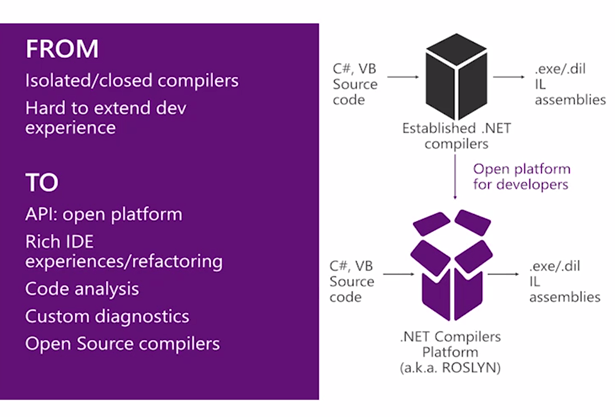
A New Way of Working as a Developer with Roslyn

One DI abstraction that the framework leverages. It’s minimalistic, by design. Pop in your own framework to handle IOC. And one note on authentication – tokens not yet migrated. Katana was our first stop, but OWIN very in your face. Now with vNext moving more to middleware handling of authentication. If you want the bits, the code is at www.asp.net/vnext, and nightly build is at github.com/aspnet/home.

The biggest change in my mind is the new config system – big focus is on moving seamlessly from on-premise to cloud. Big frustration in the past was, you’d configure locally it’d work great, move to cloud and it would blow up. This is an environment-based config system that understands what needs to be enabled based on key/value pairs. Note, all of NuGet packages are in the root, under packages folder. Look at the References node – there are all the dependencies. Browse thru it – ok, MVC depends on Razor, which …. Etc.

And you won’t see any system.web in this app at all! New config system is called out – so you can put name/value pairs for environmental variables (DEV, QA, PROD) iand the config system will pick up the value. Browse through startup.cs – see how it sets up EF, DI, ASP.Net Identity, and MVC. See the mvc routing set up at the bottom.

One of the biggest changes is – you don’t have to do a build, wait… no you modify controller code and hit F5. Try this – comment everything out. Then add an app.UseWelcomePage(); line at the end. Try it again with app.Run(async req => await req.Response.WriteAsync(“bfsfdldaf”));

So get in the habit of doing Edit, Save, F5. This to me was a huge improvement that I didn’t know I need it.

One change in naming conventions with MVC – you used to have to inherit from controller i.e. MyConttrolllerName : Controller. Now you can just declare a class. As long as it has the word Controller at the end, you’re good.

The package publishing is also smoother. Try to publish to a file folder locally. Should be fully self-contained. Could take this on a thumbdrive and pop onto a machine WITHOUT IIS. (Still recommend IIS)

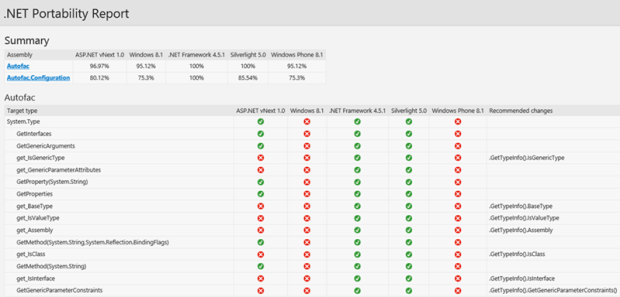
I also dig the .NET compatability profiler. For my customers, this really will hit the mark:


Bower, Grunt and Gulp Integration

It’s now much easier to incorporate jQuery, Bootstrap, and Angular client-side packages, and use Build tools like LESS, JS Minification, JSLint, and javascript unit tests.

Curious about what these tools are? They all have to do with JavaScript.

  • Bower – manages client-side packages like Javascriopt/CSS libraries. http://bower.io/
  • Grunt, Gulp are JS-based task runners (which automates routine dev tasks like minification, compilation, unit testing, linting, etc). ASP.NET 5.0 uses Grunt. See this link – note the superior way of handling dependencies to previous versions of .NET. http://gruntjs.com/getting-started
  • Npm – is a packg manager. Bundled with all of the above.

For more on this, and a complete walkthrough, check out http://www.asp.net/vnext/overview/aspnet-vnext/grunt-and-bower-in-visual-studio-2015

MVC Ch-Ch-Ch-Changes

Some link candy for you first to set the stage.

Note some big changes above to deployments and EF migrations. Finally, Microsoft listened and is going Code-First versus the former unworkable and fragile EDMX design pane, where you would drag entities onto a window. This is MUCH more workable and extensible than EF5 shtuff. As a developer, I wouldn’t even mess with anything else. A few simple command line entries:

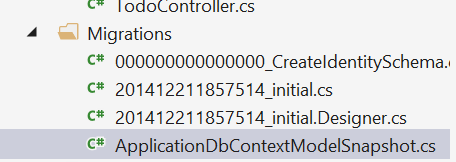
… and running these commands shows you the migration code you’d be using – for example the model snapshot and migration class. This sets up your entities (no more EDMX files!)


And ASP.NET MVC 6 now supports injection into a view from a class. See this link – http://www.asp.net/vnext/overview/aspnet-vnext/vc

And a little more on dependency injection – http://blogs.msdn.com/b/webdev/archive/2014/06/17/dependency-injection-in-asp-net-vnext.aspx

For a WebAPI walkthrough by the EXCELLENT Mike Wasson, see this link: http://www.asp.net/vnext/overview/aspnet-vnext/create-a-web-api-with-mvc-6

Windows 10 – Microsoft Gets It Right

Maybe this is one of those blog titles that comes back to haunt me. Still, I can’t help but think – we’ve really come a long way forward, and I think Windows 10 is a winner.

Downloaded the bits last night from MSDN for Windows 10 Tech Preview, and set it up on my personal laptop. It abended about halfway thru the installation, and the rollback was seamless and click-free, requiring no intervention from me. I decided the issue was that my old laptop was still running the original Windows 8 (not 8.1) bits, downloaded and installed 8.1, and then ran the Windows 10 installation this time WITHOUT saving any apps or personal files. (Naturally I’d backed everything up first). Worked like a charm, and the whole process took maybe an hour. Then I downloaded Google Chrome, Drive, Microsoft Office, and a few other apps – my kids love Endless Reader – and literally, that was it. No trackpad issues like I had with 8.1, and everything seems to Just Work.

I’ve heard some snide comments from some of my fellow Softies – I’m sure there’s some frustration points (and the last release bits are about two months old). These will be fixed. The integration with Metro/Modern Apps is much smoother, and they’ve put it more in the background. I’m really enthusiastic about Windows 10 like I never really was about Windows 8 – I think they nailed the jarring UX and little irritants that made it one of my least favorite OS versions. It’s unobtrusive and works well on my older Lenovo Yoga. So far, I can say without reservation – terrific job guys. This may be one of the smoothest upgrade experiences I’ve ever had, and the UI may match the things I loved about Windows 7. I’ll keep this up to date, but so far – if you have a personal laptop that doesn’t have any mission-critical anything running on it – try out the release bits. I think you’ll like it.

Application Insights redux

I spent a few minutes today getting reacquainted with Application Insights. Here’s some links and walkthrus so you can have fun with it yourself. For web dashboarding, I do think it has distinct advantages over Google Analytics etc.

See this article, which – fair warning – I borrowed from pretty heavily in my experiments. You’ll need an Azure account and at least VS2013 update 3.

There’s two ways of going about sprinkling ApplicationINsights pixie dust all over your app. (And no it doesn’t have to be ASP.NET site!)

Existing Site:

  1. Create a new project (or open an existing one).
  2. R-click on project and select Add Application Insights Telemetry. This will add all the references you’ll need and add some event handlers to your startup code.

Can add App Insights Status Monitor to an existing app (NuGet?) Executes NuGet, updates web.config, and restarts.

The other fancy way is on creation. Note, adding it to your site is now the DEFAULT! Redmond won’t rest till all your dashboarding/alerts are showing up in one central place.

From your Azure Portal:

Click New, Application Insights. You can browse to your site from here as well.


Once you’re viewing the A.I. portal, try clicking on Requests or Alerts to improve your telemetry/charting.

It was embarrassing how easy it was to add availability/performance tests using this site’s walkthrough. In my case, I had the site instrumented: all I had to do was click on the webtests tile in the AppInsights dashboard to create my test:


And wait a few minutes and presto – I had to manually refresh the portal – but I get fancy-dancy availability graphics. It’s drillable and … wow to get this much out of the box is kinda amazing.


Another option is to explore adding telemetry. Click on the Diagnostic Search icon in the portal…

Which opens up a drillable, filterable list of all the telemetry on my app. Including tags.


Go ahead and click on one of those events – I just dare ya. Notice you can drill in specifically by clicking on the three ellipses below the Request Details node to view every field collected:


In this case, using the very cool Filter set to Errors showed me exactly where the issue was – database availability. It even parses log4Net or Nlog traces.Easy peasy!

I could have added custom events using JavaScript, or maybe the following C# snippet:

// Set up some properties:

var properties =
new
Dictionary
<string,
string>


{{“game”, currentGame.Name},
{“difficulty”, currentGame.Difficulty}};

var measurements =
new
Dictionary
<string,
double>


{{“Score”, currentGame.Score},
{“Opponents”, currentGame.OpponentCount}};


// Send the event:

telemetry.TrackEvent(“endOfGame”, properties, measurements);


Alternately if I wanted to throw errors – this is very powerful as you can navigate between failed requests and exceptions and read the entire exception stack – create a new page called ThrowError or the like and add the following to Page_Load – after adding a using reference to Microsoft.ApplicationInsights in the header:


var telemetry = new
TelemetryClient();


try

{


//doing some stuff here


throw
new
DivideByZeroException();


}


catch (Exception ex)

{


// Set up some properties:


var properties = new
Dictionary <string, string>

{{“appinsightsdemo”, “usernamehere”}};


var measurements = new
Dictionary <string, double>

{{“Users”, 1}};


// Send the exception telemetry:

telemetry.TrackException(ex, properties, measurements);

}

Then I build it out and try hitting that page a few times. Suddenly I get drillable exceptions:

A wonderful overall video is shown here – http://azure.microsoft.com/en-us/documentation/videos/getting-started-with-application-insights/


In-Memory OLTP is WAY, way cool. NoSQL for the masses!

I’m still playing around with In-Memory OLTP on SQL Server 2014. Already I’m impressed. It seems to be the default way, when I’m writing BI solutions in the future – or transactional systems where there’s a ton of locking issues – to magically resolve contention issues and dramatically improve throughput and performance. We’re talking 5-10x performance gains – for little or no cost in terms of redesign. With sprocs, we’re seeing sometimes 10-30x improvement. Awesome!

Use Case Scenarios

Folks, this new feature is meant for where there’s a lot of contention issues. If you have a data warehouse or where the database is highly structured, it may not be a good fit. In tables where there are a lot of singleton type actions – an atomic relationship – it’s a natural.

The thing to keep in mind is that Hadoop/NoSQL doesn’t fit every scenario. NoSQL is not meant as a replacement for OLTP and has inherent latency issues.

If you want to scale up efficiently, you need to handle transactional and machine-generated data efficiently. You can now buy a 50-core machine with 500GB of memory for 50K – chump change really – and memory is scaling up to terabyte range. CPU, because of inherent heat issues in processing, has stalled out in comparison. So if we’re going to see improvements in SQL performance It has to be in the one area that has really kicked off in the past decade – memory. Frankly speaking, the rules that were in place when SQL Server 7/2000 and above were written no longer apply when we’re talking about a TB or so of memory. The old rules assumed all pages required a potential read from the disk – but today’s lower-cost memory means we need a new costing algorithm. Waits for log writes, latch availability and lock releases can be ignored or minimized.

And, I found it very transparent. You’re managing memory in the same space, and the change is nearly painless. Just some modest changes to the primary key and some db settings, and I was good to go. For example, check out the snapshot below. Half of them are in-memory, half aren’t. Can you tell the difference? I can’t.

Table/indexes are now only in-memory – this is stream-based storage. It’s lock and latch-free, with no runtime compilation of sprocs – sprocs and BL are all natively compiled, meaning a huge performance gain.

Migration Path

It isn’t just moving indexed tables to memory. And it isn’t just pinning the table in the buffer pool (i.e. the venerable and now deprecated DBCC PINTABLE). There will be some changes you’ll have to make to your table structure in handling a migration. This has been described as being NOSQL for SQL Server – without having to dip into the bowels of MapReduce algorithms.

Some things to keep in mind:

  • You will have to make some changes to your database structure to get in-memory OLTP working for you.
  • Data is (or can be) durable and highly available – meaning you won’t lose data after a server crash.
  • Row-based structure – forget about table/index structures as we know it today. A row is an atomic thing. There’s no such concept with a page as you get with an on-disk engine. Rows are versioned and there is no in-place updates. (!)
  • You can create a non-durable table with the data being transient using the SCHEMA_ONLY attribute. (Think for Staging tables or for managing session state).
  • You must have at least one index. There’s two types of indexes – nonclustered hash index (good for point lookups) or memory optimized nonclustered index (for ranges). Engine removes lock/latch concurrent. We’ve seen much reduced bandwidth in the transaction log, latency does remain.
  • One big issue for me – Entity Framework uses ad hoc queries, meaning you won’t have in-memory OLTP benefits with native sprocs.
  • With transactions –
    • Declare isolation level (no locking hints)
    • Use retry logic to handle conflicts/validation failures
    • Avoid using long-runing transactions (duh)
    • Disk-based Snapshot, RepeatableRead/Serializable is not supported. SNAPSHOT, REPEATABLEREAD/SERIALIZABLE are all good. Data migration use Snapshot (for example where you use READCOMMITTED today)

Looking Before You Leap

There’s a management data warehouse where you can analyze the current application for potential migration. This will give you a quadrant view if it’s a good fit.

To run this, I right-clicked on the Management, Data Collection node in SSMS, and selected the Configure Management Data Warehouse option. After a splash screen, I selected my target imoltp database, and left the users/roles unmapped in the final screen. Lots of spinning wheels at this point while SQL Server thought things over and spun up my mdw. This gave me a nice graphical view on whether migrating my tables was a good thing. Here’s the best practices below for analyzing whether you should make the leap:

(note – above is from MSDN article here, http://msdn.microsoft.com/en-us/library/dn205133.aspx )


I recommend experimenting with this on a copy of your current database. See if you run the report – R-mouse click at the DB-level or on individual tables – if you don’t see significant benefits.

So for highly transactional systems or for data warehouses, think of this as being a solution.


References

Great article by Kalen Delany on the internals – a must-read: http://t.co/6IzfRnJLcu

A great MSDN overview: http://msdn.microsoft.com/en-us/library/dn133186(v=sql.120).aspx

Some Sample Scripts To Play With


CREATE
TABLE [dbo].[t3_disk](

    [c1] [int] IDENTITY(1,1)
NOT
NULL,

    [c2] [char](100)
NOT
NULL,


CONSTRAINT [PK_t3_disk] PRIMARY
KEY
CLUSTERED

(

    [c1] ASC

)WITH (PAD_INDEX = OFF, STATISTICS_NORECOMPUTE =
OFF, IGNORE_DUP_KEY
=
OFF, ALLOW_ROW_LOCKS
=
ON, ALLOW_PAGE_LOCKS
=
ON) ON [PRIMARY]

)
ON [PRIMARY]


GO


SET
STATISTICS
TIME
OFF;

SET
NOCOUNT
ON;


— inserts – 1 at a time

DECLARE @starttime datetime2
=
sysdatetime();

DECLARE @timems INT;

DECLARE @rowcount INT
= 100000


— disk-based table and interpreted Transact-SQL

DECLARE @i int
= 0

DECLARE @c varchar(300)

BEGIN
TRAN

WHILE (@i <10000)

BEGIN

SET @c =
RIGHT(CAST((replicate(‘1’,100)
+
CAST(@i as
VARCHAR(300))) as
VARCHAR(300)), 100)

INSERT
INTO t3_disk VALUES(@c)

SET @i = @i + 1

END

COMMIT


SET @timems =
datediff(ms, @starttime, sysdatetime());

SELECT
‘Disk-based table insertion, 100000 records: ‘
+
CAST(@timems AS
VARCHAR(10))
+
‘ ms’;


–ok 225 ms.


— Interop Hash

— for bucket size see this article – http://msdn.microsoft.com/en-us/library/dn494956.aspx

–in general you want the bucket size to be between 1-2x the size of the number of unique values in the index


USE [imoltp]

GO

SET
ANSI_PADDING
ON

DROP
TABLE dbo.t3_inmem


CREATE
TABLE [dbo].[t3_inmem]

(

    [c1] int
IDENTITY(1,1)
NOT
NULL PRIMARY

KEY
NONCLUSTERED
HASH
WITH (BUCKET_COUNT=20000),

    [c2] [char](100)
NOT
NULL,


–could experiment as well with PRIMARY KEY NONCLUSTERED

)WITH ( MEMORY_OPTIMIZED =
ON
,
DURABILITY
= SCHEMA_AND_DATA )


SET
STATISTICS
TIME
OFF;

SET
NOCOUNT
ON;


— inserts – 1 at a time

DECLARE @starttime datetime2
=
sysdatetime();

DECLARE @timems INT;

DECLARE @rowcount INT
= 100000


DECLARE @i int
= 0

DECLARE @c varchar(300)

BEGIN
TRAN

WHILE (@i <10000)

BEGIN

SET @c =
RIGHT(CAST((replicate(‘1’,100)
+
CAST(@i as
VARCHAR(300))) as
VARCHAR(300)), 100)

INSERT
INTO t3_inmem(c2)
VALUES(@c)

SET @i = @i + 1

END

COMMIT


SET @timems =
datediff(ms, @starttime, sysdatetime());

SELECT
‘IN-memory OLTP-based table insertion, 100000 records: ‘
+
CAST(@timems AS
VARCHAR(10))
+
‘ ms’;


–105 ms.