Year: 2014

Perfmon and PAL notes

PAL is a tool (available on CodePlex –it’s open source) that generates an HTML report that charts performance counters generated from PerfMon and throws alerts when they’re exceeded. We’re not talking about anything obtrusive here – just a little VBScript GUI on top of Powershell to generate a nice-looking graphical UI. Its really sweet and can save you a ton of time in figuring out what the heck is going wrong when your server isn’t working properly. I ran it this morning on my underpowered little laptop and found a lot of issues with context switching for example:

Simple Overview:

  1. Download PAL and the separate Chart Controls for .NET 3.5 and install.
  2. Open up PAL and in the Threshold File tab export a template. Go ahead and view the XML file you generate in any text editor and view the counters. See, no magic!
  3. Open up Perfmon and create a new user defined data collector set. Import the file you created in #2. Run it in perfmon for at least 10-30 minutes.
  4. Go back to PAL and select the .blg file you just generated in #3 in the Counter Log tab. Click Next and then – last tab – generate your awesome HTML file, complete with charts and RYG indicators.


Long and Boring:

To run these tools, use the following steps:

  1. Download PAL from CodePlex and run the MSI package.
  2. Install the Chart Controls for .NET Framework 3.5 – there’s a link in the main codeplex page here.
  3. Now run PAL. Choose the default template:


    All done with that? Good.


    In the Threshold File page notice the long list of threshold files you can choose from – anything from BizTalk to System Overview (good if you have no specific match) to ASP.NET to SQL Server 2008R2 etc. BEFORE you do this go to the Questions tab and make sure its set properly for your OS/# of CPU’s / available memory etc. Then go back to Threshold and select Export to Perfmon Template File.
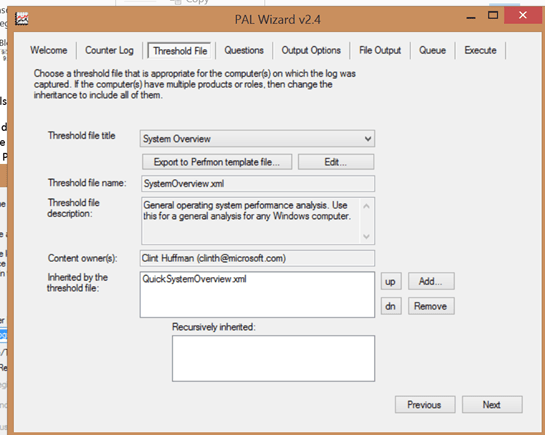


    And click on the Export to Perfmon template file and enter a nice-sounding name to create a perfmon profile template (BLG) onto your desktop. You’ll be using this next.


  4. Now open up Perfmon and expand the Data Collector Sets node, and select User Defined, and create a new data set.
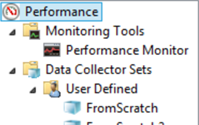
Give it a name:

You’ll see the following – use the Browse button to select your template:

… and run it. Give it a healthy 10 minutes or even longer – you won’t stress your system. Then reenter PAL.
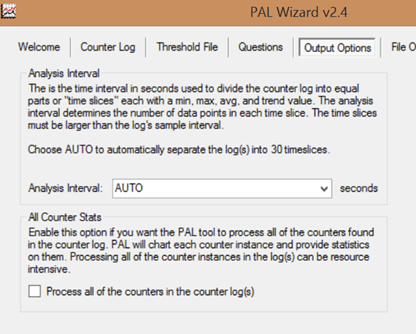
 

The tab above is worth a mention. Just select AUTO. You really don’t want to have it as more than that – a little too coarse of a grain to capture issues there – and anything less is WAY too fine. Trust me, with the number of counters we’re capturing, even with a very modest set it took PAL almost 12 minutes to finish compiling its report. 30 seconds is fine!


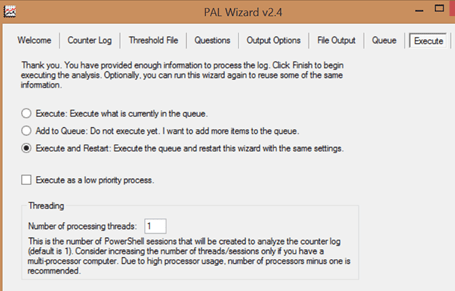
Everything else leave as is. I like to set the PAL tool so it Executes and Restarts:
 

There’s volumes of information here – a wealth of diagnostic information. Best part is, there’s KB links right there to point you to where to go. No more wondering what counters to pick, or what the values mean – it’s there and displayed, over time, in an easy to digest format. You can run perfmon just fine on any production environment with one caveat – BE CAREFUL about the length of time you’re running perfmon, usually 10-30 minutes is fine, although I’ve run it overnight – and don’t change it to something crazy like every second or something. Use the AUTO setting (which is 30 seconds). Changing this value to something unreasonable can bottom out your servers in no time flat, and makes root cause analysis harder.

There’s another tool out there called Server Performance Advisor – it analyzes both perfmon logs and Event Tracing for Windows. It’s best for analyzing short term performance problems; PAL is best for covering long periods of time.


Helpful links:

Give Yourself Nine Months to Fail.

(Note – this is a Greatest Hits posting from my previous blog. Enjoy!)

Babies aren’t born in one month.

Implementing Scrum Means Making Mistakes. Lots and Lots of Mistakes.

When I started on at my current employer – even after nine months as a team lead – I had very little to boast about by way of making change. I remember hearing a presentation from another manager that had the title, “Keeping The Lights On” – WOW! – And honestly that was how I felt about my job. Keeping the lights on, reacting to events – not getting ahead of them, and not able to control them. I was very disconnected from the work my team was doing. This changed as we moved out developers that were not contributing to the team and not being transparent about their work; and, as we got new projects coming in, I could cherrypick the fun ones and start participating in writing specfications and deploying solutions. Beyond taking on new work, though, Agile is the biggest reason why I’m still around. Without it, I’d be like the manager at my previous company – completely isolated from the daily work my team is doing, trying to defend our existence without the facts I need to prove that we’re delivering value.

I started thinking about my company – which seems to love mountains – and how every company’s definition of Agile is a little different. At the keynote I met an old compatriot – we had worked on a project together that was a failed Agile project. Everyone hated the DSU’s, which were 15+ minutes long, there was no target in sight since releases were pushed out to “never”, we went through constant rewrites as the technical team constantly refactored working code to get it “perfect”… it was a case study in how to do Agile wrong. After 18 months of development, they had to scrap the entire project and outsourced it to an offshore team – not one line of code ever saw the light of day. I believe a big reason why we failed was, we tried to change everything at once – and the team never gelled or considered itself invested in the outcome. In contrast, almost by accident, by doing things step by step – and rolling back when things weren’t working – we were successful in my current assignment. The path below took almost two years to implement, step by step – but it was done with the team setting the pace, and almost by accident we reached our goals.

I started out by talking about the fears I felt after a few months on the job. Overwhelmed, disconnected. I said, “I feel at times like I wasn’t as much in control as I need to be. I wasn’t in command of all the facts I need to support my case. I didn’t have enough visibility of what’s going on across the organization. I wasn’t giving my team all the tools and resources they need to thrive. And I wasn’t providing enough proof of delivering value aligned with what my company’s priorities are.”

Being busy is a form of laziness??!

So I had a friend recommend “The 4-Hour Workweek” by Timothy Ferriss. It’s not your typical business book, and I like how he gets down to the essentials. (I think he’s a little materialistic but there it is.)

Here’s some points that made me think:

  • Being busy is a form of laziness – lazy thinking and indiscriminate actions. It’s a failure to set priorities.
  • The 80/20 rule – Limit tasks to the important to shorten work time.
  • Parkinsons law (tasks expand to fill the time allotted) – Shorten work time to limit tasks to the most important.
  • You should have, at most, 2 goals or tasks to do each day – and you should drive them through to completion.

So what am I going to try as a result of reading this book?

  • I’m going to go on an information diet. I’m always multitasking, walking around with a book in my hand, and never giving anything – or anyone – the attention they need. It sends the wrong message and contributes to a feeling of being overwhelmed by events – instead of in command of them. So, for 1 week, I’m swearing off newssites, TV, and even reading books (except for one hour in the evening). No web surfing except for what’s necessary for work.
  • Three times a day I’m going to ask myself – Am I being productive or just active? Am I inventing things to avoid the important?
  • I’m going to try to keep M/F as free of work as possible and use it to up my skillset.
  • I’m going to be setting my priorities every morning using Outlook calendar – but not checking my email. That’s for 1 p.m. and 4 p.m. Checking email first thing in the morning is the worst thing you can do to start your day.

People over Tech?

“Where there is a multitude of counselors, there is achievement.” – Proverbs

Food for thought here – “The First 90 Days” – a great book on transitioning – brings out that people get into a vicious cycle that leads to failure by doing the following:

  • They start plowing into technical books trying to master their craft, or trying to master tech tools used within the company
  • They nurture relationships with people above them – their boss – and people below them, but not their peers

What’s the problem with this scenario? Well, anyone who focuses on the ability to do the job – proficiency – over people will put themselves in a vulnerable position. You’ve been hired for your technical ability; but people get fired because of their personalities. Specifically, a new employee that ignores the makeup of people on the team; who fails to nurture relationships with teammates, is depriving themselves of allies and the real information – the experience – that they need to be successful. Inevitably relationship- and reputation-destroying mistakes will be made – embarrassing blunders that could have been avoided with a little more care to the people side of things.

A good friend once took me aside and said, “Dave, in the end, people are the only thing that matters.” Instead of doing what I want to do – the easy thing, burying myself in books, videos and resources in mastering my tech stack – I’m going to focus on people and relationships. I’m also going to try to learn with the more indirect personality types that seem to abound in IT. This is the harder road, but I think – a little more rewarding.


“Treat Others The Way You Want To Be Treated” – the DiSC Profile

I’m not going to belabor this point, but people are different – and must be treated as individuals. Direct and Indirect people definitely interact differently and without realizing it can easily offend each other through misunderstandings. I learned as a “D” personality type hooow important it was to rely on the more introspective, careful “C” and “S” types on my team – they would produce more careful, repeatable results, and catch mistakes from being a little too impetuous!

Here’s some phrases and keywords I noted from a recent class on personality profiles. If you’ve taken a Meyers-Briggs personality profile, you’ll recognize this immediately. For the record, I’m a D/i type – and rank near zero on the S and C end of things.

  • D
    • We say…
      • Here’s how I think we should do this…
      • “Let’s get this done”
      • “A good plan today is better than a perfect plan tomorrow”
    • We do…
      • Decisive, direct
      • Budget or results-oriented
    • We hate….
      • Impatient with people who are passive
      • Second guessing
      • Behind the scenes politics. We prefer to do things in the open.
    • Could do better….
      • Once you make a plan, stick to the plan (unless it’s proven wrong) – i.e. don’t revisit things
      • Meetings must have an agenda and an outcome.
      • Discuss openly different points of view.
  • i
    • We say…
      • Maybe we should do it this way
      • Right on! (collaboration)
      • Stay focused and on point
      • How can we do this differently?
    • We do…

      Summary / trending

    • We hate…
      • Unorganized
      • Rushed
      • No objectives
      • Don’t like wasting time


    • Could do better…
      • We like feedback, teamwork, structure
      • Detail oriented, we like to stand out, we like big rewards


  • S
    • We say…
      • Have we thought this through?
      • Let’s make sure we know the whole plan before we start
    • We do…
      • Heads down analysis
      • Double check / reaffirm
    • We hate…
      • Vague instructions or directions
      • Unqualified feedback
    • Could do better…
      • Clear swim lanes
      • Articulate “why”
      • Thoughtful feedback
  • C
    • We say –
      • Get it right the first time
      • What problem are we trying to solve?
      • How do we define success?
      • Separate fact from fluff
    • We do:
      • Identify and Interview Stakeholders
      • Gather and understand requirements
      • Ensure quality
    • Don’t like
      • Doing things fast and sloppy
      • Telling you to do something without knowing the details/difficulty
    • Could do better
      • Give actionable data – not just talk
      • Give enough time to do things right
      • Understand roles and responsibilities

The Chinese Treasure Fleets and Microsoft vs Apple; and checking in on productivity

Microsoft hatchet job: Reading this article here I couldn’t help but grit my teeth. This is a little like that memorable Vanity Fair article hacking away at Steve Ballmer for being a klutz. The author basically says that while Facebook, Google, and Apple all have compelling reasons for existence – Apple with simplicity of design, Google with organizing the world’s information, and Facebook with connecting people – Microsoft currently lacks that clear distinction. As a result, there’s a brain drain where creative, talented programmers are leaving for other platforms.

This point of view is simplistic and WAY negative; it ignores the strengths of Microsoft as a company, and overemphasized the weaknesses. In my opinion, “devices and services” alone wasn’t enough of a niche for a 200K+ sized company like Microsoft; and there’s way too much competition in that space anyway. By starting from an office and meeting-type strategy – “we’re about productivity and building a platform for mobile and cloud” – that’s playing to the enterprise, MSFT’s great strength. Think about it like the board game Risk. At this point, MSFT isn’t messing around in Asia. They’ve holed up in Australia, and are stockpiling armies/cards so they can reestablish themselves. Azure, Surface, Windows 8.1, Office365, etc are all great products that are getting better – they’re starting to get a bigger footprint in the consumer space that was starting to slip away.

Microsoft made a great mistake 15 years ago not spending more on marketing; they allowed those dang John Hodgman Apple vs PC ads to define them as being stodgy and conservative. Worse was the grain of truth behind those ads; they badly missed the boat and have been playing catchup with the BYOD and tablet revolution. That being said, they’re still the best company out there for developers because of all the great ramp-up documentation that exists. I love the thinking behind Xamarin – where you can write one set of common code and still have platform-specific application development. There’s still not a company on earth that’s better able to give the guys in the trenches writing code a leg up. That’s I chose them over Oracle twenty years ago; I’d make the same call today.

In the book “Guns Germs and Steel” Jared Diamond faults a strong, gigantic central government in China as being a major contributing factor in limiting growth in China. Because if one guy (the emperor) didn’t like ‘risky’ adventures like what Christopher Columbus and others were undertaking, he could outlaw them. So, the old Chinese treasure fleets – instead of growing and taking part in the age of Exploration – rotted at the anchor in harbor, because they represented something new and scary. A European king didn’t have that luxury – he had to compete, innovate, or perish. In fact, Apple and Microsoft have very similar top-down hierarchies, and both – believe it or not – are very resistant to change. Apple was lucky enough a dozen years ago to have a true visionary at the helm who could winnow down the product line into a few compelling products – the iMac, Os X, then the iPad/iPhone/iPad and etc – and put design first, the consumer first. It already shows signs post-Jobs of losing traction in the marketplace against more nimble adversaries. Microsoft, in contrast, has suffered comparatively, but the new leadership comes from a web-first background. Microsoft’s true competition now is Google, and Microsoft’s abilities to support the enterprise far outstrip Google’s; I believe ultimately they’ll be successful in winning their way back into the minds of today’s consumer.

Time management check-in: I did an article on time management a week back. Let’s just say its been a mixed bag since then. My inbox is empty and is staying that way; I’m checking my inbox three times a day. That frees up a lot of mindspace for more important work. I do love the 1:1 format with OneNote, and I’m using that with my manager currently. I’m also scheduling my “frogs” for first thing in the morning for two hours – not every day, but when I can. The downside? I haven’t been able to use Pomodoro consistently, and I don’t think it’s appropriate for my job. Others in my role tend to be very reactive and highly responsive, since that’s what the customer base values – I need to look like them and act like them to be successful. Being offline for 50 minutes ‘focus time’ and then 20 minutes ‘break’ just won’t cut it. But, as a programmer, that would have been invaluable.